Overview
🚧 Enforcing Usage Limits
Our guardrails help maintain fair usage and system stability by enforcing limits:
- 📊 Quota thresholds prevent excessive API usage
- ⏳ Rate limiting ensures smooth traffic flow
- 🚨 Automatic blocking for anomalous behavior
- 🔄 Webhook support for real-time monitoring and enforcement
Example:
If a user exceeds their allocated quota, an automatic webhook can trigger an alert or temporarily restrict access until limits reset.
🔐 Security and Compliance
Optimize the privacy of your organization's data and the security of your users through a set of "guardrails" applied to prompts and/or responses. Our system ensures compliance with legal and organizational rules by leveraging:
- 🔑 Authentication & authorization to prevent unauthorized access
- 🔍 Anomaly detection for real-time threat monitoring
- 🛠️ Custom security rules for industry-standard compliance
- 🔎 Regex, character count, word count, and sentence count validation to filter inappropriate content
- 📜 Semantic filtering to detect and prevent harmful or sensitive data sharing
- 🚫 No gibberish, no secret leakage, and no Personally Identifiable Information (PIF)
- 🌐 Language moderation and semantic matching for content accuracy
Example:
A user prompt containing a credit card number or personal email can be automatically redacted or rejected before reaching the LLM.
Enable guardrails
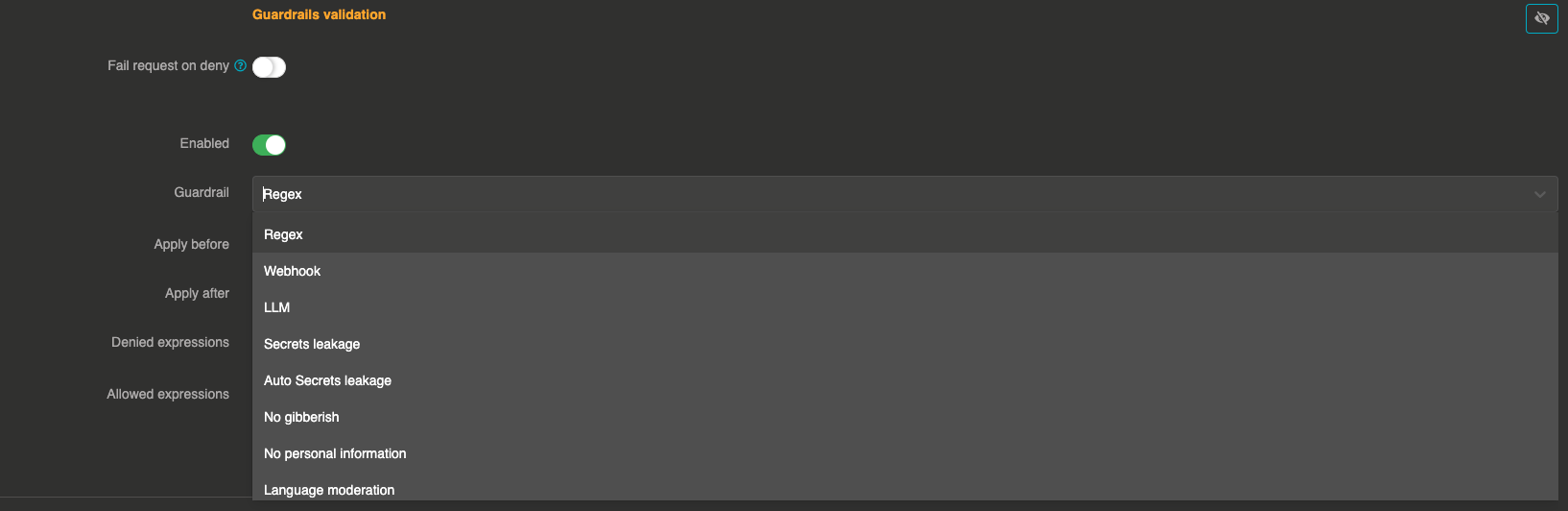
To enable guardrails, select a LLM provider, then go to Guardrails validation section.

Click on + button to display the list of all available Guardrails.

You can now choose from the list of available Guardrails.
Choose the model that judges
The guardrails that ask a model to judge the messages (personal information, secrets leakage, prompt injection, toxic language, moderation, and so on) take a validation provider and an optional model. Keep the default model of the provider, or pick a smaller and faster one dedicated to validation: a provider can even judge its own messages with another of its models.
The judgement is a call of its own: it is priced, logged and counted against the budgets of the model that judges, while the guarded call keeps counting for its own provider, with its own tokens and its own price. The same goes for a moderation model or a decision model guarding a provider.
Apply a guardrail to some calls only
A guardrail applies to every call its provider serves. Add consumer filters to it, and it only applies to the calls that match them:
{
  "enabled": true,
  "before": true,
  "after": false,
  "id": "regex",
  "config": { "deny": [".*confidential.*"], "allow": [] },
  "filters": [
    { "from": "${apikey.id}", "value": "ContainedIn(apikey_partner_a, apikey_partner_b)" },
    { "from": "${user.email}", "value": "RegexNot(.*@acme.com)" }
  ]
}
fromis read on the call with the expression language:${apikey.id},${apikey.name},${apikey.metadata.team},${user.email},${req.ip},${req.headers.x-team}, and everything else the language offers.valueis what it has to match, with the operators of the otoroshi json validators: the exact value, orNot(...),Regex(...),RegexNot(...),Wildcard(...),WildcardNot(...),Contains(...),ContainsNot(...),ContainedIn(a, b),NotContainedIn(a, b),IsDefined()andNotDefined().- Every filter has to match for the guardrail to run. Use
ContainedInorRegexto cover several consumers with one filter. - A call that carries none of what a filter reads — no api key, no signed-in user — is left alone, so a
guardrail filtered on api keys never fires on a call that has none.
NotDefined()matches exactly those calls, when that is what you want. - A guardrail without
filtersapplies to every call, which is what every guardrail written before this option does.
The AI Studio guardrails page edits them under Applies to, and the policy table says which calls each one covers.
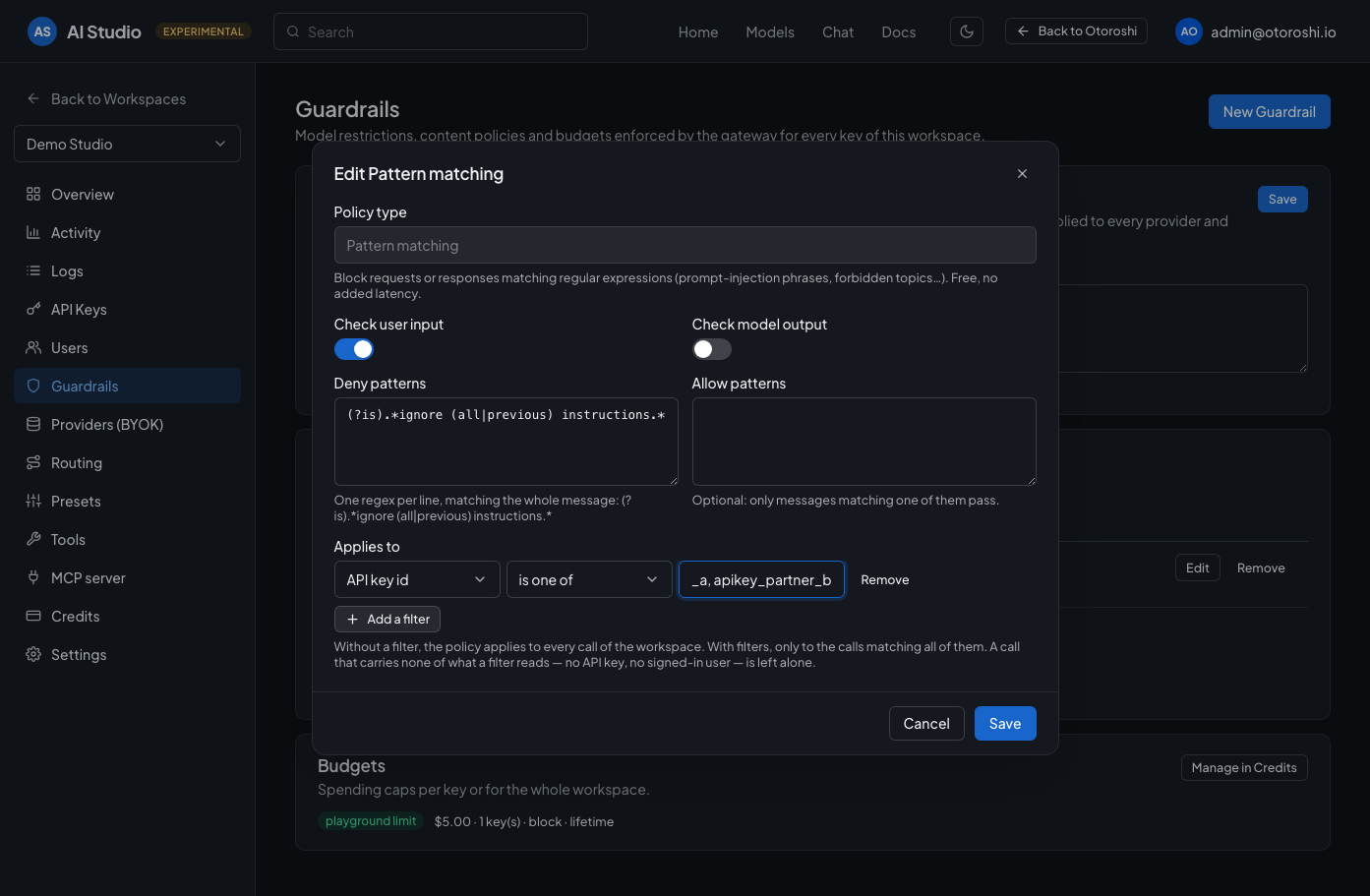
The same filters, without writing json: what is read on the call, how it is compared, and to what.
Available Guardrails
- Rampart — local PII detection/redaction (no LLM)
- Personal information
- Auto secrets leakage
- Secrets Leakage
- Characters count
- Words count
- Sentences count
- Prompt contains guardrail
- Semantic contains
- Regex
- Prompt contains gender bias guardrail
- Prompt contains gibberish guardrail
- Racial bias
- Toxic language
- Personal health information
- Prompt injection
- LLM Guardrail
- Language moderation
- Moderation model
- Decision model
- Faithfulness (Hallucination detection)
- Webhook
- WASM
- QuickJS
- Workflow