Auto Secrets Leakage
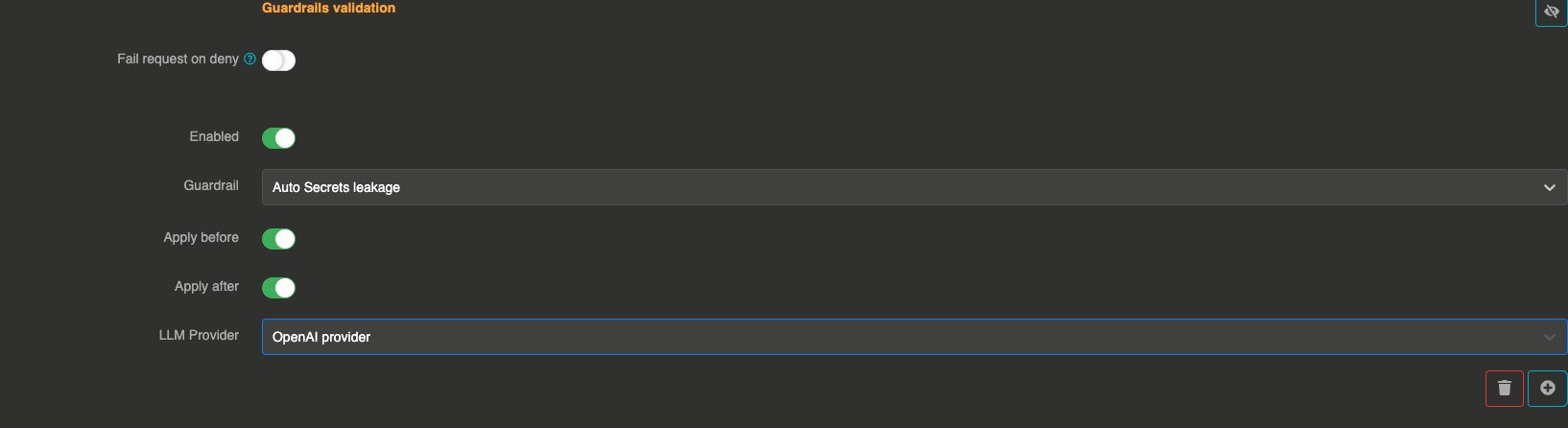
This guardrail is a security measure that prevents the LLM from exposing sensitive information such as passwords, API keys, or confidential credentials, reducing the risk of data leaks. Unlike the Secrets Leakage guardrail which requires you to select specific secret categories, this guardrail uses a comprehensive hardcoded prompt to automatically detect all types of IT secrets.
This safeguard can be applied before sending the prompt to the LLM (blocking requests that attempt to share secrets) and after generating a response (preventing accidental leaks).
How it works
The guardrail sends messages to a validation LLM with a comprehensive system prompt that instructs it to detect any sensitive IT data, including:
- Credentials — Usernames, passwords, tokens, API keys, SSH keys, or other access credentials
- Secrets — Secret keys, environment variables, database connection strings, encryption keys, or OAuth tokens
- Configuration details — Internal IP addresses, URLs of private services, database credentials, internal project names, or deployment configurations
- Personally Identifiable Information (PII) — Usernames, IDs, emails, or other information that can identify individuals in a system context
- Proprietary code or scripts — Snippets of code that may contain business logic, internal processes, or private algorithms
- Cloud infrastructure details — AWS IAM roles, Azure access keys, GCP service account details, or cloud storage bucket URLs
Configuration
"guardrails": [
  {
    "enabled": true,
    "before": true,
    "after": true,
    "id": "auto_secrets_leakage",
    "config": {
      "provider": "provider_xxxxxxxxx"
    }
  }
]
Field explanations
- enabled:
true— The guardrail is active - before:
true— The guardrail applies to user input before sending to the LLM - after:
true— The guardrail applies to the LLM response
Config section
| Parameter | Type | Required | Default | Description |
|---|---|---|---|---|
provider | string | Yes | — | Reference ID of the LLM provider used to evaluate messages for secret leakage. Must be different from the main provider, unless a model is set. |
model | string | No | default model of the provider | Model of the validation provider used to judge the messages, for instance a smaller and faster one. With a model set, the guarded provider can judge its own messages with another of its models. |
err_msg | string | No | "This message has been blocked by the 'auto-secrets-leakage' guardrail !" | Custom error message returned when a message is blocked. |
Guardrail example
If a user asks, "Can you share my API key?", the Otoroshi Extension will block the request from the LLM.
If a response accidentally contains sensitive information, it will be removed before being sent to the user.
When to use this vs Secrets Leakage
| Auto Secrets Leakage | Secrets Leakage | |
|---|---|---|
| Detection | Broad, automatic | Targeted to selected categories |
| Configuration | Just a provider reference | Provider + list of secret categories |
| Scope | Detects all types of IT secrets | Only detects selected types (API keys, passwords, tokens, etc.) |
| Use case | General-purpose security | Fine-grained control over what to detect |