Otoroshi Router
The Otoroshi Router lets the gateway choose the model for you. Your applications call a single model name, and the router decides, request after request, which of your providers answers:
code-routerpicks the cheapest model that still codes well enough. Quality comes from a coding benchmark index, price from the gateway's cost catalog.auto-routerreads each prompt and sends it to the best suited model (coding, reasoning, writing, long context…), following the cost / quality tradeoff you choose.smart-routerhas a decision model rate how demanding each request is, and answers with the cheapest model that is good enough for it: trivial requests go to your cheapest model, hard ones to your best.intent-routersends each request to the model you described for it: you say what each candidate is good at, and a decision model picks the one that fits.fusion-routerasks a panel of models in parallel. A judge compares their answers, and a synthesizer writes one final answer from the best of each.
Each routing model works with any provider already configured in Otoroshi: OpenAI, Anthropic, Mistral, Ollama, or one of the many other supported providers. If a candidate fails, the router moves on to the next best one, so a routed request keeps answering even when a provider is down.
How it works
The router is a virtual provider of type otoroshi. Like the load balancer,
it has no connection of its own. It references existing providers, called candidates, and each
candidate is called with its own default model (options.model). This means you control exactly
which models can be picked, and with which settings, guardrails and credentials.
A single router exposes all the routing models. Configure candidates only for the ones you want to use: a routing model without candidates answers with an explicit error.
Everything the gateway does for a provider still applies to the models picked by the router: costs, guardrails, caches, audit and analytics. Usage is recorded once, on the model that actually answered, so dashboards show the real usage of each model.
Creating a router
Create an LLM provider entity with provider set to otoroshi. The connection object is not used,
and all the configuration goes in options:
{
  "id": "provider_router",
  "name": "router",
  "provider": "otoroshi",
  "connection": {},
  "options": {
    "code_router_refs": ["provider_claude_sonnet", "provider_gpt_mini", "provider_qwen_coder"],
    "min_coding_score": 0.6,

    "auto_router_refs": ["provider_claude_sonnet", "provider_gpt_mini", "provider_mistral_small"],
    "auto_router_classifier_ref": "provider_gpt_nano",
    "cost_quality_tradeoff": 7,
    "allowed_models": [],

    "decision_model_ref": "decision-model_jev",
    "decision_model_model": "jev-latest",

    "smart_router_refs": ["provider_claude_sonnet", "provider_gpt_mini", "provider_mistral_small"],

    "intent_router_refs": [
      { "ref": "provider_gpt_mini", "description": "Everyday questions and conversation" },
      { "ref": "provider_claude_sonnet", "description": "Software development, code review and debugging" },
      { "ref": "provider_mistral_small", "model": "mistral-small-latest", "description": "Translation and rewriting, in any European language" }
    ],

    "fusion_router_refs": ["provider_claude_sonnet", "provider_gpt", "provider_gemini"],
    "fusion_router_judge_ref": "provider_gpt_mini",
    "fusion_router_synthesizer_ref": "provider_claude_sonnet"
  }
}
In the Otoroshi backoffice, pick Otoroshi (router) as the provider type: the form groups the options of each routing model. In AI Studio, open Routing and create a router in the Smart routing section.
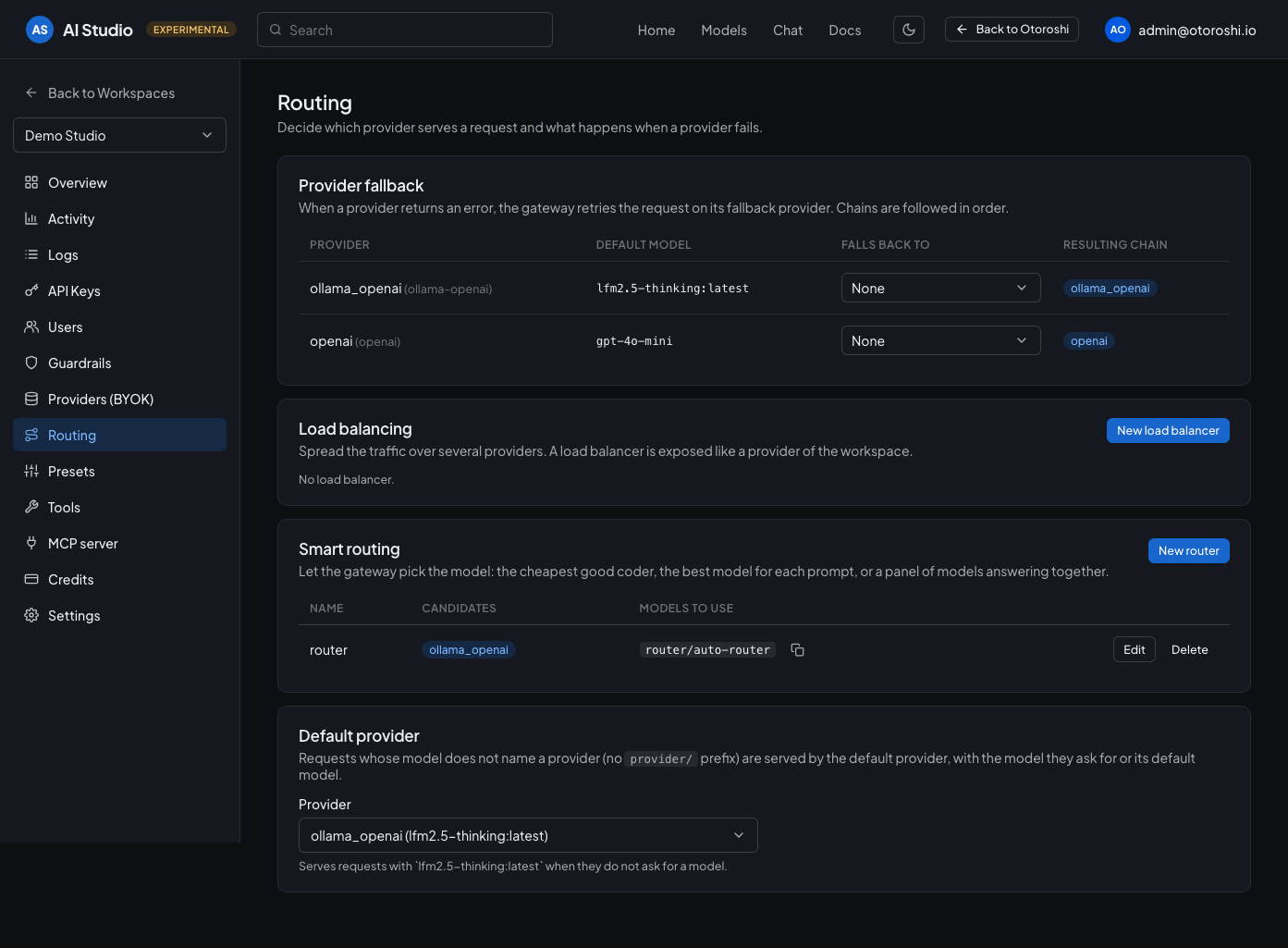
In AI Studio, each router lists its candidates and the model ids to call.
Calling the router
Put the routing model in the model field of the request. When the router is exposed through the
OpenAI Compatible API with other providers, prefix it with the
router name:
$ curl https://ai.oto.tools/v1/chat/completions \
-H "Authorization: Bearer $OTOROSHI_API_KEY" \
-H "Content-Type: application/json" \
-d '{
  "model": "router/auto-router",
  "messages": [{ "role": "user", "content": "Write a SQL query listing the top 10 customers by revenue" }]
}'{
"id": "chatcmpl-...",
"object": "chat.completion",
"model": "claude-sonnet-5",
"choices": [...]
}
The model of the response tells which model answered. Calls without a model use code-router.
Streaming, tool calling and every other chat completion parameter are passed to the selected model.
code-router
code-router is built for coding agents and IDE assistants. It gives you a strong coder without
paying for the most expensive model on every request.
- Each candidate model gets a coding quality score from the Artificial Analysis Coding Index, bundled with the gateway and refreshed with its price catalogs, and a price from the gateway's cost catalog. The price is weighted towards output (1 × input + 3 × output per token), since code generation writes much more than it reads.
- The minimum coding score (
min_coding_score, from0to1) sets the quality floor, relative to your best candidate: with0.6, any model scoring at least 60% of your best candidate's score qualifies. - The router calls the cheapest qualifying candidate first. If it fails, it tries the next cheapest qualifying candidate, then the other candidates from best to worst quality, and finally the candidates without a known score.
Raise the floor for harder tasks, lower it to save more. A caller can also set it on a single request:
{
  "model": "router/code-router",
  "min_coding_score": 0.9,
  "messages": [...]
}
auto-router
auto-router routes each prompt to the model that suits it best, like OpenRouter's auto model.
- A judge model (
auto_router_classifier_ref) reads the prompt and the list of candidates, with their quality and price, and picks one. A small, fast model is enough for this job. When no judge is set, the cheapest candidate is used as the judge. - The cost / quality tradeoff (
cost_quality_tradeoff, from0to10) guides the judge:0means the best answer whatever the price,10means the cheapest acceptable answer, and the default7balances both. - The chosen model answers. If it fails, the other candidates are tried in order of the same tradeoff. If the judge itself fails, the router still answers, following that order.
Narrow the candidates with allowed models: wildcard patterns matched against
<provider type>/<model> or the bare model name, such as anthropic/*, openai/gpt-5* or *mini*.
Callers can override all three settings on a request:
{
  "model": "router/auto-router",
  "cost_quality_tradeoff": 2,
  "allowed_models": ["anthropic/*", "openai/gpt-5*"],
  "messages": [...]
}
smart-router
smart-router spends on a request what the request deserves. A greeting and a research question do not need
the same model: the router tells them apart, and you only pay for your best model when it is needed.
- A decision model (
decision_model_ref, with its default model or the one set indecision_model_model) rates how demanding the request is, on a five level scale going from trivial to expert. It answers in a fraction of a second, for a fraction of the cost of the request it routes. - The rating sets the quality floor of the request, relative to your best candidate: no floor for a trivial request, your best candidate for the most demanding one, and a floor in between for the others.
- The router calls the cheapest candidate above that floor, from the coding quality index and the price of each
model, exactly like the
code-routerdoes. If it fails, the next candidates are tried in the same order.
The choice is yours to read and to tune: the same request always gets the same floor, and two settings move
the floors. smart_router_min_score is the floor of a trivial request (0 by default: your cheapest model answers),
smart_router_max_score the floor of the most demanding one (1 by default: only your best model answers). With
0.4 and 0.8, even a greeting gets a decent model, and your best one is kept for requests nothing else can
answer.
The router keeps answering when the decision model does not: a request it could not rate is routed as a request of average difficulty.
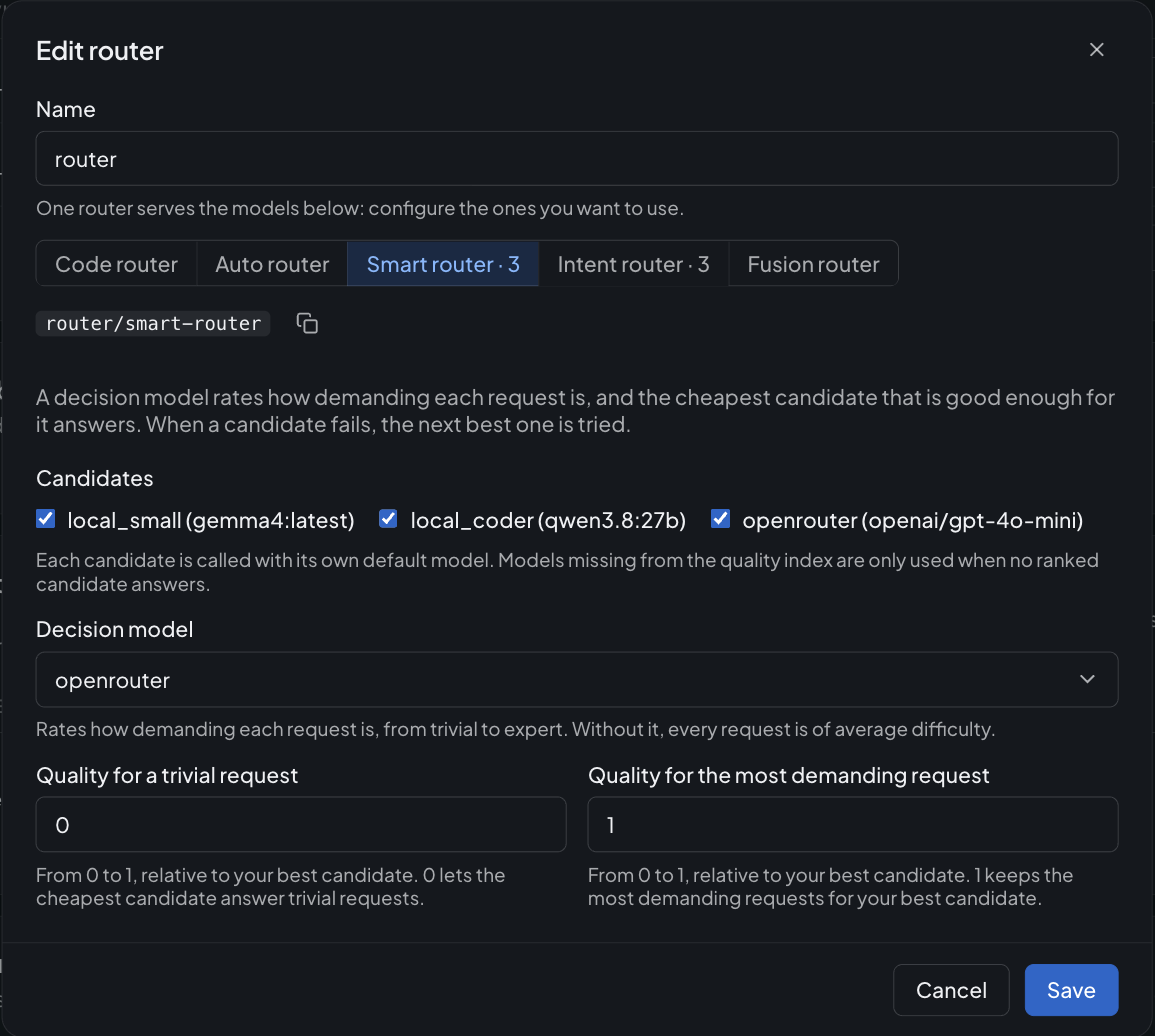
In AI Studio: the candidates, the decision model that rates the requests, and the two quality floors.
intent-router
intent-router routes on what the request is about, with rules you write in plain words. Each candidate
comes with a description of what it is good at, and a decision model picks the candidate whose description fits
the request: your coding model for code, your multilingual model for translations, a small and fast model for
everything else.
"intent_router_refs": [
  { "ref": "provider_gpt_mini", "description": "Everyday questions and conversation" },
  { "ref": "provider_claude_sonnet", "description": "Software development, code review and debugging" },
  { "ref": "provider_mistral_small", "model": "mistral-small-latest", "description": "Translation and rewriting, in any European language" }
]
- The decision model (
decision_model_ref) is asked which candidate is the best suited to answer the request, and gives the probability of each one. - The most probable candidate answers. If it fails, the other ones are tried from the most to the least probable.
- With a minimum confidence (
intent_router_min_confidence, from0to1), an answer the decision model is not sure enough of is not followed: the first candidate of the list answers. Put your default model first.
Write a description the way you would brief someone doing the routing by hand: what the model is for, not how
it works. intent_router_instructions replaces the question asked to the decision model, when your candidates call
for a more specific one.
Like the smart-router, the intent-router keeps answering when the decision model does not: the candidates are
then tried in the order of the list.
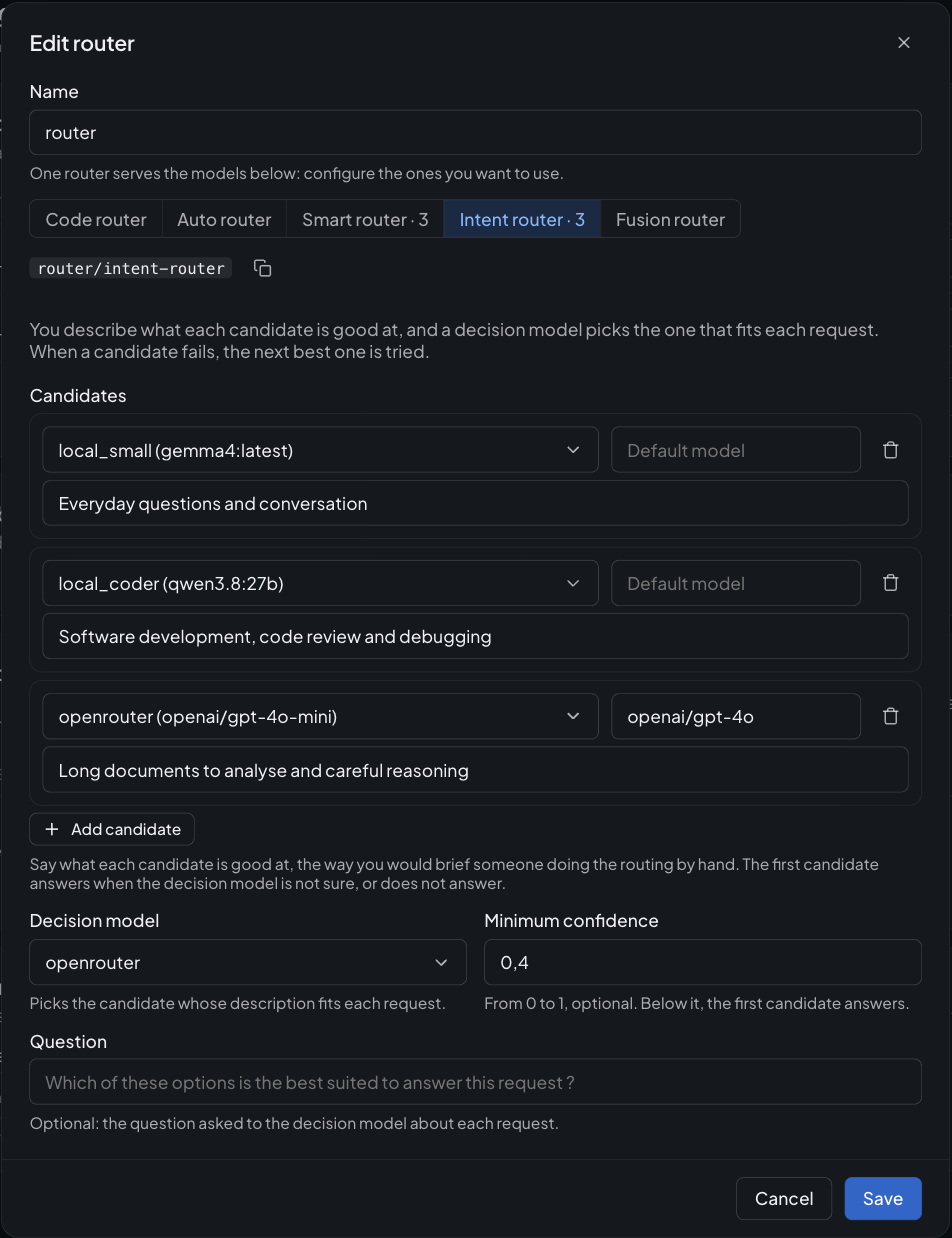
In AI Studio: each candidate with the model it serves and what it is good at, then the decision model that picks.
fusion-router
fusion-router trades latency and tokens for the most reliable answer. It is useful for high-stakes
questions, research or reviews, where a single model's blind spots matter.
- Panel: up to 8 candidates (
fusion_router_refs) answer the request in parallel. Members that fail are left out, and the request only fails if every member fails. - Judge:
fusion_router_judge_refcompares the answers without rewriting them. It lists what the models agree on, where they disagree, the insights only one of them found, and what none of them covered. - Synthesizer:
fusion_router_synthesizer_refwrites the final answer to the original request from that analysis. This is the answer returned to the caller, and it can be streamed.
When the judge or the synthesizer is not set, the best panel member (by quality score) takes the role.
A fusion request costs the sum of its calls: every panel member, the judge and the synthesizer. Put a budget on the route or on the API keys allowed to use it.
Configuration reference
| Option | Routing model | Default | Description |
|---|---|---|---|
code_router_refs | code-router | [] | Candidates: provider ids or { "ref", "model" } objects |
min_coding_score | code-router | 0.5 | Quality floor from 0 to 1, relative to the best candidate |
auto_router_refs | auto-router | [] | Candidates: provider ids or { "ref", "model" } objects |
auto_router_classifier_ref | auto-router | cheapest candidate | Provider id of the judge that picks the model |
auto_router_classifier_model | auto-router | default model of the judge | Model of the judge provider |
cost_quality_tradeoff | auto-router | 7 | 0 = best quality, 10 = cheapest |
allowed_models | auto-router | [] (all) | Wildcard patterns restricting the candidates |
decision_model_ref | smart-router, intent-router | none | Id of the decision model that reads the requests |
decision_model_model | smart-router, intent-router | default model of the decision model | Model of the decision model |
smart_router_refs | smart-router | [] | Candidates: provider ids or { "ref", "model" } objects |
smart_router_min_score | smart-router | 0 | Quality floor of a trivial request, from 0 to 1, relative to the best candidate |
smart_router_max_score | smart-router | 1 | Quality floor of the most demanding request, from 0 to 1, relative to the best candidate |
intent_router_refs | intent-router | [] | Candidates: { "ref", "model", "description" } objects, the default candidate first |
intent_router_instructions | intent-router | which option suits the request best | The question asked to the decision model |
intent_router_min_confidence | intent-router | none | From 0 to 1: below it, the first candidate answers |
fusion_router_refs | fusion-router | [] | Panel: provider ids or { "ref", "model" } objects (up to 8) |
fusion_router_judge_ref | fusion-router | best panel member | Provider id of the judge comparing the answers |
fusion_router_judge_model | fusion-router | default model of the judge | Model of the judge provider |
fusion_router_synthesizer_ref | fusion-router | best panel member | Provider id of the model writing the final answer |
fusion_router_synthesizer_model | fusion-router | default model of the synthesizer | Model of the synthesizer provider |
Candidate lists accept provider ids (["provider_1"]) or objects ([{ "ref": "provider_1", "model": "gpt-4o-mini" }]).
A candidate uses the model given with it, or the default model of its provider: one provider can be a candidate
several times with different models, each one scored and priced on its own model. A router never routes to itself.
Per-request parameters
| Body field | Routing model | Description |
|---|---|---|
min_coding_score | code-router | Overrides the quality floor for this request |
cost_quality_tradeoff | auto-router | Overrides the tradeoff for this request |
allowed_models | auto-router | Overrides the allowed models for this request |
These fields are only read by the router. They are never sent to the selected models.
Works with the rest of the gateway
- Fallback: candidates already cascade inside the router. You can also set a fallback on the router itself, which takes over when no candidate answers.
- Guardrails, caches, model constraints: set them on the router to apply them to every routed request, or on the candidates to apply them to one model.
- Budgets: scope a budget on the route or on the API keys calling the router to cap the spend of routed traffic.
- Dashboards: routed calls show up under the model that answered in the built-in dashboards, and are never counted twice.