Setup a new LLM Provider
Quick start
Open your Otoroshi admin web UI on otoroshi.oto.tools:8080
In the categories section click on AI - LLM and then select LLM Providers
Click on Add item to create a new LLM provider.

Then, choose the provider you would like to use among the supported providers.
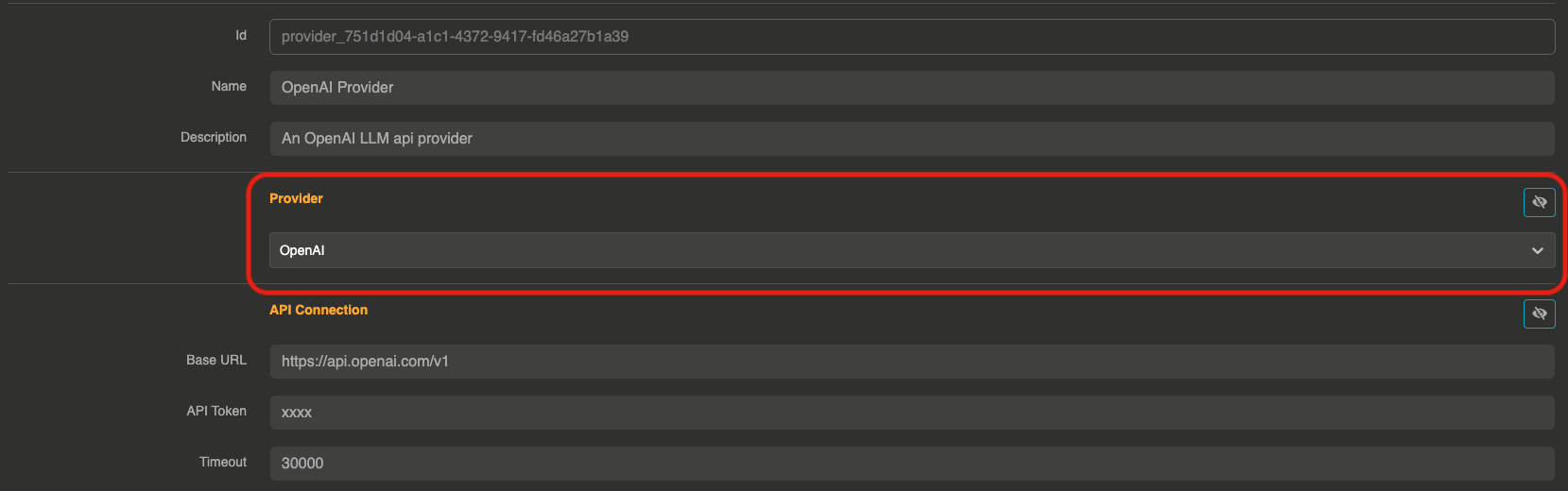
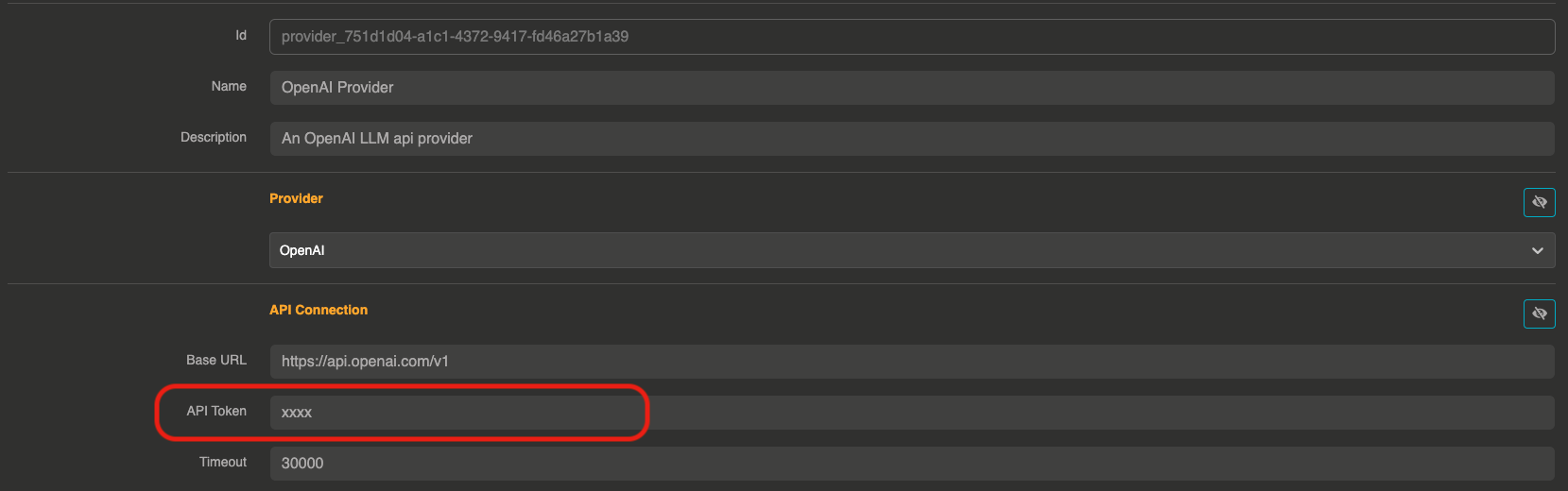
After choosing a provider, you can set up your secret API token and other settings if needed.
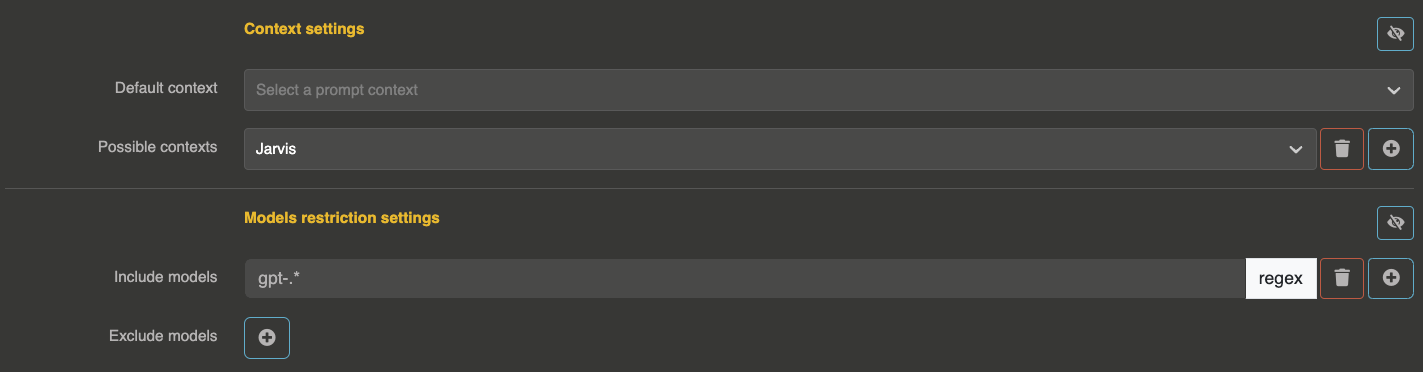
You can also choose to have a default context for this provider, or some possible contexts that will be usable by users (directly from the input payload). You can also provide restrictions on what models are usable or not with this provider.
Now you can click on Create provider to save your changes and use it into an Otoroshi Route.
Demo
Provider entity structure
The provider entity (JSON) has the following top-level fields:
{
  "id": "provider_xxx",
  "name": "My Provider",
  "description": "A description",
  "tags": ["production"],
  "metadata": {},
  "provider": "openai",
  "connection": { },
  "options": { },
  "provider_fallback": null,
  "context": { },
  "models": { },
  "cache": { },
  "guardrails": [],
  "guardrails_fail_on_deny": false,
  "memory": null
}
Connection
The connection object contains the settings to connect to the LLM provider API.
Common connection fields
These fields are shared across most providers:
| Field | Type | Default | Description |
|---|---|---|---|
base_url | string | provider-specific | The base URL of the provider API |
token | string | "xxx" | The API token or key. Supports comma-separated values for token round-robin |
timeout | number | 180000 | Request timeout in milliseconds (default: 3 minutes) |
Token round-robin
You can distribute requests across multiple API tokens by providing a comma-separated list:
{
  "connection": {
    "token": "sk-token1,sk-token2,sk-token3"
  }
}
Each request will use the next token in a round-robin fashion, helping to distribute rate limits across multiple accounts.
Provider-specific connection fields
Azure OpenAI
| Field | Type | Description |
|---|---|---|
resource_name | string | Azure resource name |
deployment_id | string | Deployment ID |
api_version | string | API version (default: "2024-02-01") |
api_key | string | API key (alternative to bearer token) |
{
  "connection": {
    "resource_name": "my-azure-resource",
    "deployment_id": "my-deployment",
    "api_version": "2024-02-01",
    "api_key": "xxx"
  }
}
With the v1 API version, the limit of an answer reaches Azure OpenAI as max_completion_tokens, whether the request named it max_tokens or max_completion_tokens: reasoning deployments are called like any other. With a dated API version, it reaches Azure under the name the request gave it.
Cloudflare
| Field | Type | Description |
|---|---|---|
account_id | string | Cloudflare account ID |
model_name | string | Model name |
{
  "connection": {
    "account_id": "your-account-id",
    "model_name": "@cf/meta/llama-2-7b-chat-int8",
    "token": "xxx"
  }
}
OVH AI Endpoints
| Field | Type | Description |
|---|---|---|
base_domain | string | OVH base domain |
unified | boolean | Use unified API mode (default: true) |
OpenAI Compatible
| Field | Type | Description |
|---|---|---|
supports_tools | boolean | Whether the API supports tool calling (default: true) |
supports_streaming | boolean | Whether the API supports streaming (default: true) |
supports_completion | boolean | Whether the API supports text completions (default: true) |
models_path | string | Path to the models endpoint (default: "/models") |
param_mappings | object | Map of parameter name overrides, for instance {"max_completion_tokens": "max_tokens"}. The limit of an answer reaches the API under the name the request gave it, max_tokens or max_completion_tokens: map one to the other when your API only knows one of them |
headers | object | Custom headers (default: {"Authorization": "Bearer {api_key}"}) |
additional_body_params | object | Extra parameters to include in every request body |
acc_stream_consumptions | boolean | Accumulate token usage across streaming chunks (default: false) |
{
  "connection": {
    "base_url": "https://my-api.example.com/v1",
    "token": "xxx",
    "supports_tools": false,
    "supports_streaming": true,
    "headers": {
      "Authorization": "Bearer {api_key}",
      "X-Custom-Header": "value"
    }
  }
}
Options
The options object configures the model and its parameters. These options follow the OpenAI chat completion API parameters for most providers.
| Field | Type | Default | Description |
|---|---|---|---|
model | string | provider-specific | The model to use (e.g., "gpt-4o", "claude-sonnet-4-20250514") |
temperature | float | — | Sampling temperature (0.0 to 2.0). Lower values are more deterministic |
top_p | float | — | Nucleus sampling parameter (0.0 to 1.0) |
max_tokens | integer | — | Maximum number of tokens in the response |
n | integer | 1 | Number of completions to generate |
seed | integer | — | Seed for deterministic generation |
frequency_penalty | float | — | Penalize tokens based on frequency (-2.0 to 2.0) |
presence_penalty | float | — | Penalize tokens based on presence (-2.0 to 2.0) |
stop | string | — | Stop sequence |
response_format | string | — | Response format (e.g., "json_object") |
logprobs | boolean | — | Return log probabilities |
top_logprobs | integer | — | Number of top log probabilities to return |
allow_config_override | boolean | true | Allow users to override these options from the request body |
responses | boolean | false | Call the provider's native Responses API endpoint for /responses requests instead of translating them to chat completions. Available on OpenAI, OpenAI-compatible providers, Azure OpenAI, Groq, x.ai and Ollama |
wasm_tools / tool_functions | array | [] | List of Wasm function IDs for function calling |
mcp_connectors | array | [] | List of MCP connector IDs |
search_engines | array | [] | List of Search Engine IDs, exposed to the model as a web search tool |
mcp_include_functions | array | [] | Whitelist of MCP function names to expose |
mcp_exclude_functions | array | [] | Blacklist of MCP function names to hide |
max_function_calls | integer | 10 | Maximum number of function call iterations |
Config override
When allow_config_override is true (the default), users can override options like model, temperature, max_tokens, etc. directly from the request body. This allows a single provider entity to serve different use cases.
When set to false, the options defined on the provider entity are always used, regardless of what the user sends in the request body.
Context
The context object lets you define system prompts that will be prepended to every request.
| Field | Type | Default | Description |
|---|---|---|---|
default | string | — | Default system prompt applied to all requests |
contexts | array | [] | List of named context strings that users can select from |
{
  "context": {
    "default": "You are a helpful assistant specialized in customer support.",
    "contexts": [
      "You are a technical expert.",
      "You are a creative writer."
    ]
  }
}
When contexts are defined, users can select a context by including a context_id (index) in their request.
Model restrictions
The models object restricts which models can be used with this provider, using regex patterns.
| Field | Type | Default | Description |
|---|---|---|---|
include | array | [] | Regex patterns for allowed models. If empty, all models are allowed |
exclude | array | [] | Regex patterns for denied models |
{
  "models": {
    "include": ["gpt-4.*", "gpt-3.5-turbo"],
    "exclude": [".*preview.*"]
  }
}
A model is allowed if it matches at least one include pattern (or include is empty) AND does not match any exclude pattern.
Target a model of one provider
Behind the unified API, the same model can be called under several names: model, <provider>/<model> or <provider>###<model>, the provider being its name (as a slug) or its id. A pattern can use any of these forms, so a rule can allow or block a model on one provider only:
{
  "models": {
    "include": ["openai/gpt-4o", "mistral-.*"],
    "exclude": ["azure###.*"]
  }
}
Here gpt-4o is allowed only through the openai provider, every mistral-* model is allowed wherever it is served, and nothing from the azure provider goes through. A pattern without a provider, like mistral-.*, applies to every provider.
Per API key / per user restrictions
In addition to the provider-level restrictions, model access can be further restricted per API key or per user through their metadata. This allows fine-grained control: for example, a single provider exposing multiple models can restrict each consumer to only the models they are entitled to use.
The following metadata keys are supported on both API keys and users (Otoroshi private app users):
| Metadata key | Description |
|---|---|
ai_models_include | Comma-separated list of regex patterns for allowed models |
ai_models_exclude | Comma-separated list of regex patterns for denied models |
Patterns accept the same model, <provider>/<model> and <provider>###<model> forms as the provider restrictions. Since the list is comma-separated, a pattern cannot contain a comma. A blank value restricts nothing.
For example, to restrict an API key to only GPT-4 models:
{
  "metadata": {
    "ai_models_include": "gpt-4.*"
  }
}
To restrict a user to GPT-4 while excluding preview models:
{
  "metadata": {
    "ai_models_include": "gpt-4.*",
    "ai_models_exclude": ".*preview.*"
  }
}
All three levels of restrictions are combined: a model is allowed only if it passes the provider restrictions, AND the API key restrictions (if any), AND the user restrictions (if any). A provider that restricts nothing does not lift the restrictions of its API keys and users. If a model is denied at any level, the request is rejected with {"error": "you can't use this model"}, before the provider is called. A request without a model goes to the default model of the provider, which patterns can target as <provider>/_default.
To restrict a user to GPT-4o on OpenAI and to Mistral models anywhere:
{
  "metadata": {
    "ai_models_include": "openai/gpt-4o,mistral-.*"
  }
}
This mechanism applies to all model types: LLM providers, embedding models, audio models, image models, video models, moderation models and OCR models.
Load balancers, routers and fallbacks
Load balancers, Otoroshi routers and fallbacks hand requests over to other providers. The restrictions of an API key or a user apply to what the consumer calls: the load balancer or the router, with the model it asks for (my_balancer/_default, router/auto-router...). Where the request then goes is your routing configuration: the providers it reaches apply their own restrictions, not those of the consumer. Allowing a consumer to use a router is enough, there is no need to list its candidates.
{
  "metadata": {
    "ai_models_include": "router/auto-router,my_balancer/_default"
  }
}
A fallback only takes over the requests the primary provider accepted: a model refused on the primary provider is never served by its fallback.
Cache
The cache object configures response caching to reduce costs and latency.
| Field | Type | Default | Description |
|---|---|---|---|
strategy | string | "none" | Cache strategy: "none", "simple", or "semantic" |
ttl | number | 86400000 | Cache TTL in milliseconds (default: 24 hours) |
score | number | 0.8 | Minimum similarity score for semantic cache hits (0.0 to 1.0) |
{
  "cache": {
    "strategy": "simple",
    "ttl": 3600000,
    "score": 0.8
  }
}
none: No cachingsimple: Exact match caching — identical prompts return cached responsessemantic: Similarity-based caching — semantically similar prompts can return cached responses. Uses thescorethreshold. See Semantic Cache for details.
Guardrails
The guardrails array configures content validation rules that are applied before and/or after LLM calls. See the Guardrails documentation for all available guardrails.
{
  "guardrails": [
    {
      "enabled": true,
      "before": true,
      "after": false,
      "id": "regex",
      "config": {
        "allow": [],
        "deny": ["credit.card.\\d+"]
      }
    }
  ],
  "guardrails_fail_on_deny": false
}
| Field | Type | Default | Description |
|---|---|---|---|
guardrails | array | [] | List of guardrail items |
guardrails_fail_on_deny | boolean | false | When true, denied requests return an error. When false, the guardrail denial message is returned as the assistant response |
Each guardrail item has:
| Field | Type | Description |
|---|---|---|
enabled | boolean | Whether this guardrail is active |
before | boolean | Apply before the LLM call (on user input) |
after | boolean | Apply after the LLM call (on model output) |
id | string | Guardrail type identifier |
config | object | Guardrail-specific configuration |
Fallback
The provider_fallback field references another provider entity ID to use as a fallback when this provider fails.
{
  "provider_fallback": "provider_backup_xxx"
}
See the Fallback documentation for details.
Memory
The memory field references an LLM Memory entity ID to enable conversation memory for this provider.
{
  "memory": "memory_entity_id"
}
When configured, the provider will maintain conversation history across requests using the referenced memory store.
Special metadata
The provider metadata object supports special keys that affect behavior:
| Key | Description |
|---|---|
endpoint_name | Override the provider name used in API responses |
costs-tracking-provider | Override the provider used for cost tracking computation |
costs-tracking-model | Override the model used for cost tracking computation |
eco-impacts-provider | Override the provider used for ecological impact computation |
eco-impacts-model | Override the model used for ecological impact computation |
eco-impacts-electricity-mix-zone | Override the electricity mix zone for this provider |
These metadata overrides are useful when using OpenAI-compatible providers that host models from other providers (e.g., a Mistral model hosted on Scaleway).
Full example
{
  "id": "provider_openai_prod",
  "name": "OpenAI Production",
  "description": "Production OpenAI provider with guardrails and caching",
  "tags": ["production", "openai"],
  "metadata": {
    "costs-tracking-provider": "openai",
    "costs-tracking-model": "gpt-4o"
  },
  "provider": "openai",
  "connection": {
    "base_url": "https://api.openai.com/v1",
    "token": "sk-xxx",
    "timeout": 180000
  },
  "options": {
    "model": "gpt-4o",
    "temperature": 0.7,
    "max_tokens": 4096,
    "allow_config_override": true
  },
  "provider_fallback": "provider_mistral_backup",
  "context": {
    "default": "You are a helpful assistant."
  },
  "models": {
    "include": ["gpt-4o.*"],
    "exclude": []
  },
  "cache": {
    "strategy": "simple",
    "ttl": 3600000
  },
  "guardrails": [
    {
      "enabled": true,
      "before": true,
      "after": false,
      "id": "regex",
      "config": {
        "deny": ["\\b\\d{16}\\b"]
      }
    }
  ],
  "guardrails_fail_on_deny": true,
  "memory": null
}