Otoroshi Assistant
The Otoroshi Assistant is an LLM-powered chatbot embedded directly in the Otoroshi backoffice. It helps backoffice users master and operate the platform through a conversational interface — answering questions, navigating to the right page, drafting JSON payloads, and (optionally) calling the admin API on their behalf.
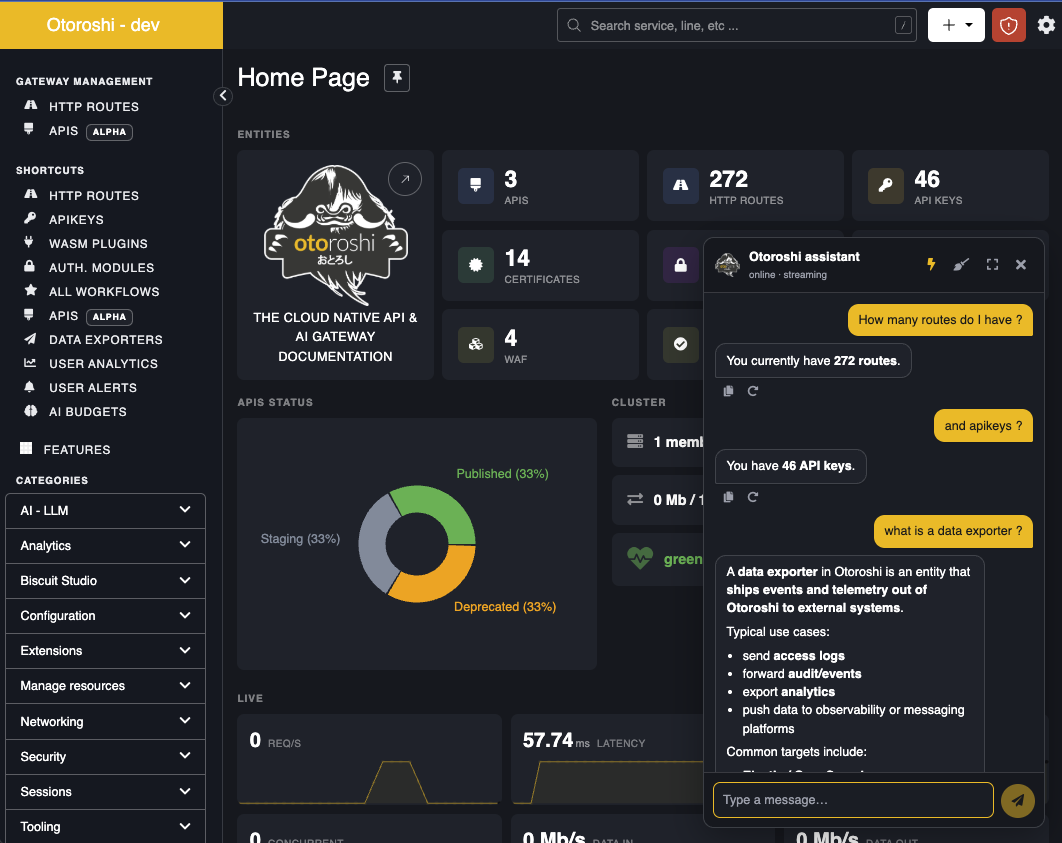
What it does
The assistant is built on top of the LLM Extension and combines three capabilities the model can use to answer your questions:
search— searches the live Otoroshi Admin API catalog, fetched at startup from the running instance's OpenAPI (core + every loaded extension). Returns matching operations with their HTTP signature, parameters, request body shape, and response shape. The model uses this to discover which endpoint to call for any given task.doc— fetches Otoroshi conceptual documentation from a curated allowlist (www.otoroshi.io,cloud-apim.github.io,maif.github.io). The model uses this for how does X work questions and to point you to the right page in the manual.execute— runs a sequence of HTTP requests against the Otoroshi Admin API. Requests run in order against the loopback admin API, with results piped into a JSON object keyed by request name. A small expression language (${request_name.body.field}) lets later requests reference values produced by earlier ones — e.g. fetch a template, mutate it, post the result.
The model receives a tailored system prompt that includes the list of resources, the backoffice URL map, and the current backoffice user context (name, email, current page, current date/time), so it can give answers that are both accurate and actionable in your situation.
Features
Answers your questions in context
The assistant draws on the official Otoroshi documentation and your running instance — its concepts, your loaded extensions, the page you are currently looking at. Ask how does X work or where do I configure Y and you get an answer grounded in your setup, not a generic one. Replies come with clickable links into the docs and into the right backoffice page.
Performs admin tasks on your behalf
Describe what you want — "create a route that exposes example.com on my-api.oto.tools with the API key plugin", "list all disabled LLM providers", "give route abc123 the same JWT verifier as route xyz789" — and the assistant runs the matching admin API calls. Read, write, and delete permissions are each toggleable, so you can scope what the assistant is allowed to touch on a given environment.
Handles multi-step workflows
Complex requests don't need to be broken down. The assistant can fetch a template, mutate it, post it back, and link you to the result — all in a single prompt. It chains the actions itself and reuses values from earlier steps, so one instruction can drive a whole workflow.
Shows you what it's doing
With streaming enabled (⚡ icon), each step appears in real time: which documentation page is being read, which admin API call is in flight, what arguments were sent, whether it succeeded, and how long it took. Nothing happens behind the scenes — you can audit the work as it runs and stop the conversation if it goes off-track.
Lives inside the backoffice
A floating button in the bottom-right opens a chat panel docked alongside your work — no context switch, no separate tab. Expand it to near-fullscreen for longer prompts, switch between light and dark themes (it follows the rest of the backoffice), copy or retry any reply, or clear the conversation to start fresh.
Setup
The assistant is configured in the global Otoroshi configuration (Danger Zone), in the Otoroshi Assistant (LLM) section.
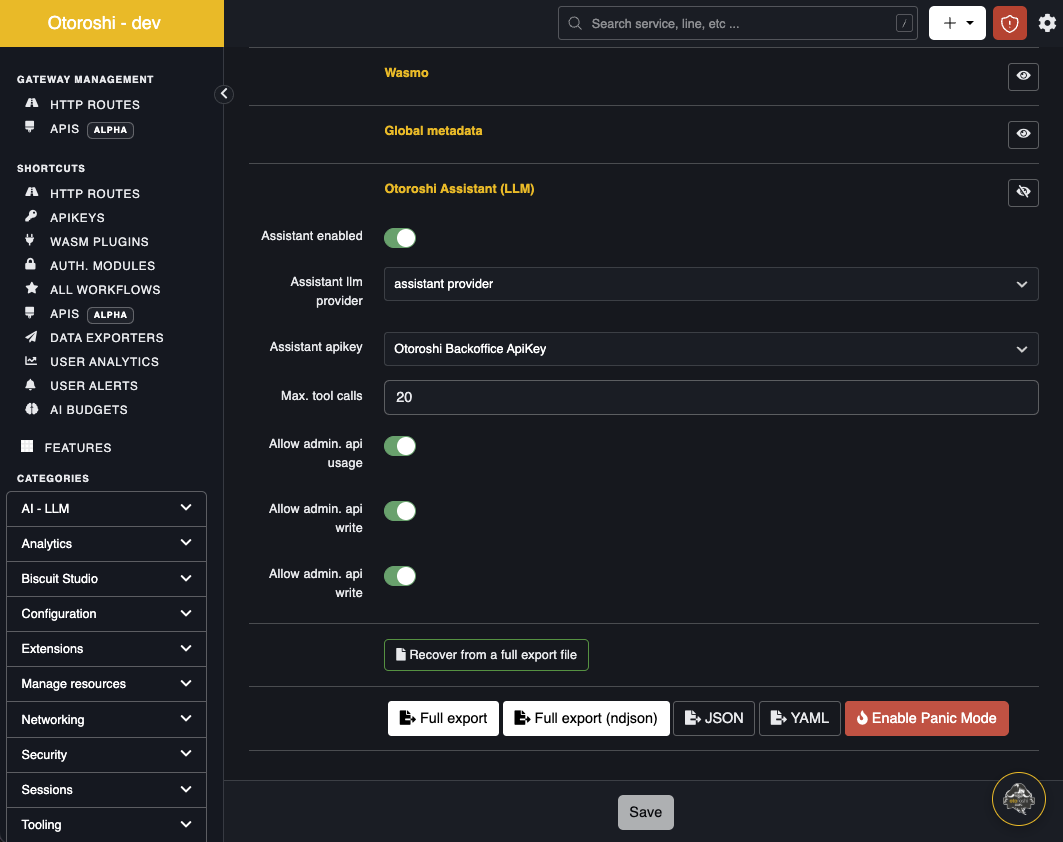
| Setting | Description |
|---|---|
| Assistant enabled | Toggle the floating button on/off across the backoffice. |
| Assistant llm provider | The LLM provider the assistant uses for completions. Pick a provider that supports tool calling and streaming (e.g. OpenAI gpt-5, Anthropic Claude, Mistral, etc.). |
| Assistant model | The model of that provider the assistant uses. Leave it empty to use the default model of the provider. |
| Assistant apikey | An Otoroshi admin API key used by the execute tool to call the admin API on the user's behalf. The assistant inherits the rights of this api key — scope it accordingly. |
| Max. tool calls | Hard limit on tool-calling iterations per user message. Prevents runaway loops. Default 20. |
| Allow admin. api usage | Master switch for the execute tool. When off, the model can still answer with search and doc, but cannot call the admin API. |
| Allow admin. api write | When off, the assistant cannot perform POST / PUT / PATCH calls. |
| Allow admin. api delete | When off, the assistant cannot perform DELETE calls. |
Once enabled, save the configuration and refresh any backoffice page. The floating button appears in the bottom-right corner.
Tip — provider choice: The assistant streams responses, supports parallel tool calls, and benefits from longer context windows (the system prompt embeds the resource list and URL map). Modern frontier models with native tool-calling work best.
How to use
- Click the floating button — the chat panel opens, docked on the right.
- Type your question. Use
Shift+Enterfor newlines,Enterto send. - Toggle the ⚡ icon in the header to enable streaming (persisted in
localStorage). - Toggle the ⛶ icon to expand the chat to near-fullscreen for long prompts.
- Use the broom icon to clear the current conversation.
Examples of prompts that work well:
- "List all my LLM providers and tell me which one isn't enabled."
- "Create a route that exposes
https://api.example.comonmyapi.oto.tools, with the API key plugin in front." - "How do biscuit verifiers work? Link me to the relevant doc."
- "What's wrong with my route
abc123? Why is auth failing?" - "Generate a JWT verifier for asymmetric RS256 keys."
Security model
- The
executetool only calls the Otoroshi admin API of the same instance (origin-locked). Absolute URLs and cross-origin paths are rejected. - The
executetool always uses the configured admin api key — the model cannot overrideAuthorization,Cookie,Host, orProxy-Authorizationheaders. - Sensitive response headers (
set-cookie,www-authenticate, …) are stripped from results before being surfaced to the model. - The
doctool only fetches from an exact-match host allowlist overhttps, with redirects disabled and the response size capped before HTML→text conversion (SSRF / ReDoS mitigation). - Tool outputs are truncated to 24 KB before being fed back to the model.
- The assistant's system prompt forbids it from echoing back secrets and recommends rotation if a user pastes one.
- Disable
Allow admin. api write/Allow admin. api deleteon production tenants to limit the assistant to read-only operations.
Limitations
- The assistant runs inside the Otoroshi backoffice and is meant for interactive use; there is no programmatic API exposed to other consumers (use the LLM gateway for that).
- The OpenAPI catalog is cached for 10 minutes. If you install a new extension, the assistant's
searchtool will pick it up after the cache expires (or restart the instance to force-refresh). - The
executetool runs requests sequentially, not in parallel. Each tool turn can run a batch of requests, but inside a batch they are pipelined to keep${...}references deterministic. - Conversations are not persisted server-side — clearing the chat or refreshing the page resets the context.