Fallback
The fallback mechanism ensures continuity of service by automatically switching to an alternative LLM provider when the primary provider fails.
How it works
When a provider has a fallback configured, every LLM request is first sent to the primary provider. If the request fails (error response or exception), the system automatically retries the same request against the fallback provider.
The fallback is transparent to the caller — the response format is identical regardless of which provider handled the request.
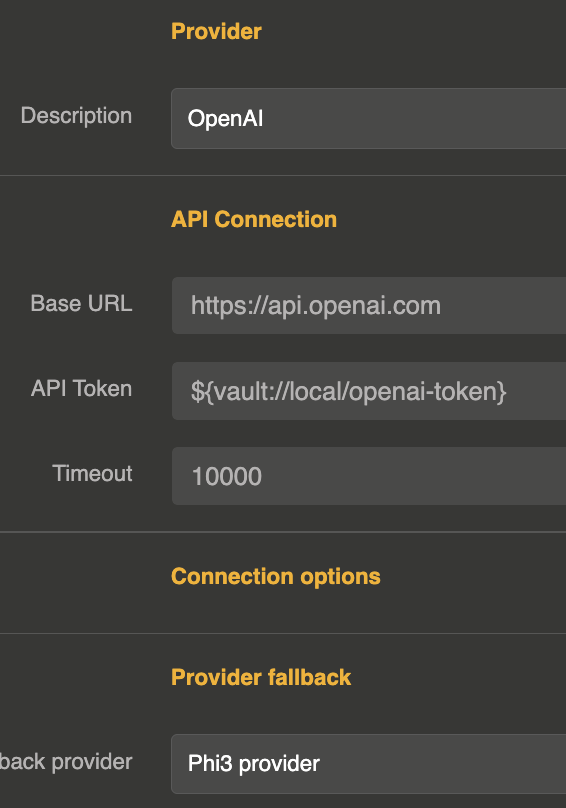
Configuration
The fallback is configured directly on the provider entity using the provider_fallback field, which references the ID of another provider entity.
{
  "id": "provider_openai_main",
  "name": "OpenAI (primary)",
  "provider": "openai",
  "connection": {
    "base_url": "https://api.openai.com/v1",
    "token": "sk-xxx",
    "timeout": 180000
  },
  "options": {
    "model": "gpt-4o"
  },
  "provider_fallback": "provider_mistral_backup"
}
| Parameter | Type | Default | Description |
|---|---|---|---|
provider_fallback | string | — | ID of the fallback provider entity |
provider_fallback_model | string | default model of the fallback provider | Model of the fallback provider to use. When set, the model asked for the primary provider is not sent to the fallback, so a fallback on another vendor always gets a model it serves. |
When fallback triggers
The fallback provider is called when:
- The primary provider returns an error response (e.g., rate limit exceeded, server error, authentication failure)
- The primary provider throws an exception (e.g., timeout, connection refused, network error)
If the fallback provider also fails, the error is returned to the caller.
A request for a model the primary provider does not allow, through its own model restrictions or those of the API key or user, is refused right away: it is not retried on the fallback, and it does not count as a failure of the primary provider. The fallback only serves the requests the primary provider would have accepted.
Supported operations
The fallback mechanism works for all LLM operations:
- Chat completion (blocking)
- Chat completion (streaming)
- Text completion (blocking)
- Text completion (streaming)
Chaining fallbacks
You can chain multiple fallback providers by configuring a fallback on the fallback provider itself:
Provider A (primary)
  └─ fallback → Provider B
                  └─ fallback → Provider C
// Provider A
{
  "id": "provider_a",
  "provider": "openai",
  "provider_fallback": "provider_b",
  "..."
}

// Provider B
{
  "id": "provider_b",
  "provider": "mistral",
  "provider_fallback": "provider_c",
  "..."
}

// Provider C
{
  "id": "provider_c",
  "provider": "anthropic",
  "..."
}
A chain always ends. A provider that already failed for a request is not asked for it again: two providers naming each other as fallback are each tried once, then the last error goes back to the caller.
Costs and budgets
A request served by a fallback is priced at the price of the provider and the model that actually answered it, and that is the cost reported to the caller, in the response and in its headers. It counts against the budgets of both providers, the primary and its fallback, and once in a budget that has both in its scope.
Combining with load balancing
Fallback and load balancing work together. You can set a fallback on a load balancer provider, or set fallbacks on individual providers within the load balancer:
{
  "id": "provider_lb",
  "provider": "loadbalancer",
  "options": {
    "refs": ["provider_openai", "provider_mistral"],
    "loadbalancing": "round_robin"
  },
  "provider_fallback": "provider_anthropic_emergency"
}
In this setup, if the selected provider within the load balancer fails, the fallback provider is used.