The preset plugin
The fabric is five plugins that talk to each other through a shared score. Composing them by hand works, but it puts a correctness requirement on the person doing the composing: the response must run after everything that contributes to the score. Get that wrong and nothing breaks — requests keep flowing, events keep being emitted, and the score the response reads is simply incomplete.
That is the worst class of misconfiguration: silent, and invisible in a test.
Protecting a route, end to end creates every entity this preset references, in order, and covers what to read before arming it. This page is the reference for the plugin itself.
This plugin has to be added to every route that wants it. The global preset is the same expansion driven from the global configuration, which decides what each route gets from a table of selectors — so a route created next month is protected without anyone remembering.
Cloud APIM Threat Protection - Preset removes the requirement. It is a single plugin that expands, at request time, into the whole chain with explicit ordering indices.
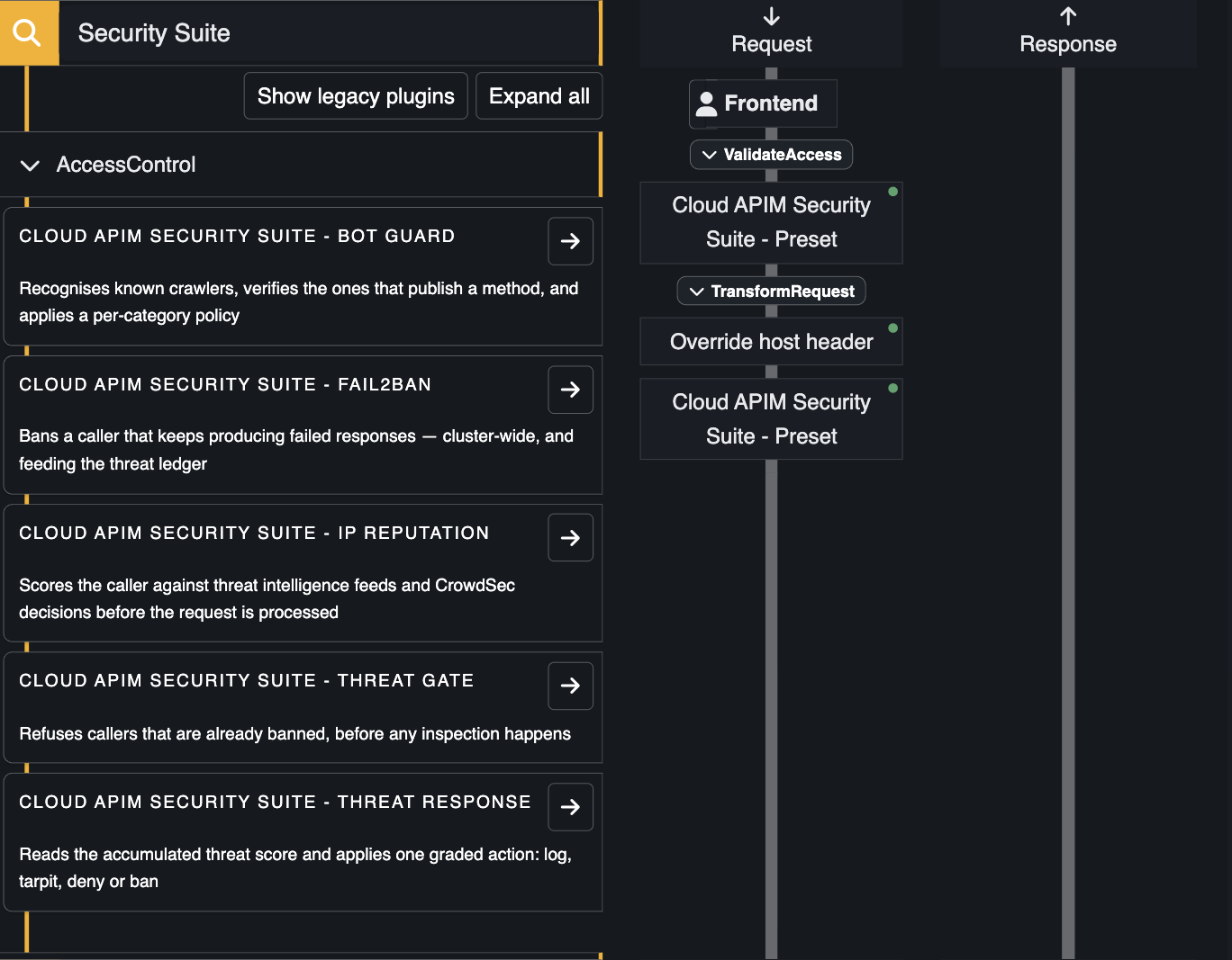
On the left, the five plugins available individually. On the right, the same route protected by one slot. Composing them by hand works — the preset exists because their order matters and is easy to get wrong. (The preset is missing from the list because this route already carries it.)
What it expands into
| Order | Plugin | Phase | Index |
|---|---|---|---|
| 1 | Threat gate | access validation | 1.0 |
| 2 | Bot guard | access validation | 2.0 |
| 3 | IP reputation — feeds, CrowdSec and ASN | access validation | 3.0 |
| 4 | Fail2ban (off by default) | access validation | 4.0 |
| 5 | Traffic guard (off by default) | access validation | 5.0 |
| 6 | API contract (off by default) | request and response transformation | 0.5 |
| 7 | Cloud APIM WAF | request transformation | 1.0 |
| 8 | Upload guard (off by default) | request transformation | 2.0 |
| 9 | Login guard (off by default) | request and response transformation | 3.0 |
| 10 | Object guard (off by default) | request and response transformation | 4.0 |
| 11 | Threat response | request transformation | 900.0 |
| 12 | Error leakage guard (off by default) | response transformation | 1.0 |
| 13 | Sensitive data guard (off by default) | response transformation | 2.0 |
The indices are Otoroshi's own plugin_index mechanism, so the ordering is enforced by the engine
rather than by the order slots happen to sit in on the route.
Within a phase, Otoroshi sorts the plugins that carry an index and then appends the ones that do not. Everything the preset emits is indexed, so the whole fabric runs ahead of the rest of the route's plugins in each phase — a banned caller is refused before Otoroshi does the work of authenticating them.
It also means you should not add the WAF a second time as a separate slot: an unindexed WAF would land after the threat response, which is the exact inversion the preset exists to prevent. Let the preset carry it.
Configuration
{
  "threat_policy": "threat-policy_9f2c...",
  "bot_policy": null,
  "waf_config": "waf-config_1f3a...",

  "gate": true,
  "bots": true,
  "reputation": true,
  "waf": true,
  "fail2ban": false,
  "response": true,

  "reputation_mode": "block",
  "fail2ban_dry_run": true,
  "error_leakage": false,
  "error_leakage_mode": "mask",
  "sensitive_data": false,
  "sensitive_data_mode": "enforce",
  "sensitive_data_detectors": {},
  "uploads": false,
  "uploads_mode": "enforce",
  "uploads_allowed_extensions": [],
  "uploads_scanner": null,
  "uploads_scan_failure_action": "reject",
  "login": false,
  "login_paths": [],
  "traffic": false,
  "traffic_sensitivity": "medium",
  "objects": false,
  "objects_mode": "alert",
  "objects_paths": [],
  "objects_budget": 0,
  "api_contract": false,
  "api_contract_id": null,
  "api_contract_mode": "monitor",
  "include": [],
  "exclude": []
}
| Field | Default | Meaning |
|---|---|---|
threat_policy | (empty) | Shared by the gate and the response. Empty means the built-in dry-run policy: everything is recorded, nothing is enforced. |
bot_policy | (empty) | Empty means the first enabled bot policy. |
waf_config | (empty) | Required for the WAF section to expand at all. |
gate · bots · reputation · waf · response | true | Section switches. |
fail2ban | false | Off by default: it is the one detector your own clients can trip. See Fail2ban. |
fail2ban_dry_run | true | Count and report without banning. Leave it on until the failure statuses have been checked against real traffic. |
reputation_mode | block | monitor scores without ever denying on its own, leaving the decision to the response. |
error_leakage | false | Off by default: it rewrites responses rather than refusing requests. See error leakage. |
error_leakage_mode | mask | monitor reports a leak and lets the response through as it is. |
sensitive_data | false | Off by default, for the same reason. See sensitive data. |
sensitive_data_mode | enforce | monitor reports what every detector finds and changes nothing. |
sensitive_data_detectors | {} | A detector id and its action, off, log, mask or block. A detector not named keeps its default. |
uploads | false | Off by default: a route that takes no upload has nothing for it to judge. See upload guard. |
uploads_mode | enforce | monitor reports what would be refused and lets every upload through. |
uploads_allowed_extensions | [] | When not empty, the only file extensions accepted, without the dot. |
uploads_scanner | (empty) | A malware scanner every uploaded file also goes to. |
uploads_scan_failure_action | reject | A scan that cannot be made refuses the upload, or allow lets it through unscanned. |
login | false | Off by default: a route without a login endpoint has nothing to count. See login guard. |
login_paths | [] | The login endpoints, exact or ending in *. Empty means every POST of the routes. |
traffic | false | Off by default: a baseline needs traffic to learn first. See traffic guard. |
traffic_sensitivity | medium | How far from usual traffic a surge starts: 5 times for low, 3 for medium, 2 for high. |
objects | false | Off by default. See object guard. |
objects_mode | alert | alert only reports enumeration, walks and surges of new objects; score puts them on the threat score too. |
objects_paths | [] | Object paths such as /api/orders/{id}. Empty means any segment shaped like an identifier. |
objects_budget | 0 | Distinct objects of one kind a consumer may read per hour, across the cluster, refused with a 429 past it. 0 is none. |
api_contract | false | Off by default. See API contracts. |
api_contract_id | null | The contract every route is checked against. null: each route's metadata names its own, under cloud-apim-api-contract. |
api_contract_mode | monitor | monitor reports what does not match the contract; enforce refuses it. |
| (none) | — | The reputation section covers feeds, CrowdSec and ASN classification — every enabled source of each, since none of the three has a plugin of its own. |
include · exclude | (empty) | Path scoping — see the warning below. |
A section switched off expands into nothing, not into a disabled slot. A plugin that is present but inert is the kind of thing one finds six months later while wondering why it never fired.
Otoroshi drops a preset's own include / exclude when it expands it — the expansion sees the
config, not the slot. The route designer will still show you the usual include/exclude fields on
the preset, and they will do nothing.
Use the include and exclude fields inside the preset's configuration instead. They are
copied onto every plugin the preset emits.
What it does not cover
The three incoming request validators — honeypot, WAF and IP reputation — run before routing, from the global configuration. No route-level preset can reach them; see global plugins are not route plugins.
When to compose by hand instead
The preset covers the common shape. Build the chain slot by slot when you need:
- more than one IP reputation slot, for instance a strict set of feeds on
/adminand a permissive one elsewhere; - the full reputation configuration — score thresholds, explicit feed lists, CrowdSec reporting, passthrough ranges. The preset only exposes the mode. (ASN databases are not per-route in either case: every enabled one is always consulted.);
- the WAF's fabric weights (
block_weight,match_weight) tuned away from their defaults; - fail2ban tuned at all — the preset exposes only the section switch and its dry run; windows, thresholds, status lists and counter keys are configured on the plugin itself;
- fabric plugins interleaved with your own, where a custom plugin has to sit between two of them.
Both routes are supported and produce the same runtime chain. The preset is the one that cannot be ordered wrongly.
A route carrying any of these hand-composed slots is left alone by the global preset, so a route tuned by hand does not end up with a second chain over it.