Tuning assistant
Writing a CRS exclusion by hand is specialist work. You need to know which of five directives applies, which of them run at compile time and which at request time, where in the composed configuration each has to sit, and what the one you picked gives up. Most teams do not have that person, and the fallback when a rule fires on legitimate traffic is to turn the rule off — or the WAF.
The assistant is the answer to that. It takes one observed match and produces the exclusions that would silence it, ordered from surgical to blunt, each one run against your actual configuration before it is offered to you.
Find it under Threat Protection → WAF tuning.

Every row is a rule objecting to one input of one endpoint. INPUT is the part that makes tuning
possible — without it there is nothing to exclude but the rule itself.
The guarantee
Nothing is written that has not been demonstrated to work.
This is not a slogan, it is the reason the feature is trustworthy. An exclusion that silently does nothing is the worst outcome available: it compiles, it is saved, it is reviewed and approved, and the alert keeps arriving — so the next person writes a wider one. Before an exclusion is offered, and again before it is saved, the assistant:
- rebuilds the request that tripped the rule, from what the rule logged,
- runs your configuration against it, and confirms the rule fires,
- runs it again with the candidate exclusion in the position it will actually occupy,
- confirms the rule no longer fires,
- replays a corpus of known attacks through the same input and reports anything that stopped being caught.
Step 5 is the one that matters most. SecRuleUpdateTargetById 942100 "!ARGS:query" on a search
endpoint is a reasonable-looking line that hands the search box to anyone who asks; the assistant
tells you that before you save it, not afterwards.
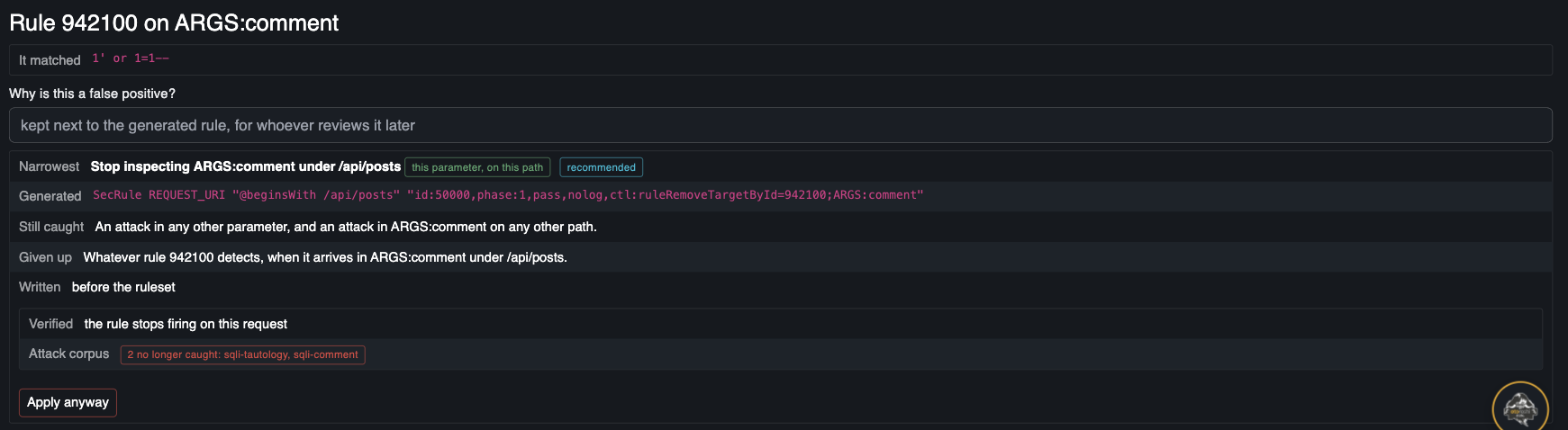
The narrowest option, already run. Verified says the rule stops firing; Attack corpus says what
that cost — here, two SQL injection payloads that would no longer be caught in the same parameter.
The button reads "Apply anyway" rather than "Apply" for exactly that reason.
The four options
For a match on ARGS:comment under /api/posts, from narrowest to widest:
| Option | What it generates | Still caught | Given up |
|---|---|---|---|
| This parameter, on this path | ctl:ruleRemoveTargetById=942100;ARGS:comment gated on the path | Everything else, everywhere | That rule, on that parameter, under that path |
| This parameter, everywhere | SecRuleUpdateTargetById 942100 "!ARGS:comment" | Every other parameter | That rule on that parameter, on every route sharing the config |
| The rule, on this path | ctl:ruleRemoveById=942100 gated on the path | That rule on every other path | That rule entirely, under that path — every parameter, header and cookie |
| The rule, everywhere | SecRuleRemoveById 942100 | Nothing it was responsible for | Everything that rule detects |
The first is recommended and preselected. The last two are marked as concessions, because presenting four options as equals is how someone picks the one that makes the alert go away — reliably the widest one.
Some rules report a match against the engine's own scratch space (TX) rather than against a
caller-supplied input — the CRS anomaly-score rules do this. There is no parameter to exclude, so
only the rule-level options are offered. The right place to tune is the rule that contributed the
score, which is the one above it in the same event.
Where it writes
Each WafConfig gets up to two rulesets of its own, created on first use:
<config> — exclusions (before CRS)— thectl:forms, referenced first<config> — exclusions (after CRS)— the declarative forms, referenced last
The split is not cosmetic. A ctl: exclusion is an ordinary phase 1 rule that sets state the target
rule reads afterwards, so it has to be evaluated first; placed after the CRS it is simply too late
for anything the CRS does in phase 1, and it fails silently. This mirrors the CRS's own
REQUEST-900-EXCLUSION-RULES-BEFORE-CRS and RESPONSE-999-EXCLUSION-RULES-AFTER-CRS convention.
The assistant never appends to a ruleset you wrote, and never touches the config's inline rules.
Shared rulesets are shared: a tuning decision taken for one route would follow every other route
reusing the baseline. Its own rulesets are ordinary entities — reviewable, exportable, diffable, and
deletable in one click if a session turns out to have been a mistake.
What gets recorded
Every generated exclusion is written with its provenance above it:
# cloud-apim tuning · 2026-09-09T22:04:11.000+02:00 · by Ada <ada@example.com>
# false positive on rule 942100 on ARGS:comment · route public api
# reason: the comment field legitimately contains SQL snippets
SecRuleUpdateTargetById 942100 "!ARGS:comment"
A bare directive six months later is indistinguishable from a mistake, and the safest-looking thing to do with a line nobody can explain is delete it.
Applying also emits a CloudApimWafTuningAudit event carrying the user, the rule, the input, the
generated SecLang, the reason, and the measured preview — so the consequence is recorded next to
the decision rather than left to be re-derived later.
When it refuses
| Situation | What happens |
|---|---|
| The exclusion does not compile | Refused |
| The rule still fires afterwards | Refused. This is the guarantee above, and it has no override |
| The match could not be reproduced | Refused by default, overridable. Not the same claim: there is nothing to measure against, so the result is unverified rather than wrong |
| Known attacks stop being caught | Warned, with the list. Overridable — sometimes that really is the trade you want |
A rule that carries no logdata leaves nothing to rebuild the match from, which is the second case.
Every CRS rule carries one; hand-written rules should too:
logdata:'Matched Data: %{TX.0} found within %{MATCHED_VAR_NAME}: %{MATCHED_VAR}'
What it sees
The candidate list is kept in memory, per node, bounded to the most recent matches. It is a source of examples, not a census — the census is the analytics table that the security console fills, and counts here are labelled as covering one node within what it has retained.
Candidates are published to the shared state on a timer and merged on read, so a match seen by any node reaches the page. That needs the shared state to actually span the cluster — on a leader/worker Otoroshi it requires a dedicated redis, and the page says so when it does not have one. See what a complete deployment needs.
Only matches naming an input a rule can be excluded from are kept, so the anomaly-score and correlation rules that fire on every match do not fill the list with entries nobody can act on.
One at a time, or a window at a time
The assistant works on one false positive at a time, which is the right shape when something breaks today. When the question is instead "can this whole configuration be armed", the same machinery runs over a measured window: see learning mode.
Doing it by hand
The assistant generates what the tuning page documents. Nothing stops you writing the same directives yourself into a ruleset — the assistant has no privileged mechanism, only the discipline of running what it proposes.