Install
The architecture
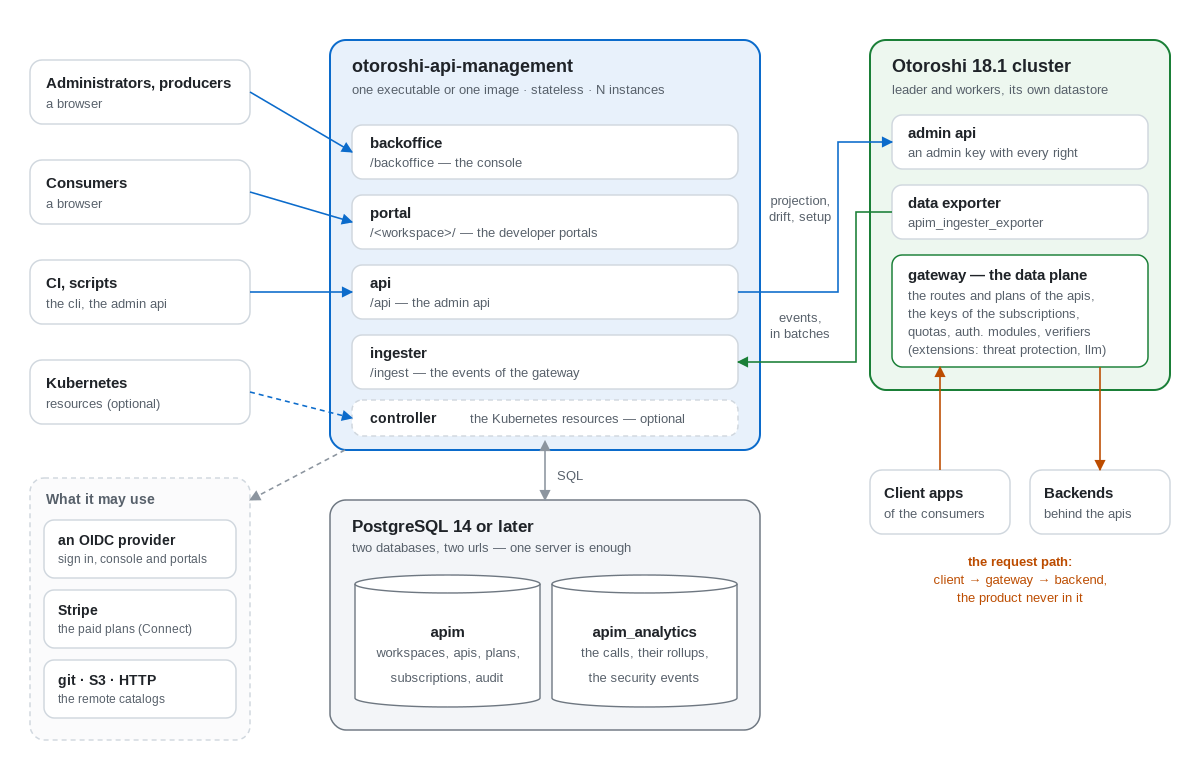
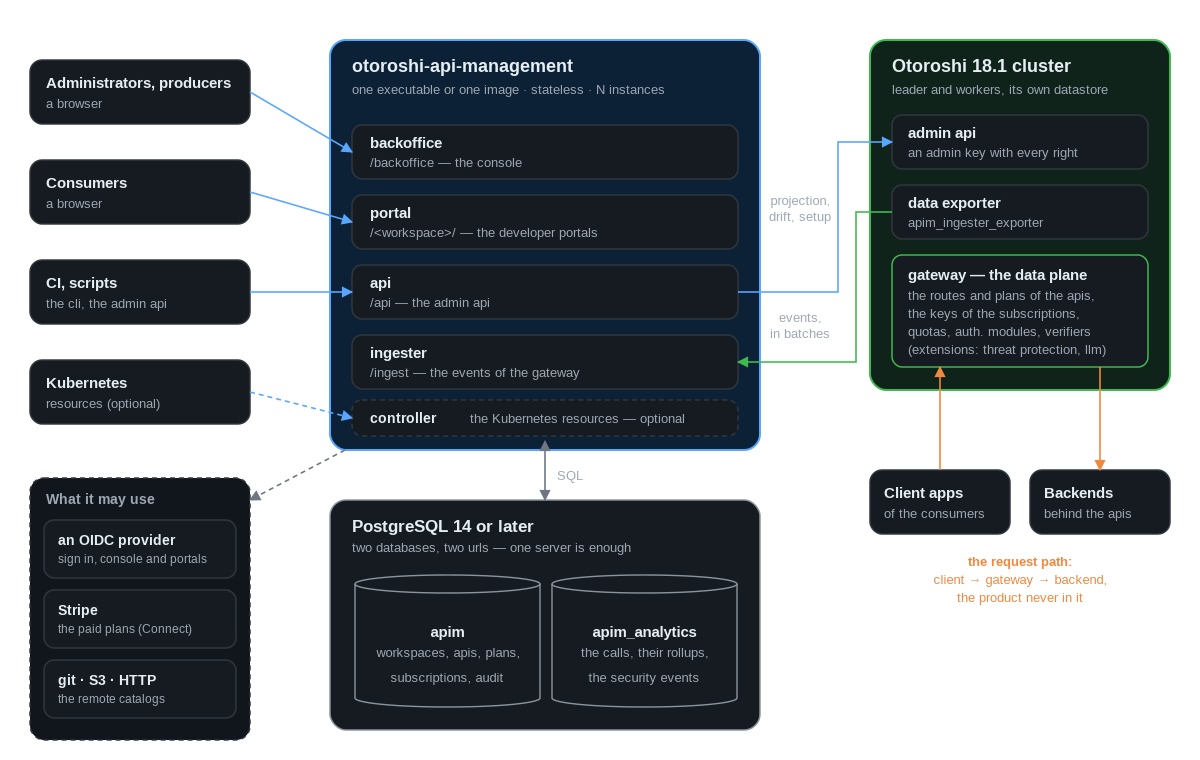 The diagram at full size: light, dark.
An installation is the product — one executable, or one container image — beside an Otoroshi cluster it drives, with two PostgreSQL databases. The product describes the APIs, their plans and their subscriptions, and projects them on the gateway through its admin API; the gateway serves the calls alone, and sends its events back to the product, which keeps the analytics. The product is never in the request path: when it is down, the gateway keeps serving what was projected (see When the product is down).
One installation drives one Otoroshi cluster. Environments — a test, a production — are installations of their own, a snapshot promoted from one to the next.
What an installation needs
| Required | ||
|---|---|---|
| Otoroshi 18.1 or later | yes | a cluster (one node is a cluster); an admin API key with every right — super admin, for its global configuration (the dictionaries, the TLS settings) |
| PostgreSQL 14 or later | yes | two databases, created beforehand: the application data, and the events and analytics — two connection URLs, one server is enough; a user that owns them (the product creates its tables, the migrations run at startup) |
| The product | yes | the executable (linux and macOS, x64 and arm64) or the image ghcr.io/cloud-apim/otoroshi-api-management; one instance or several, listening on one port (9000) |
| A key for the secrets | yes | APIM_SECRETS_KEY: the secrets it keeps — of the credentials, of its key to the gateway, of the identity providers — are sealed with it (secrets at rest) |
| An OpenID Connect provider | no | to sign in to the console, to a portal (authentication); local accounts otherwise |
| A Stripe account | no | to sell paid plans (payments) |
| The extensions of the gateway | no | the Threat Protection Suite for the threat protection of the plans, the LLM extension for the AI and MCP audits |
| A git repository, an S3 bucket, an HTTP server | no | as remote catalogs of declarative documents |
| A Kubernetes cluster | no | to describe APIs, applications and subscriptions as resources |
The flows to open
| From | To | For |
|---|---|---|
| Browsers | the product (APIM_PUBLIC_URL) — directly, or through routes of the gateway the setup makes | the console (/backoffice) and the portals (/<workspace>/, or a host per workspace) |
| CI, scripts | the product, /api | the admin API, the CLI |
| The product | the Otoroshi admin API (OTOROSHI_URL) | the projection, the drift detection, the setup |
| Otoroshi | the product, /ingest (APIM_INGEST_URL) | the events of the gateway, sent by its data exporter — the gateway has to reach the product |
| The product | PostgreSQL | its two databases |
| Stripe | the product, /payments/stripe/webhook (an instance with the api role) | the events of the payments, when payments are on |
| The product | an OIDC provider, Stripe, the catalogs, the sources of the dictionaries | when used |
| Client applications | the gateway | the calls — the product is not on their way |
Its shape
- One instance carrying every role —
APIM_ROLES=ingester,api,backoffice,portal, the default — is a whole installation: a test, a small production. - Split by role when the load or the exposure calls for it: the public portals and the ingester do not have the profile of the console. The instances are stateless — sessions, the task queue and the analytics live in PostgreSQL —, so a role scales by adding instances behind a load balancer.
- On Kubernetes, the manifests and the Helm chart deploy the serving roles with several replicas, and the controller apart (on Kubernetes).
The minimal configuration of an instance:
APIM_DATABASE_URL=postgres://apim:…@db:5432/apim
APIM_ANALYTICS_DATABASE_URL=postgres://apim:…@db:5432/apim_analytics
APIM_PUBLIC_URL=https://apim.example.com
APIM_SECRETS_KEY=…                       # a long random secret, kept safe
APIM_ADMIN_TOKEN=…                       # the first admin token: change it
APIM_BOOTSTRAP_ADMINS=you@example.com    # the first administrators of the console
APIM_BOOTSTRAP_PASSWORD=…
APIM_INGEST_TOKEN=…                      # what the data exporter of the gateway presents
APIM_INGEST_URL=https://apim.example.com/ingest   # optional: /ingest as the gateway reaches it
OTOROSHI_URL=https://otoroshi-api.example.com
OTOROSHI_HOST=otoroshi-api.example.com
OTOROSHI_CLIENT_ID=…                     # the admin key of the gateway
OTOROSHI_CLIENT_SECRET=…
OTOROSHI_PUBLIC_SCHEME=https             # how consumers call the apis: https://<api domain>:443
OTOROSHI_PUBLIC_PORT=443
An instance missing one of them does not start: it names every variable missing, then exits.
A secret left at the value of the development stack (apim-admin-token, password…) is refused the
same way. APIM_ADMIN_TOKEN is needed by the instances with the api, backoffice or portal
role, APIM_INGEST_TOKEN by those with the ingester, api or backoffice role, the others by
every instance; APIM_PORTAL_DOMAIN too, when the portals are exposed by hostname. Only DEV=true
fills what is missing, with the values of the development stack of the repository: never set it
elsewhere.
On PostgreSQL, the two databases made once:
CREATE DATABASE apim OWNER apim;
CREATE DATABASE apim_analytics OWNER apim;
Then the setup of the gateway — the product's own admin key, the data exporter, the routes of
the console and of the portals — from the console (Gateway › Setup) or otoroshi-apim setup,
with --dry-run first (setup).
Every variable is described below.
One binary, five roles
The product is a single Bun program, started with a comma-separated list of roles in APIM_ROLES
(default: the first four). A deployment can carry every role, or split them according to load and
exposure — the public portal and the ingester do not have the same profile as the console.
| Role | Serves |
|---|---|
api | /api — the admin API, bearer tokens |
backoffice | /backoffice (the console) and /backoffice/api (the same admin API, with a session) |
portal | /<workspace>/ and /<workspace>/front/api — or <workspace>.<domain>/ in hostname mode |
ingester | /ingest |
controller | no route: reconciles the Kubernetes resources of the product — not a default role |
/health answers {"status":"ok","roles":[…]} on every instance.
The background workers — the projection queue, the periodic drift detection, the remote catalog
scheduler, the payments, the expiry of the subscriptions, the refresh of the dictionaries, the
export of the audit trail — run on instances carrying api or backoffice; the rollups and the
retention of the analytics run on the instances carrying ingester, one at a time.
APIM_WORKERS_ENABLED=false keeps an instance out of both.
Several instances of a role share the work: they hold no state of their own — a session made on one
console instance is good on the others, and the workers of several instances share the projection
queue, each task claimed by one of them. They also share the connections of PostgreSQL: each
instance opens up to APIM_DATABASE_POOL + APIM_ANALYTICS_DATABASE_POOL connections (30 by
default), and the sum over the instances has to stay under the max_connections of the server (100
by default) — lower the pools of the instances that need few, a portal or an ingester.
The executable
The product compiles into one executable: the server and its roles, the console and the portal
(their files embedded), the migrations, and the command line. It needs nothing beside it but the
two PostgreSQL databases, Otoroshi, and git for the git remote catalogs.
mise run build:binary          # dist/bin/otoroshi-apim, for this machine
mise run build:binaries        # dist/bin/otoroshi-apim-{linux,darwin}-{x64,arm64}
otoroshi-apim                  # the server, with the roles of APIM_ROLES — or: otoroshi-apim serve
otoroshi-apim setup …          # what the product needs on the gateway, given an Otoroshi admin key
otoroshi-apim version
otoroshi-apim apis list default        # the command line
Once the databases are reachable, otoroshi-apim setup with an Otoroshi admin key makes the
product's own key, the data exporter and the routes of the console and of the portals — see
Setting the gateway up.
Cross-compiling makes bun download the runtime of each target. mise run test:binary starts the
executable away from the repository and checks its faces, its health and its command line.
The container image
The image is the executable on a slim Debian: no Bun, no node_modules, git for the git
remote catalogs and the certificates of the https calls, run by an
unprivileged user. Its entry point is the executable, serve by default:
# apim.env: the minimal configuration above, one variable per line
docker run -p 9000:9000 --env-file apim.env ghcr.io/cloud-apim/otoroshi-api-management

# the same image, for the setup of the gateway or a command of the cli
docker run --rm --env-file apim.env \
  ghcr.io/cloud-apim/otoroshi-api-management setup --admin-client-id … --admin-client-secret … --dry-run
otoroshi-apim health is its health check. On SIGTERM it stops taking requests, finishes the ones
in flight, and exits — within ten seconds.
mise run image builds it (docker build -t otoroshi-api-management:dev .); for several
platforms, docker buildx build --platform linux/amd64,linux/arm64 . cross-compiles the executable.
Releases
A tag v<version> — the version of package.json — publishes the executables for linux and
macos, x64 and arm64, and this documentation as a zip (otoroshi-api-management-docs-<version>.zip,
a static site to serve from its root: python3 -m http.server in its directory), with their
SHA256SUMS, on the GitHub release — its notes are the section of the version in CHANGELOG.md,
a pre-release while in 0.x —, and the image for
linux/amd64 and linux/arm64 on ghcr.io/cloud-apim/otoroshi-api-management (tags <version>,
<major>.<minor>, latest). The Kubernetes manifests and the Helm chart use that image; the chart
defaults to its appVersion.
On Kubernetes
Two ways, the same resources: the product (its four serving roles, several replicas), its controller (one replica), and the custom resources it reconciles.
Kustomize, with kubectl alone:
kubectl create namespace apim
kubectl -n apim apply -f deploy/kubernetes/secret.example.yaml   # edited: databases, Otoroshi key, tokens
kubectl apply -k deploy/kubernetes/base                          # edit configmap.yaml first, or overlay it
deploy/kubernetes/base holds the CRDs, a ConfigMap of what is not secret, the deployments of
the product and of its controller, their service accounts, the ClusterRole of the controller and
the service. An overlay changes the namespace (apim by default), the image and the
configuration.
Helm, the chart deploy/helm/otoroshi-api-management:
helm install apim deploy/helm/otoroshi-api-management -n apim --create-namespace \
  --set config.publicUrl=https://apim.example.com \
  --set config.otoroshi.url=http://otoroshi-api.otoroshi.svc.cluster.local:8080 \
  --set secrets.existingSecret=otoroshi-api-management
Its values follow the variables of the configuration below: config.* for what is not secret,
secrets.* (or secrets.existingSecret, a Secret with the keys of secret.example.yaml),
controller.enabled, ingress.*. The CRDs are in its crds/ folder: Helm installs them first.
The databases are not part of either: point the product at a managed PostgreSQL, or at one you run in the cluster.
Databases
Two PostgreSQL databases: the application data (workspaces, APIs, drafts, snapshots, subscriptions, audit…) and the events and analytics. They do not have the same write profile, retention or criticality, so they are two connection URLs — they may live on the same server. Migrations run at startup.
Secrets at rest
What the product keeps that opens something is sealed before it is stored — AES-256-GCM, with
the key of the installation, APIM_SECRETS_KEY: the secrets of the credentials it shows to
consumers, the key it calls the gateway with, the client secrets of the identity providers of the
console and of the portals, the secret of the "via Otoroshi" info token, the headers of the remote
catalogs and of the audit exporters, the key of the pseudonyms of the ingester. A database dump, a
backup, a replica hold them sealed; the product reads them in clear. Every instance of an
installation has the same key.
enc:v1:<key id>:<iv, tag and ciphertext>
Rotation. Set the new key in APIM_SECRETS_KEY, list the previous one in
APIM_SECRETS_PREVIOUS_KEYS, restart: at start, every secret sealed with another key — or stored
in clear before a key was set — is sealed again with the current one. Once every instance runs with
the new key, the previous one can go.
With DEV=true and no key, secrets are stored in clear, and the setup check says so.
The secrets a plan describes — the HMAC secret of a jwt plan, the client secret of an authorization
server — are in its draft, in every snapshot and in their exports: give a vault reference
(${vault://local/partner_hmac}), resolved by the gateway, and the draft warns otherwise
(secret_in_clear). The secrets of the payments are not in the database: they come from the environment of the instances (APIM_STRIPE_SECRET_KEY, APIM_STRIPE_WEBHOOK_SECRET).
Configuration
Installation-level settings come from the environment. Everything per workspace lives in the database. The gateway connection and the console authentication can also be edited later from the console (Gateway and Global settings); stored values take precedence.
Server
Required means required to start: an instance without it names it and exits — unless DEV=true,
which fills it with the value of the development stack, given in parentheses.
| Variable | Default | Meaning |
|---|---|---|
DEV | false | true: the values of the development stack for what is not given, its secrets accepted — the repository's stack only |
APIM_PORT (or PORT) | 9000 | listening port |
APIM_ROLES | ingester,api,backoffice,portal | roles of this instance |
APIM_PUBLIC_URL | required (http://localhost:<port>) | public base url of the product |
APIM_INSTALLATION_NAME | the host of APIM_PUBLIC_URL | the name of this installation — an environment: recette, production. A promoted snapshot says where it comes from |
APIM_DATABASE_URL | required (postgres://apim:apim@localhost:5442/apim) | application database |
APIM_ANALYTICS_DATABASE_URL | required (postgres://apim:apim@localhost:5442/apim_analytics) | events and analytics database |
APIM_DATABASE_POOL | 20 | connections an instance may open to the application database |
APIM_ANALYTICS_DATABASE_POOL | 10 | connections an instance may open to the analytics database |
APIM_DATABASE_IDLE_TIMEOUT_S | 30 | an idle connection is closed after that many seconds |
APIM_SECRETS_KEY | required (none: in clear) | the key the secrets kept by the product are sealed with (secrets at rest) |
APIM_SECRETS_PREVIOUS_KEYS | — | previous keys, comma-separated: still read, their secrets sealed again with the current key at start |
APIM_WORKERS_ENABLED | true | run the background workers: projection queue, drift detection, catalogs, payments, expiry, dictionaries, audit export — and, on an ingester, the rollups and the retention |
APIM_PROJECTION_INTERVAL_MS | 2000 | how often the projection queue is polled |
APIM_DRIFT_INTERVAL_MS | 60000 | how often drift is detected |
APIM_COOKIE_SECURE | true when APIM_PUBLIC_URL is https | mark session cookies Secure |
Bootstrap
| Variable | Default | Meaning |
|---|---|---|
APIM_BOOTSTRAP_ADMINS | required (admin@otoroshi.io) | comma-separated emails of the installation administrators |
APIM_BOOTSTRAP_PASSWORD | required (password) | their local password, set when they are created |
APIM_BOOTSTRAP_WORKSPACE | default | slug of the workspace created on first start, and the target of / |
APIM_ADMIN_TOKEN | required with the api, backoffice or portal role (apim-admin-token) | a static admin API token acting as the first bootstrap administrator |
The secrets of the development stack — password, apim-admin-token, ingest-secret, its Otoroshi
key and its secrets key — are refused outside DEV=true: the instance does not start with them.
The Otoroshi cluster
One installation drives one Otoroshi cluster, with an administration key.
| Variable | Default | Meaning |
|---|---|---|
OTOROSHI_URL | required (http://localhost:8080) | where the product reaches the Otoroshi admin API |
OTOROSHI_HOST | required (otoroshi-api.oto.tools) | the Host of the admin API |
OTOROSHI_CLIENT_ID / OTOROSHI_CLIENT_SECRET | required (apim-admin-client / apim-admin-secret) | an Otoroshi admin apikey |
OTOROSHI_PUBLIC_SCHEME / OTOROSHI_PUBLIC_PORT | required (http / 8080) | how consumers reach the APIs: <scheme>://<api domain>:<port> |
OTOROSHI_BACKOFFICE_URL | — (http://otoroshi.oto.tools:8080) | used to link a projected entity in the Otoroshi backoffice; none, no link |
The extensions of the gateway are the gateway's: the product needs none, and uses the ones it finds — the Threat Protection Suite for the threat protection of the plans, the LLM extension for the AI and MCP audits it ingests. In the development stack, the gateway starts with the jars of a directory on its classpath, both extensions enabled:
# the latest releases, built for Otoroshi 18.1 (see below), in a directory of their own
mkdir -p ~/otoroshi-extensions && cd ~/otoroshi-extensions
gh release download -R cloud-apim/otoroshi-waf-extension -p 'otoroshi-waf-extension_3-*.jar*'
gh release download -R cloud-apim/otoroshi-llm-extension -p 'otoroshi-llm-extension_3-*.jar*'
# each checksum file holds the digest alone
for f in *.jar; do echo "$(cat $f.sha256)  $f"; done | sha256sum -c -
# the gateway restarted with them (docker/extensions, empty, by default)
OTOROSHI_EXTENSIONS=~/otoroshi-extensions mise exec -- docker compose up -d otoroshi
mise run demo   # the demo again, if the gateway lost its state (mise run reset)
An extension runs only on the Otoroshi it was built against: on Otoroshi 18.1, the Threat Protection Suite 1.1.0 and the LLM extension 0.0.91 or later — the earlier releases, built for 18.0, do not start. Without them the product runs: a plan that asks for the threat protection is warned, and no AI or MCP audit comes in.
Ingestion
| Variable | Default | Meaning |
|---|---|---|
APIM_INGEST_TOKEN | required with the ingester, api or backoffice role (ingest-secret) | the token the data exporter presents to /ingest |
APIM_INGEST_URL | — | /ingest as the gateway reaches it, used by the exporter helper |
APIM_INGEST_STORE_RAW | true | keep the raw path (see analytics); its sampling, the pseudonymisation and the retention are set in the console |
APIM_INGEST_RETENTION_MS | 300000 | how often the ingester rolls the calls up and applies the retention |
Developer portal
| Variable | Default | Meaning |
|---|---|---|
APIM_TENANCY | multi | multi: one portal per workspace · single: one workspace, its portal at the root, no workspace selector |
APIM_PORTAL_EXPOSURE | path | with several workspaces — path: <portal url>/<workspace>/ · hostname: <workspace>.<domain>/ |
APIM_PORTAL_DOMAIN | required in the hostname mode (portal.oto.tools) | the domain of the hostname mode |
APIM_PORTAL_URL | APIM_PUBLIC_URL | the public base of the portals; its scheme and port make the hostname URLs |
Payments
The paid plans are sold through Stripe Connect: APIM_PAYMENTS_PROVIDER, APIM_STRIPE_SECRET_KEY,
APIM_STRIPE_CLIENT_ID, APIM_STRIPE_WEBHOOK_SECRET — see Payments. Off by
default.
Console authentication
| Variable | Default | Meaning |
|---|---|---|
APIM_CONSOLE_AUTH | local | local (accounts + optional OIDC) or otoroshi (exclusive) |
APIM_OIDC_ISSUER | — | enables OIDC for the console when set |
APIM_OIDC_CLIENT_ID / APIM_OIDC_CLIENT_SECRET | — | the client at the provider |
APIM_OIDC_SCOPES | openid email profile | requested scopes |
APIM_OIDC_LABEL | single sign-on | the label of the sign-in button |
APIM_OTOROSHI_CLAIM_HEADER | Otoroshi-Claim | header of the Otoroshi info token (otoroshi mode) |
APIM_OTOROSHI_CLAIM_SECRET | — | its HMAC secret |
See Authentication.
Command line
The command line is the executable, otoroshi-apim <command> — or, from a clone
of the repository, mise run cli <command>.
| Variable | Default | Meaning |
|---|---|---|
APIM_URL | http://localhost:9000 | the product the CLI talks to |
APIM_TOKEN | — | an admin API token |
The data exporter
Analytics need Otoroshi to send its events to the ingester. From the console, Gateway → Connection & events → Install / update the exporter, or:
curl -X POST http://localhost:9000/api/gateway/exporter \
  -H 'Authorization: Bearer apim-admin-token' -H 'Content-Type: application/json' \
  -d '{"url": "http://apim:9000/ingest"}'
It creates (or updates) an Otoroshi webhook data exporter with the id apim_ingester_exporter,
filtered on GatewayEvent, CloudApimSecurityEvent, and the AuditEvents of the LLM extension
whose audit is LLMUsageAudit or McpAudit, sending batches to /ingest with
Authorization: Bearer <APIM_INGEST_TOKEN>. An exporter is gateway infrastructure: this
helper only creates the one it marks as its own and never touches the others.
Portal exposure
There is one portal per workspace and no global portal. The workspace is always read from the URL, never from a session, so an API URL means the same thing to everyone. One form for the whole installation:
| Form | Settings | A portal is served at |
|---|---|---|
| by root path (default) | APIM_PORTAL_EXPOSURE=path | https://apis.example.com/<workspace>/ — no wildcard DNS nor certificate. / leads to the portal of APIM_BOOTSTRAP_WORKSPACE |
| by hostname | APIM_PORTAL_EXPOSURE=hostname, APIM_PORTAL_DOMAIN=apis.example.com | https://<workspace>.apis.example.com/ — a wildcard DNS entry and a wildcard certificate. The bare domain leads to the portal of APIM_BOOTSTRAP_WORKSPACE |
| one workspace, at the root | APIM_TENANCY=single | https://apis.example.com/ — no prefix; the console shows no workspace selector |
The portal API follows the same form (<portal>/front/api), and the portal assets are always
served under /_portal/. The console and the admin API give the URL of each workspace's portal
(portal_url), and Global settings → Workspaces shows the form in use. APIM_PORTAL_URL (by
default APIM_PUBLIC_URL) is the public base of the portals: https://apis.example.com above.
A single-workspace installation serves APIM_BOOTSTRAP_WORKSPACE alone: it refuses to start when
the database holds other workspaces, and creates no other.
Changing the form
The form changes every public URL — links in documentation, mails, tickets — so choose it at
installation time. If it changes later, the product remembers the forms served before (the last
five, from one start to the next) and redirects their URLs to the same page in the current form,
permanently (301, 308 for a form or an API call) — but not cached by the browsers, so that
going back to a previous form never loops:
| From | To | Example |
|---|---|---|
| by root path | by hostname | https://apis.example.com/acme/apis/x → https://acme.apis.example.com/apis/x |
| by hostname | by root path | https://acme.apis.example.com/apps → https://apis.example.com/acme/apps |
| one workspace | several | https://apis.example.com/apis/x → https://apis.example.com/acme/apis/x |
| several | one workspace | https://apis.example.com/acme/apps → https://apis.example.com/apps |
The old hosts have to keep reaching the product for their redirects to be served: keep the DNS entries and certificates of the previous form for as long as links to it circulate.
In the development stack *.oto.tools resolves to 127.0.0.1: with APIM_PORTAL_EXPOSURE=hostname
and the default domain, the portal of default is http://default.portal.oto.tools:9000/.