Developer portal
Each workspace has its own portal, carrying its identity, its catalogue and its identity
provider. It is served at /<workspace>/ (or <workspace>.<domain>/, see
portal exposure) and talks to /<workspace>/front/api.
Identity
Developer portal, in the sidebar of the console, is the page of the portal: its design — the default template, a theme, or templates; its title, tagline, accent colour, logo and home, see The design of a portal — and its settings: the interface languages (English and French ship today) and default language, self signup, the categories of its catalogue, and the workspace's identity provider. The portal follows the visitor's light / dark / system preference.
Pages
Beyond its home, a portal has the pages its workspace writes — terms of use, a getting-started
guide, a contact page — in Markdown, in each language of the portal (the default one shown where a
translation is missing), at /pages/<slug>. A page is in the navigation of the portal, in the order
of the list, or reached by its link only. They are part of the design of the
portal, written in Developer portal › Pages and published with it, from a folder with
otoroshi-apim portal push, or by the admin API (PUT …/workspaces/<ws>/portal/design with pages: a slug made
of lowercase letters, digits and dashes, unique; a title; a content per language; nav). In a portal
written as templates, a page is a template, its tags and variables included.
Catalogue
The catalogue shows the APIs whose snapshot runs on the gateway — never a draft — in the
published or deprecated lifecycle, filtered by their visibility: public APIs to anyone,
authenticated ones to signed-in members, restricted ones by ACL tags. Because it is served from
the product's own snapshots, it stays readable during a gateway incident.
Search covers names, descriptions and tags.
Discovery
Beyond a few dozen APIs a flat list is not enough. The catalogue is a discovery tool on three axes, each correcting the blind spots of the others:
- Editorial — the portal declares its categories (Developer portal › Settings, a slug and a name per language), and each API is placed in its own and possibly featured from its page, tab Catalogue. The placement covers all the versions of the API and applies at once: it is not part of the description, so it needs no snapshot and holds on an API a remote catalog manages. Featured APIs open the catalogue in a section of their own, and fill the home page.
- Reviews — a consumer whose applications subscribed to an API (now or before) rates it from 1 to 5 with an optional comment, on its tab Reviews; one review per person and API, which they can update or withdraw. A producer hides a review from the API's tab Catalogue: it leaves the portal and the rating, and stays visible in the console.
- Real usage — the applications subscribed to the API and its calls of the last thirty days, across its versions, from the ingester.
The catalogue filters by category and tag, and sorts by featured first (the default), most used, best rated, name or most recently published. A workspace keeps its reviews or its usage off the portal in Developer portal › Settings › Discovery.
An API page
- Overview: the description, the base URL on the gateway, and how to call it —
curl, JavaScript and Python snippets, filled with the visitor's own credentials when signed in — and the resources. - Documentation: the pages of the snapshot, with a language switcher over the languages the producer wrote them in.
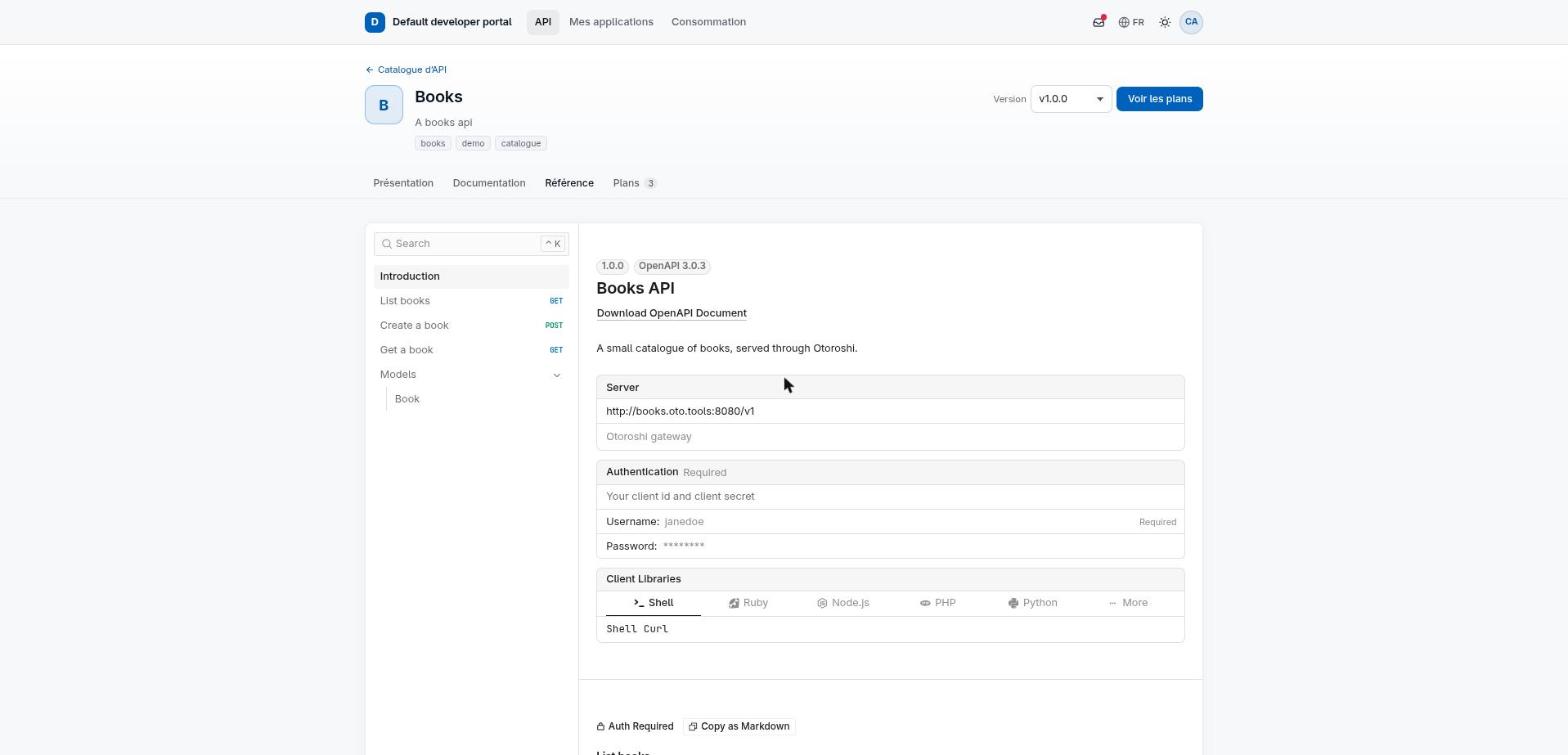
- Reference: when the API has an OpenAPI specification, rendered with Scalar, bundled in the portal. Its servers point at the gateway.
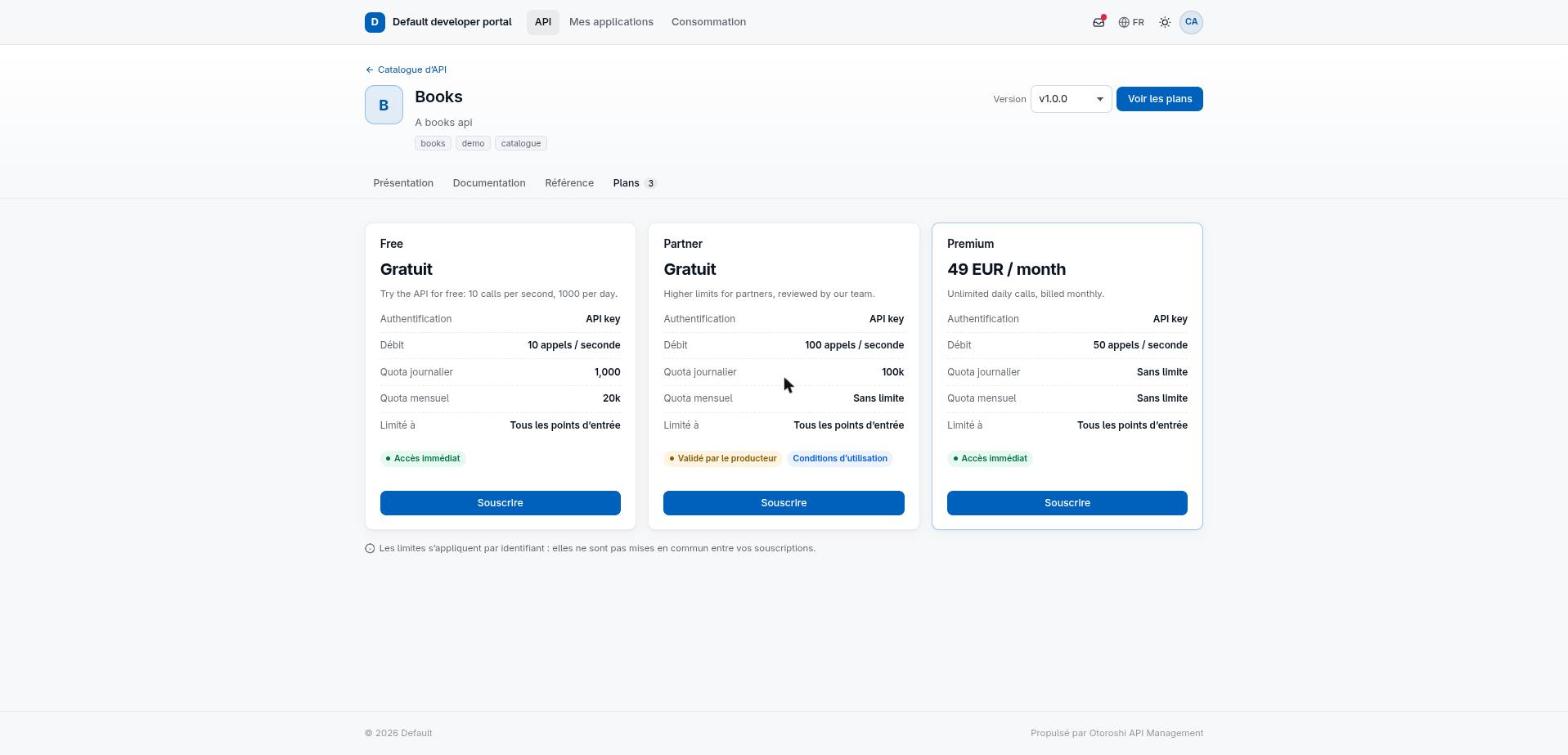
- Plans: auth mechanism, rate limit and quotas as they apply — per credential, nothing pooled — the resources a plan gives access to, terms, approval mode and price.
- Reviews: the ratings and comments of the consumers, and the visitor's own when they subscribed.
- Events: when the API has an AsyncAPI specification, its channels and what a consumer does on
each — what it sends, what it receives —, the messages with their payload schemas and examples.
Its servers are the gateway: the brokers stay private, the consumers reach them through the routes
of the API, with the credentials of their subscription. A specification the portal cannot read is
said on the draft (
asyncapi_unreadable). - A version switcher when several versions of the API are in the catalogue.
Testing
Scalar sends its requests through the portal's proxy, /<workspace>/front/api/test?scalar_url=….
The proxy only talks to the hosts of the workspace's deployed APIs, never forwards the portal's
cookies, and reaches the gateway at its own address with the API's Host header — so the browser
needs no CORS on the API. The consumer tests the API with its own credentials.
An API without an OpenAPI specification has a Try it tab instead: the request composer the console uses too — a method, a path among the resources of the API, a query, headers, a body. The request goes through the gateway with the credentials of one of the consumer's own active subscriptions to the API (an API key or client credentials), or none, and the composer shows the response: status, headers, body, duration.
Subscribing
Subscribe on a plan opens a dialog: pick an application or create one (it goes to the visitor's
personal team), declare the expected client_id when the plan is jwt, mtls or oauth2-remote,
answer the usage statement and the request form, accept the terms. The result depends on the plan:
- automatic: the credentials are shown at once;
- manual: waiting for a producer's review;
- paid: waiting for the payment — Pay opens a Stripe Checkout, and the key comes once it is paid (payments).
Plans that are not open to self-service are shown, marked as such, and cannot be requested from the portal.
My apps
The consumer's applications: their subscriptions with their status, the credentials (reveal, copy,
rotate), the live quotas of each key as the gateway counts them, the expected client_id, and
close a subscription. Whoever can see an application can see its credentials.
An application can call every API with one API key — chosen when it is created, or in its settings, for the subscriptions made from then on: each subscription shows that key, marked as the key of the application, with the quotas of its own plan; a new secret is taken by every API (Applications and subscriptions).
Usage
The calls of the visitor's own applications — never anyone else's — in two views that share their filters: the timeframe (from the last 5 minutes to the last 90 days, or a custom range), the application, the API and the status class. Each application links to both.
- Analytics: calls and requests per second, error rate and server errors, latency (average, minimum, maximum, p95) and the gateway overhead, data; the responses over time (successes, client errors, server errors), the latency over time, the hits by API and by application; the top APIs, the failed and the slow ones, the top paths, the status codes, the plans. Every chart has its legend and a table view.
- Logs: the request log of these applications, filtered also by method and path, searched by
path, status or request id — the
Otoroshi-Request-Ida consumer quotes to the producer to find a call — with the detail of a call, and Export as CSV (10,000 calls at most, recorded in the audit trail of the workspace).
Teams
A consumer can create teams and invite workspace members by email to share applications. An invitation never reveals whether an email exists outside the workspace.