CrowdSec
CrowdSec is a community threat intelligence network: agents detect attacks locally, share signals, and a Local API distributes decisions to bouncers that enforce them.
This extension is both. It consumes decisions from a Local API, and it reports detections back — which makes Otoroshi a CrowdSec detector rather than only an enforcement point.
Threat Protection → CrowdSec bouncers.
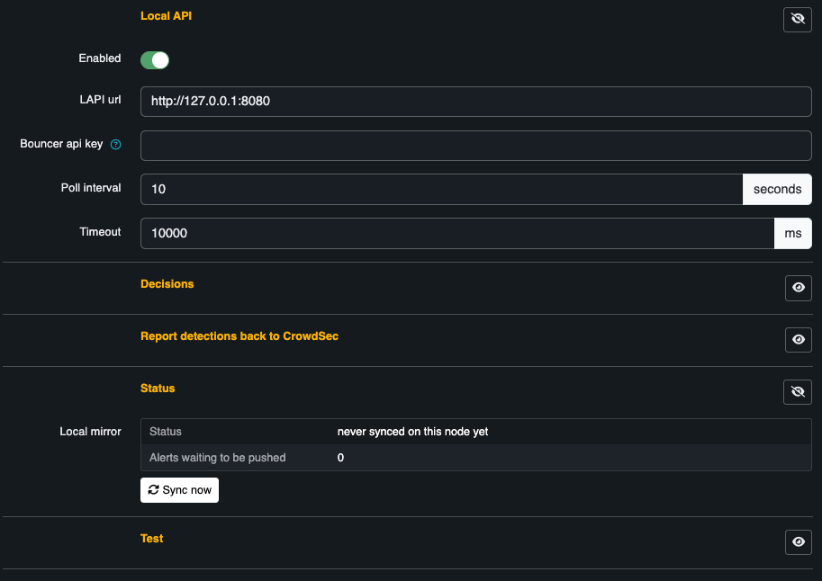
Consuming decisions and reporting detections back are separate sections because they need separate credentials. The status block shows the local mirror, which is what the request path actually reads.
The two directions need different credentials
CrowdSec models reading decisions and writing alerts as two different roles, so you need two sets of credentials:
# reads decisions — this is the bouncer api key
cscli bouncers add otoroshi-bouncer

# writes alerts — a bouncer key cannot do this
cscli machines add otoroshi-waf --password 'a-strong-password'
Consuming decisions
| Field | Default | What it does |
|---|---|---|
lapi_url | http://127.0.0.1:8080 | The Local API |
api_key | — | Bouncer key. Use a vault reference |
poll_interval_seconds | 10 | |
scopes | ["ip", "range"] | Which decision scopes to honour. Others are ignored |
origins_filter | [] | Empty accepts every origin — crowdsec, cscli, CAPI, … |
weight | 90 | Contribution to the reputation score |
action | block |
The bouncer uses the stream endpoint: one full sync on first contact, then deltas. Each Otoroshi node keeps its own mirror and its own cursor, exactly as every official bouncer does, so no coordination between nodes is needed.
The status panel shows what the node currently holds:
Decisions held           1 042
Single addresses         1 019
Ranges                   23
Last sync                4s ago
Initial sync done        Yes
A rejected key or an unreachable API surfaces as an error on the bouncer page; the decisions already held keep being enforced. The mirror is never emptied by a failure.
Reporting detections back
Off by default. Turning it on is what makes the integration two-way.
| Field | Default | What it does |
|---|---|---|
push_enabled | false | Master switch |
push_machine_id / push_password | — | From cscli machines add |
push_scenario | cloud-apim/otoroshi-reputation | The scenario name your alerts carry |
push_interval_seconds | 10 | Alerts are batched and flushed on this timer |
push_max_batch | 50 | |
push_with_decision | false | See below |
push_waf_detections | false | Also report WAF and CRS rule matches |
push_waf_monitored | false | Include matches a WAF in monitoring mode let through |
Signal or decision
push_with_decision is the important one.
- Off (default) — the alert is a signal. CrowdSec's own scenarios decide whether it warrants a ban, correlating it with everything else it knows.
- On — the alert carries a ban decision, applied immediately and unconditionally.
Off is the safer default and the one that plays properly with the rest of a CrowdSec deployment. Turn it on when you want Otoroshi's judgement to be final.
Reporting WAF detections
push_waf_detections is where the integration earns its keep. A CRS rule match is information
CrowdSec has no other way to learn — its own parsers watch logs, not your gateway's rule engine.
With it on, every enforced WAF block is reported as an alert naming the rules that fired:
otoroshi waf blocked a request (rules 942100, 949110): SQL Injection Attack Detected
push_waf_monitored extends that to matches a WAF in monitoring mode let through. Leave it off
unless you mean it — a WAF you are still tuning should not be quietly getting addresses banned
elsewhere in your infrastructure.
Detections are picked up from Otoroshi's analytics event stream, which requires
otoroshi.options.useEventStreamForScriptEvents — on by default. If it is off, the extension logs a
warning at startup rather than being silently inert.
Trying it locally
docker run -d --name crowdsec -p 8080:8080 \
  -e DISABLE_ONLINE_API=true \
  crowdsecurity/crowdsec:latest

docker exec crowdsec cscli bouncers add otoroshi-bouncer -o raw
docker exec crowdsec cscli machines add otoroshi-waf --password test -f -

# add a decision and watch it reach the bouncer
docker exec crowdsec cscli decisions add --ip 203.0.113.10 --duration 4h --reason test
Create a bouncer entity pointing at http://127.0.0.1:8080, press Sync now, then look up
203.0.113.10 in the test box.
The extension's own integration suite does exactly this against a real Local API — decision streaming, deltas, watcher login, the alert payload and the full round trip are all covered by container-backed tests.