Configuring a route
The reaper works per route: a route carries the plugin Cloud APIM - Clever Cloud Reaper, and
the plugin carries every setting. There is no other entity to create.
Two ways to set it up
From the console
Open Clever Cloud Reaper in the backoffice, click the route, fill in the settings and click Enable the reaper at the bottom. The console adds the plugin at the end of the route's plugin chain, after the authentication plugins, and fills in the Clever Cloud app it guessed from the targets.
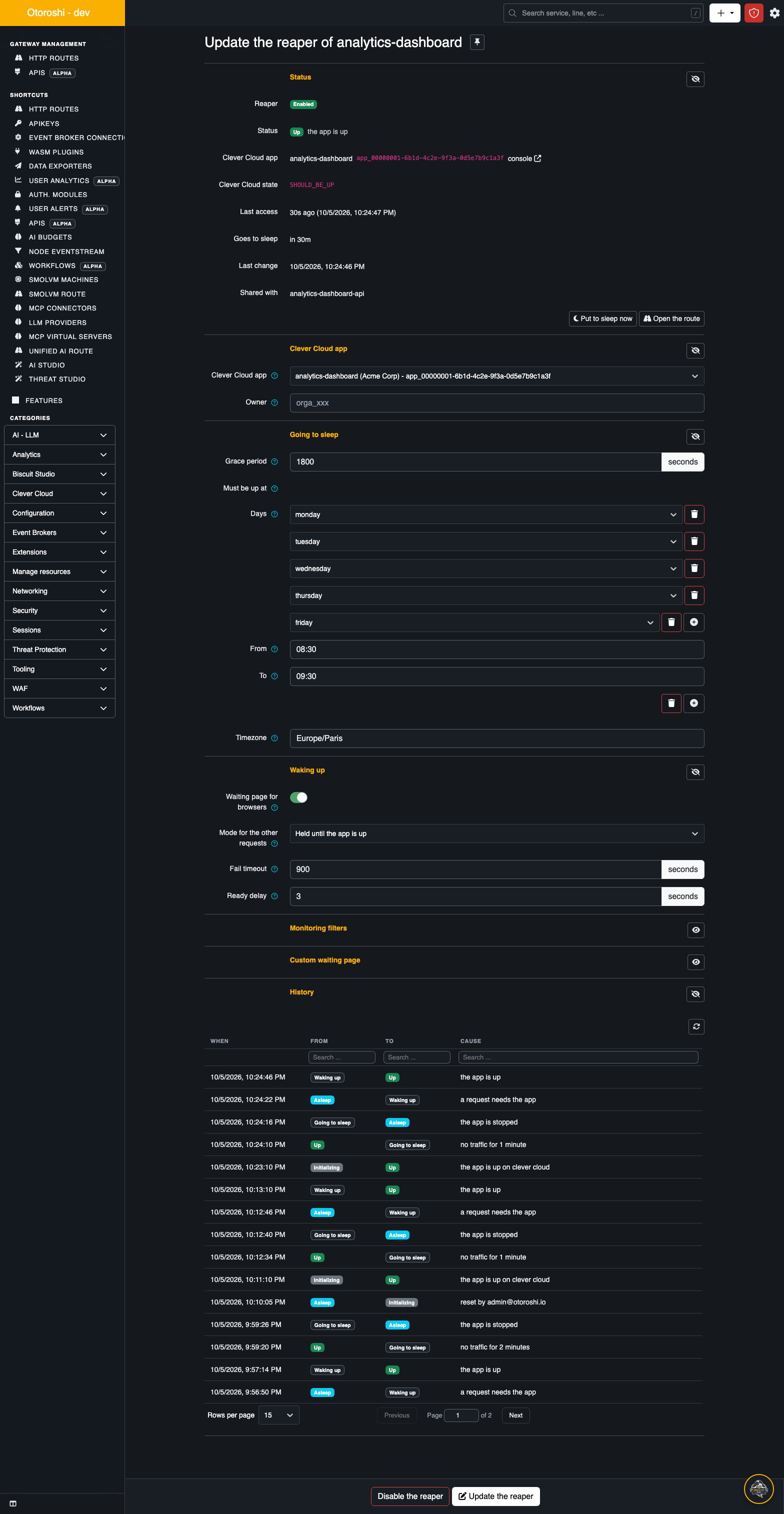
Update the reaper saves the settings. Disable the reaper switches the plugin off, keeping its settings for later, and starts the app at once if it was asleep and no other route manages it.
From the route designer
Type Clever Cloud Reaper in the plugin search of the designer, and add it like any other plugin. Its form has the same fields as the console, with a list of your Clever Cloud apps for the app.
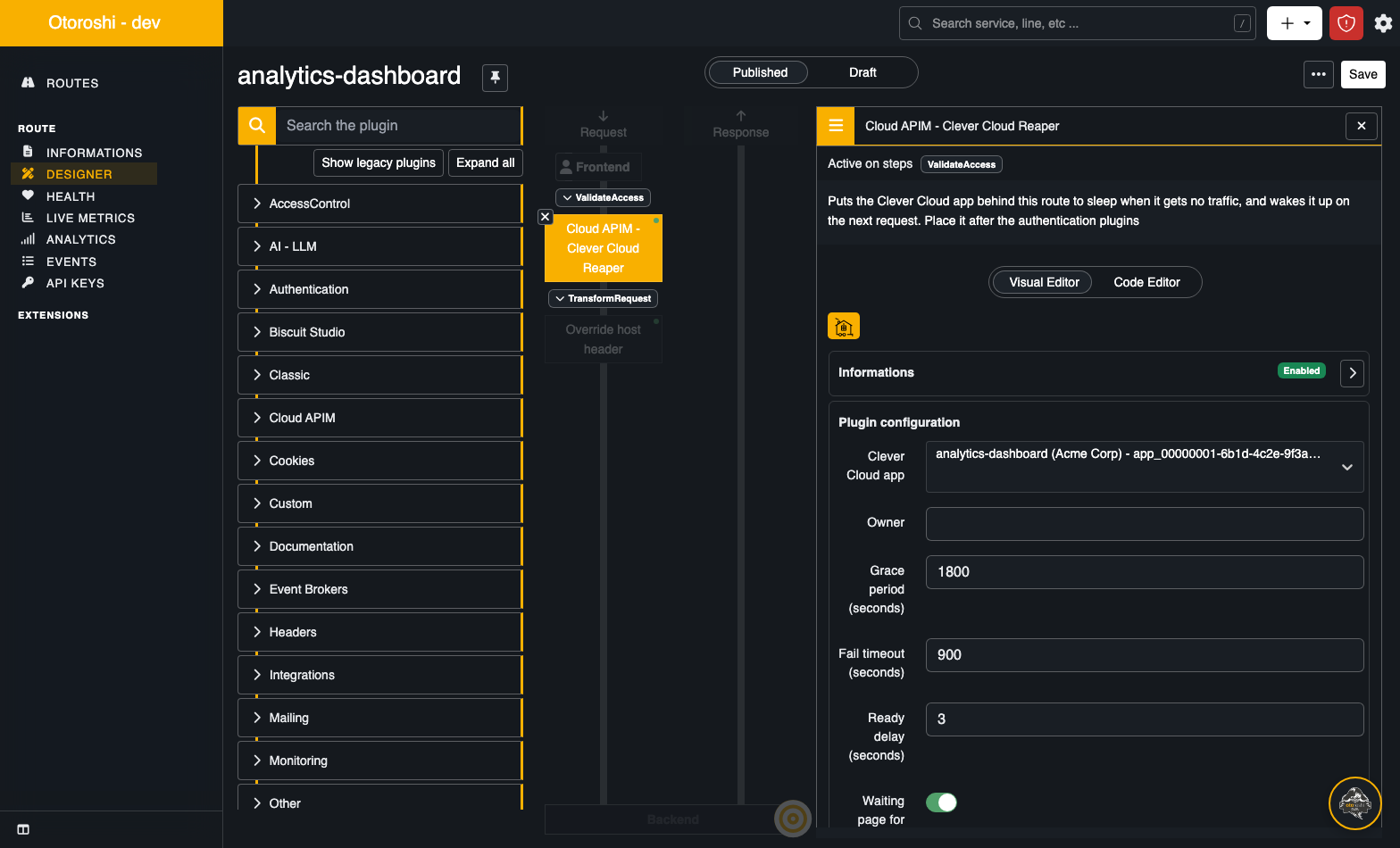
Removing the plugin, or switching it off, from the designer is noticed by the reaper within five minutes: the app is then started if it was asleep, and forgotten. See Releasing an app.
The plugin runs in the access validation step, in the order of the route. Put it after your apikey, JWT or authentication module plugins: a request that is refused there then never wakes the app up, and never counts as traffic. The console does that for you.
The settings
All durations are in seconds.
The Clever Cloud app
| Setting | Default | |
|---|---|---|
Clever Cloud app (app_id) | guessed | the app behind the route, app_<uuid> |
Owner (owner_id) | discovered | the organisation (orga_...) or user (user_...) that owns it |
When app_id is empty, the plugin uses the default domain of the targets: a target
app-<uuid>.cleverapps.io is the app app_<uuid>. A route whose targets use another domain needs
the app id set explicitly.
In the console, the Detect button next to the list of apps does it for you: it looks for the app whose domain is the host of a target of the route, and selects it with its owner. In order:
- a target on the default domain of an app,
app-<uuid>.cleverapps.io; - a target on a domain of an app: a custom domain like
api.example.com, or acleverapps.iosubdomain chosen for the app likemy-shop.cleverapps.io; - as a last resort, a frontend domain of the route that is also a domain of an app.
Ports, paths and case do not matter. The list of apps is read again when it has no match, so an app created a minute ago is found too. The console also guesses the app the same way when you enable the reaper without choosing one.
The owner is only a hint: the reaper finds the owner of each app from the API token on its own.
A route without an app id, and whose targets are not on cleverapps.io, is left alone: the plugin
lets everything through and the reaper does not manage anything.
Going to sleep
| Setting | Default | |
|---|---|---|
Grace period (grace_period) | 3600 | how long the app may go without traffic before it is put to sleep |
Must be up at (must_be_up_at) | none | time ranges where the app stays up whatever its traffic |
Timezone (timezone) | the extension's, Europe/Paris | the timezone of those ranges |
The grace period counts from the last request, or from the moment the app came up, whichever is later: an app that just woke up always gets a full grace period, even if the request that woke it was its only one.
The must-be-up ranges, and the requests that should not count as traffic, are described in Keeping apps awake.
Waking up
| Setting | Default | |
|---|---|---|
Waiting page for browsers (allow_waiting_page) | true | browsers get a page that reloads itself once the app answers |
Mode for the other requests (api_behavior) | hold | hold: the request waits for the app. unavailable: a 503 at once |
Fail timeout (fail_timeout) | 900 | how long a start or a stop may take before the app goes into error, and how long a held request waits at most |
Ready delay (ready_delay) | 3 | how long held requests still wait once Clever Cloud says the app is up |
What each caller gets, and when, is detailed in Waking up.
Monitoring filters and waiting page
| Setting | Default | |
|---|---|---|
Monitoring filters (monitoring_filters) | none | requests that are not traffic: they neither keep the app awake nor wake it up |
Custom waiting page (waiting_page) | the built-in page | your own HTML for the waiting page |
See Keeping apps awake and The waiting page.
The plugin JSON
The same settings, as they are stored in the route. Every field is optional.
{
  "plugin": "cp:otoroshi_plugins.com.cloud.apim.otoroshi.extensions.clevercloudreaper.CleverCloudReaper",
  "enabled": true,
  "config": {
    "app_id": "app_0f4c2b0e-1a2b-4c3d-8e9f-0123456789ab",
    "owner_id": "orga_7d2a6c0e-5b1f-4e2d-9a8b-0123456789ab",
    "grace_period": 1800,
    "must_be_up_at": [
      { "days": ["monday", "tuesday", "wednesday", "thursday", "friday"], "start": "08:30", "end": "19:00" }
    ],
    "timezone": "Europe/Paris",
    "allow_waiting_page": true,
    "api_behavior": "hold",
    "fail_timeout": 900,
    "ready_delay": 3,
    "monitoring_filters": [
      { "source": "path", "regex": "^/health$" },
      { "source": "user_agent", "regex": "UptimeRobot|Pingdom" }
    ],
    "waiting_page": null
  }
}
The plugin reference has the exact type and accepted values of every field.
Several routes, one app
Several routes can lead to the same app: a public route and an internal one, one per domain, and so on. The reaper keeps one state per app, shared by its routes:
- traffic on any of the routes keeps the app awake;
- a request on any of them wakes it up;
- the app is put to sleep with the longest grace period of its routes, and goes into error with the longest fail timeout;
- a must-be-up range of any route keeps it up.
The page of each route lists the other routes of its app under Shared with.
What a caller gets while the app wakes up (waiting page, held request, 503), and the custom
waiting page, stay per route.
Rights
The console follows the Otoroshi rights of the user:
- the table shows the routes the user can read, with their tenant and teams;
- enabling, updating or disabling the reaper on a route needs the right to write it;
- waking up, putting to sleep or resetting an app needs the right to write one of its routes;
- the kill switch needs a super admin.