Install
Requirements
| Otoroshi | 18.0.0 or later (built against 18.0.0-rc1) |
| Java | 17 or later |
| Clever Cloud | an API token, created with clever-tools 3.12 or later |
The reaper needs nothing else: it keeps its state in the Otoroshi datastore, whatever the backend (in memory, file, Redis, PostgreSQL...).
Create a Clever Cloud API token
The reaper talks to the Clever Cloud API with an API
token, sent as a Bearer token to the API bridge (https://api-bridge.clever-cloud.com). Create one with
clever-tools:
clever login
clever tokens create "otoroshi reaper"
The token is printed once: keep it in your secret manager. Check that it works:
curl -s https://api-bridge.clever-cloud.com/v2/summary \
  -H "Authorization: Bearer $CLEVER_CLOUD_API_TOKEN" | head -c 300
What the token can do is what its user can do:
- the reaper sees the apps of every organisation the user belongs to, and of the user itself;
- it stops and starts them, so the user needs a role that can stop and restart apps in the organisations of the apps you put under the reaper.
A dedicated Clever Cloud user, member of the organisations the reaper manages and nothing else, keeps the blast radius of the token small.
API tokens expire. List them with clever tokens, revoke one with clever tokens revoke <id>, and
put a renewal in your calendar. When the token stops working, the console says so in red and the
reaper stops doing anything: apps that sleep stay asleep until it is renewed. See
Troubleshooting.
Download the extension
Grab the latest jar from the
releases page. The
asset is named otoroshi-clevercloud-reaper_3-<version>.jar:
curl -L -o otoroshi-clevercloud-reaper.jar \
  'https://github.com/cloud-apim/otoroshi-clevercloud-reaper/releases/download/<version>/otoroshi-clevercloud-reaper_3-<version>.jar'
Every release ships a SHA-256 checksum next to the jar:
curl -L -o otoroshi-clevercloud-reaper.jar.sha256 \
  'https://github.com/cloud-apim/otoroshi-clevercloud-reaper/releases/download/<version>/otoroshi-clevercloud-reaper_3-<version>.jar.sha256'

shasum -a 256 otoroshi-clevercloud-reaper.jar | cut -d ' ' -f 1
cat otoroshi-clevercloud-reaper.jar.sha256
Run Otoroshi with the extension
With the jar
curl -L -o otoroshi.jar \
  'https://github.com/MAIF/otoroshi/releases/download/v18.0.0-rc1/otoroshi.jar'

export CLEVER_CLOUD_API_TOKEN='...'
export OTOROSHI_STORAGE='file'

java -cp "./otoroshi-clevercloud-reaper.jar:./otoroshi.jar" \
  play.core.server.ProdServerStart
On its first boot Otoroshi creates an admin user, admin@otoroshi.io, and prints its password in the
logs; set OTOROSHI_INITIAL_ADMIN_LOGIN and OTOROSHI_INITIAL_ADMIN_PASSWORD to choose them. The
backoffice is then at http://otoroshi.oto.tools:8080/. For
anything beyond a trial, see the
Otoroshi setup documentation.
With Docker
Mount the jar into the plugins directory Otoroshi scans:
docker run \
  -p 8080:8080 \
  -e OTOROSHI_STORAGE=file \
  -e OTOROSHI_PLUGINS_DIR_PATH=/usr/app/plugins \
  -e CLEVER_CLOUD_API_TOKEN="$CLEVER_CLOUD_API_TOKEN" \
  -v "$(pwd)/otoroshi-clevercloud-reaper.jar:/usr/app/plugins/clevercloud-reaper.jar" \
  -v "$(pwd)/otoroshi.db:/usr/app/filedb/state.ndjson" \
  maif/otoroshi:18.0.0-rc1
On Clever Cloud
Otoroshi runs on Clever Cloud since its very first day: deploy it as a Java or Docker app (the
Otoroshi manual shows how), or use
the managed Otoroshi with LLM
service of Clever Cloud. Set
CLEVER_CLOUD_API_TOKEN in its environment variables, and do not put the Otoroshi app under the
reaper: nothing would be left to wake it up.
Check that it runs
On startup the logs say:
the 'Cloud APIM - Clever Cloud Reaper' extension is enabled !
and, if the token is missing:
no clever cloud api token configured (CLEVER_CLOUD_API_TOKEN): the reaper will not do anything
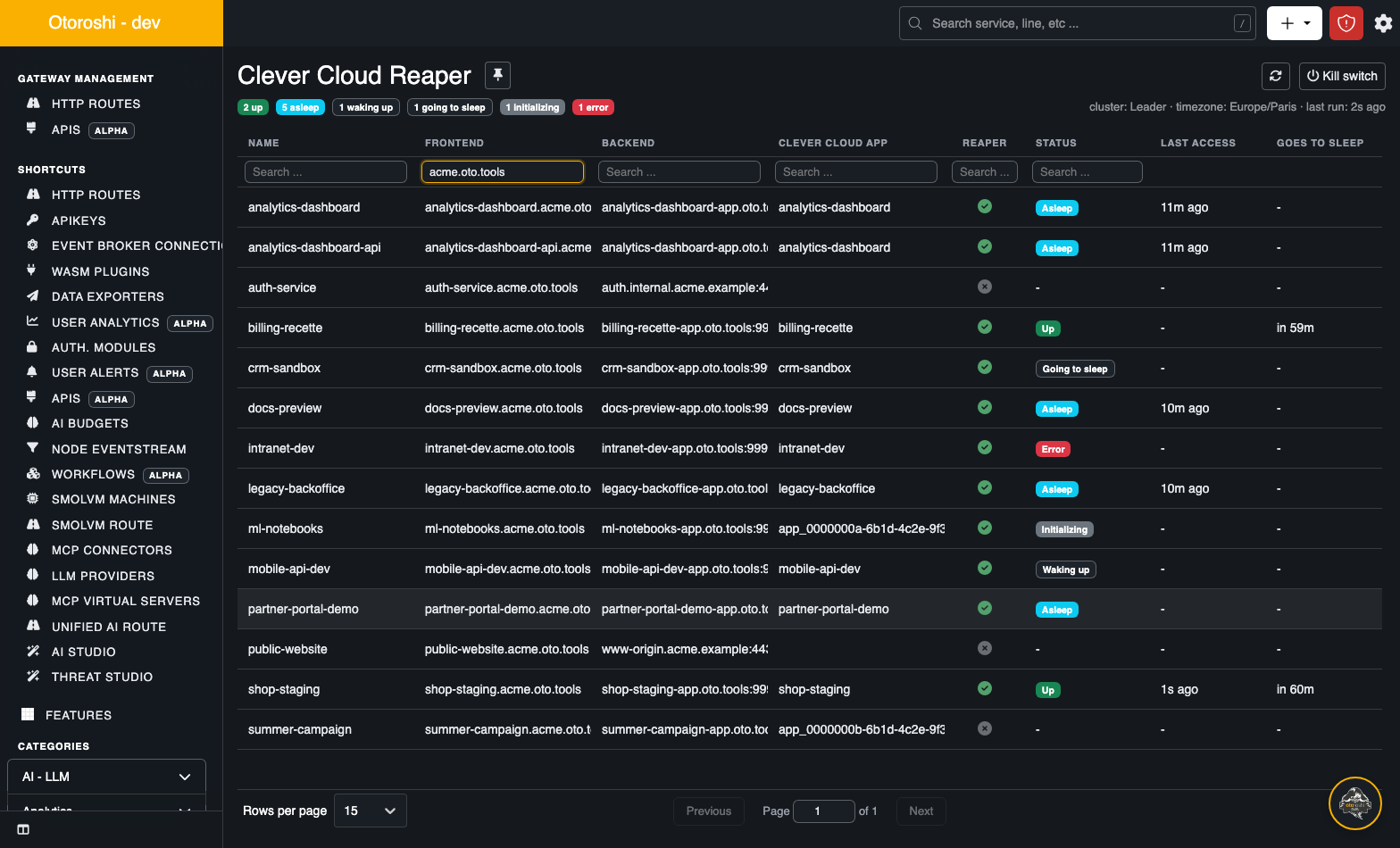
In the backoffice, search for Clever Cloud Reaper in the top bar, or open
/bo/dashboard/extensions/cloud-apim/clevercloud-reaper. A red banner at the top of that page means
the token is missing or rejected.
Enable or disable the extension
The extension is enabled as soon as its jar is on the classpath. To keep the jar but switch the
extension off, set CLOUD_APIM_EXTENSIONS_CLEVERCLOUD_REAPER_ENABLED=false, or in the configuration
file:
otoroshi.admin-extensions.configurations.cloud-apim_extensions_clevercloudreaper {
  enabled = false
}
A disabled extension leaves every route alone: its plugin lets every request through, and no app is stopped or started. Apps that were asleep stay asleep: wake them up first, from the console, if you remove the extension for good.
Configure the extension
Everything has a default, and the token is the only setting most installs need. The configuration reference lists every key with its environment variable; the ones you are most likely to touch:
| Env var | Default | |
|---|---|---|
CLEVER_CLOUD_API_TOKEN | none | the API token. Without it the reaper does nothing |
CLOUD_APIM_EXTENSIONS_CLEVERCLOUD_REAPER_DRY_RUN | false | evaluate and log, but never stop an app |
CLOUD_APIM_EXTENSIONS_CLEVERCLOUD_REAPER_TIMEZONE | Europe/Paris | the timezone of the must-be-up ranges of the routes that do not set one |
CLOUD_APIM_EXTENSIONS_CLEVERCLOUD_REAPER_JOB_INTERVAL | 30000 | how often every app is evaluated, in milliseconds |
In a cluster
Install the same jar on every node: leaders and workers. Only the leaders need the API token: workers never call Clever Cloud, they hand their accesses and wake ups to the leaders. A worker without the token is fine, and does not complain about it; giving it to every node does no harm either, if you prefer one configuration for all. The workers report their traffic to the leaders over the regular cluster channel: there is nothing more to open. See Architecture.
Build from source
Only needed for an unreleased change:
sbt package
# target/scala-3.8.4/otoroshi-clevercloud-reaper_3-dev.jar
./rebuild.sh does the same, links the jar into a local Otoroshi checkout
(../otoroshi/otoroshi/lib, or $OTOROSHI_HOME/lib) and asks it to reload.