Semantic cache
The semantic cache goes beyond exact matching: it uses embeddings to find prompts with the same semantic meaning, even when the wording is different. For example, "What's the weather in Paris?" and "Tell me the current weather for Paris" would match semantically.
How it works
The semantic cache uses a two-stage lookup:
1. Exact match (fast path)
First, a SHA-512 hash of the messages is checked against an in-memory cache, exactly like the simple cache. If an exact match is found, the response is returned immediately.
2. Semantic similarity (vector search)
If no exact match is found, the cache computes an embedding of the user's messages using a local MiniLM model (AllMiniLmL6V2, running via ONNX — no external API call needed). This embedding is compared against all stored embeddings using cosine similarity.
If a stored entry has a similarity score above the configured score threshold, the cached response is returned.
Configuration
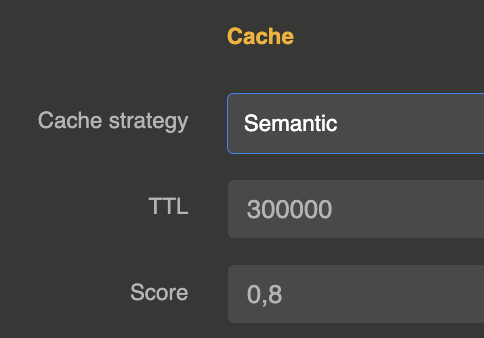
The cache is configured on the LLM Provider entity in the cache section:
{
  "cache": {
    "strategy": "semantic",
    "ttl": 300000,
    "score": 0.85
  }
}
| Parameter | Type | Default | Description |
|---|---|---|---|
strategy | string | "none" | Set to "semantic" to enable semantic cache |
ttl | number (ms) | 86400000 (24h) | Time-to-live for cached entries in milliseconds |
score | number (0-1) | 0.8 | Minimum cosine similarity score for a semantic match. Higher values require closer matches. |
embedding_ref | string | — | Optional reference to an Embedding Model entity to use instead of the built-in AllMiniLmL6V2 |
embedding_model | string | default model of the embedding model | Model of that Embedding Model entity to use |
redis_url | string | — | Optional Redis URL to use Redis Stack as cache and vector search backend |
Score tuning
| Score | Behavior |
|---|---|
| 0.95+ | Very strict — only near-identical prompts match |
| 0.85 | Good default — catches paraphrases while avoiding false matches |
| 0.70 | Loose — broader matching, higher risk of incorrect cache hits |
| < 0.60 | Too loose — likely to return irrelevant cached responses |
Embedding model
By default, the semantic cache uses the AllMiniLmL6V2 sentence transformer model (384 dimensions), which runs locally via ONNX runtime. This means:
- No external API call is needed for embedding computation
- No additional cost per cache lookup
- Low latency (typically < 10ms for embedding)
- The model is included in the extension — no separate setup required
Custom embedding model
You can use any embedding model registered in the extension instead of the built-in AllMiniLmL6V2. Set embedding_ref to the id of an Embedding Model entity:
{
  "cache": {
    "strategy": "semantic",
    "ttl": 300000,
    "score": 0.85,
    "embedding_ref": "embedding-model_xxxxx",
    "embedding_model": "text-embedding-3-small"
  }
}
embedding_model is optional: without it, the default model of the Embedding Model entity is used. The cached
vectors are only comparable with vectors of the same model, so changing the model starts a fresh cache.
This lets you use a higher-quality model (OpenAI, Mistral, Cohere, etc.) for cache matching. If the referenced model is unavailable or returns an error, the cache falls back to the built-in AllMiniLmL6V2 automatically.
Only messages with role "user" are used for semantic matching.
Redis-backed semantic cache
By default, the semantic cache uses in-memory storage (Caffeine + LangChain4j InMemoryEmbeddingStore). To share the cache across a cluster, set redis_url to a Redis Stack URI:
{
  "cache": {
    "strategy": "semantic",
    "ttl": 300000,
    "score": 0.85,
    "redis_url": "redis://localhost:6379"
  }
}
When Redis is configured:
- Embeddings are stored as binary vectors in Redis HASH keys and indexed with RediSearch for KNN similarity search
- Cached responses are stored as JSON strings with automatic TTL expiration
- Embedding HASH keys also expire via
PEXPIRE, automatically removing them from the search index - The RediSearch index is created automatically on first use with the correct vector dimensions
- Redis connections are pooled and shared across providers
Requires Redis Stack (the redis-stack or redis-stack-server Docker image) for the RediSearch vector search module.
Cache behavior
- In-memory mode: Maximum 5000 entries per provider. When a cached entry expires, its embedding is automatically cleaned up from the vector store.
- Redis mode: No entry limit (limited by Redis memory). TTL is managed by Redis natively.
- Cached responses return zero token usage (no cost incurred)
- Both blocking and streaming responses are cached
Response headers and metadata
Same as the simple cache: X-Cache-Status, X-Cache-Key, X-Cache-Ttl, Age headers and a cache object in response metadata.
When to use semantic cache
- Customer support: Users ask the same questions with different phrasing
- Search-like applications: Queries with varied wording but same intent
- Multi-language contexts: Similar questions in slightly different formulations
For strict exact-match caching, use the simple cache instead. You can also combine both strategies by setting "strategy": "simple,semantic" — the simple cache is checked first (faster), then the semantic cache if no exact match is found.