MCP Virtual Server exposition
Otoroshi can expose tool functions and MCP connectors as an MCP server that external MCP clients connect to.
The way to go is to define an MCP Virtual Server and expose it. A virtual server is a single, reusable, persisted definition that carries the whole exposition complexity in one place: which tool functions / MCP connectors to serve, plus filtering, OAuth, RBAC (scope → tool), audience binding, meta mode, rate limiting & caching, managed resources/prompts and overlays. The exposition plugin then simply references it with server_ref — so your access control and settings live on the virtual server, not scattered across routes.
You can set the same settings inline on a plugin, or override individual fields on top of a referenced virtual server, but for anything beyond a quick test, expose a virtual server.
The recommended transport is Streamable HTTP; the other transports still exist but are deprecated or experimental.
Transports
| Transport | Plugin | Status |
|---|---|---|
| Streamable HTTP | McpRespEndpoint | ✅ Recommended — the current MCP HTTP transport. Speaks MCP 2025-11-25 and the stateless 2026-07-28 revision. What MCP clients and MCP apps use. |
| SSE | McpSseEndpoint | ⚠️ Deprecated — the legacy HTTP+SSE transport, kept for backward compatibility. |
| WebSocket | McpWebsocketEndpoint | 🧪 Experimental — not part of the MCP standard; use only if you specifically need it. |
Unless you have a specific reason, expose your MCP servers over Streamable HTTP.
Supported MCP methods
All exposition plugins implement the full MCP protocol:
| Method | Description |
|---|---|
initialize | Initialize the MCP session (MCP 2025-11-25 clients) |
server/discover | Advertise the supported protocol versions, capabilities and server identity (MCP 2026-07-28, Streamable HTTP) |
subscriptions/listen | Open a long-lived notification stream (MCP 2026-07-28, Streamable HTTP) |
tools/list | List all available tools (from tool functions and MCP connectors) |
tools/call | Call a tool by name with arguments |
resources/list | List all available resources from connected MCP servers |
resources/read | Read a resource by its URI. Returns text or binary content. |
resources/templates/list | List all available resource templates from connected MCP servers |
prompts/list | List all available prompts with their arguments |
prompts/get | Get a prompt by name with arguments. Returns the prompt description and messages (each with role and content). |
Tools
When listing tools, each tool includes at least:
name- The tool namedescription- A description of the toolinputSchema- The JSON schema of the tool arguments (type,properties,required)
Tools coming from a tool function entity can also carry extra MCP metadata when configured on the entity (see tool function entity):
outputSchema- JSON schema describing the tool result (MCPoutputSchema)annotations- MCP tool annotations (e.g.readOnlyHint,destructiveHint,idempotentHint,openWorldHint,title)_meta- Free-form metadata object, used by MCP apps and hybrid-auth scenarios
These fields are only emitted when set on the tool function; they are omitted (not null) otherwise.
For tools coming from an MCP connector, the fidelity depends on the connector transport:
- connectors using a Streamable HTTP transport (
transport.kind: "http"or"http_2026_07_28") are proxied with a raw, full-fidelity passthrough: the upstream tool definitions are forwarded as-is, preservingoutputSchema,annotations,_meta,titleand richtools/callresults (structuredContent, resource links, images, ...). This is what MCP apps need. - for every other connector transport, tool definitions go through the langchain4j abstraction:
_meta,annotationsandtitleare recovered and re-emitted, butoutputSchemais not available on that path.
Resources
When listing resources, each resource includes:
uri- The resource URIname- The resource namedescription- A description of the resourcemimeType- The MIME type of the resource
When reading a resource, the content is returned as either text (with uri, mimeType, text) or binary blob (with uri, mimeType, blob).
Resource Templates
When listing resource templates, each template includes:
uriTemplate- The URI template with parametersname- The template namedescription- A description of the templatemimeType- The MIME type of resources generated by this template
Prompts
When listing prompts, each prompt includes:
name- The prompt namedescription- A description of the promptarguments- An array of arguments, each withname,description, andrequired
When getting a prompt, the response includes:
description- The prompt descriptionmessages- An array of messages, each withrole(e.g.user,assistant) andcontent(text or image)
Streamable HTTP plugin (recommended)
The McpRespEndpoint plugin exposes your tools and connectors over the standard MCP Streamable HTTP transport (a single endpoint handling POST requests and SSE streams). This is the transport MCP clients and MCP apps expect — use it by default. It serves both the 2025-11-25 revision of MCP and the stateless 2026-07-28 revision, see Protocol versions.
Point it at an MCP Virtual Server with server_ref (the recommended way — the virtual server carries all the config and access control), or set the same configuration inline.
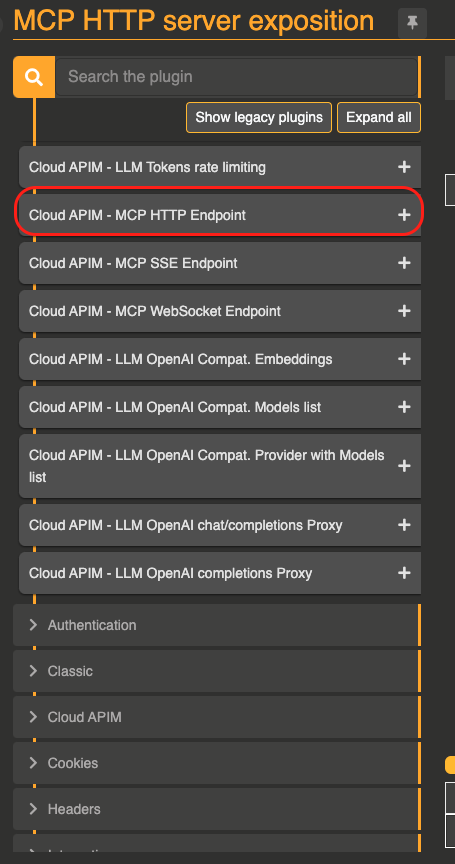
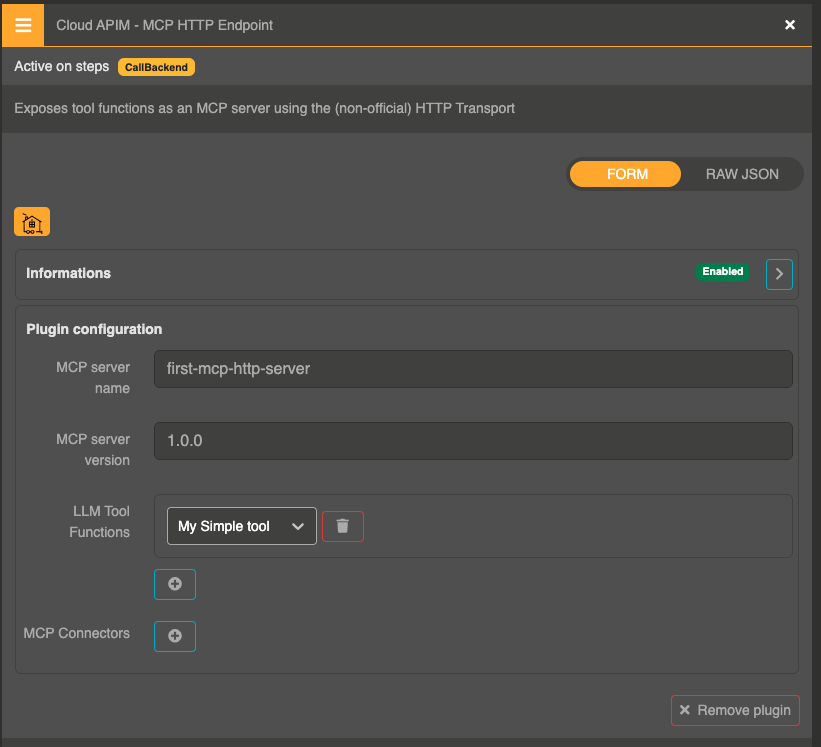
Configuration
{
  "_loc": {
    "tenant": "default",
    "teams": [
      "default"
    ]
  },
  "id": "route_2629d12c2-130b-42d5-aba5-b584b95961c9",
  "name": "MCP HTTP server exposition",
  "description": "MCP HTTP server exposition",
  "tags": [],
  "metadata": {},
  "enabled": true,
  "debug_flow": false,
  "export_reporting": false,
  "capture": false,
  "groups": [
    "default"
  ],
  "bound_listeners": [],
  "frontend": {
    "domains": [
      "mcp-http-expo.oto.tools"
    ],
    "strip_path": true,
    "exact": false,
    "headers": {},
    "query": {},
    "methods": []
  },
  "backend": {
    "targets": [
      {
        "id": "target_1",
        "hostname": "request.otoroshi.io",
        "port": 443,
        "tls": true,
        "weight": 1,
        "predicate": {
          "type": "AlwaysMatch"
        },
        "protocol": "HTTP/1.1",
        "ip_address": null,
        "tls_config": {
          "certs": [],
          "trusted_certs": [],
          "enabled": false,
          "loose": false,
          "trust_all": false
        }
      }
    ],
    "root": "/",
    "rewrite": false,
    "load_balancing": {
      "type": "RoundRobin"
    }
  },
  "backend_ref": null,
  "plugins": [
    {
      "enabled": true,
      "debug": false,
      "plugin": "cp:otoroshi.next.plugins.OverrideHost",
      "include": [],
      "exclude": [],
      "config": {},
      "bound_listeners": [],
      "plugin_index": {
        "transform_request": 0
      },
      "nodeId": "cp:otoroshi.next.plugins.OverrideHost"
    },
    {
      "enabled": true,
      "debug": false,
      "plugin": "cp:otoroshi_plugins.com.cloud.apim.otoroshi.extensions.aigateway.plugins.McpRespEndpoint",
      "include": [],
      "exclude": [],
      "config": {
        "name": "first-mcp-http-server",
        "version": "1.0.0",
        "refs": [
          "tool-function_0511ff44-0ce5-487d-aa1c-d1980ac9a4b8"
        ],
        "mcp_refs": []
      },
      "bound_listeners": [],
      "plugin_index": {},
      "nodeId": "cp:otoroshi_plugins.com.cloud.apim.otoroshi.extensions.aigateway.plugins.McpRespEndpoint"
    }
  ],
  "kind": "proxy.otoroshi.io/Route"
}
Protocol versions
The protocol_version setting (on the virtual server, or inline on the plugin) selects the MCP revision served by the endpoint:
| Value | Behavior |
|---|---|
2025-11-25 (default) | Classic MCP: clients open with the initialize handshake. The endpoint negotiates the version requested by the client (2025-11-25, 2025-06-18, 2025-03-26 or 2024-11-05). |
2026-07-28 | Stateless MCP: no handshake and no session, every request carries its own protocol version and client capabilities. Clients that still open with initialize are served on the same endpoint with 2025-11-25 semantics, so you can switch without breaking anyone. |
{
  "server_ref": "mcp-virtual-server_xxxxx",
  "protocol_version": "2026-07-28",
  "cache_ttl_ms": 300000
}
With 2026-07-28, your MCP server becomes a perfect citizen of your HTTP infrastructure:
- Scale out freely: every request is self-contained, so any Otoroshi instance can answer any call. No sticky sessions, no shared session store.
- Route and inspect without parsing bodies: the method, the tool name and the parameters annotated with
x-mcp-headertravel in theMCP-Protocol-Version,Mcp-Method,Mcp-NameandMcp-Param-*headers. The endpoint checks that they match the JSON-RPC body (-32020header mismatch error otherwise), so a load balancer, a WAF or an Otoroshi plugin can safely route, rate limit or authorize on them. - Client-side caching:
server/discover,tools/list,prompts/list,resources/list,resources/templates/listandresources/readresults carryttlMs(fromcache_ttl_ms,0by default) andcacheScope. The scope isprivateas soon as the endpoint authenticates callers or filters per consumer (OAuth, scopes, rules, rate limits),publicotherwise. - Precise errors: unsupported versions get a
-32022error listing the supported ones, malformed requests a-32602, unknown methods a404with-32601.
A 2026-07-28 request looks like this:
curl -X POST 'http://mcp.oto.tools:8080/mcp' \
  -H 'Content-Type: application/json' \
  -H 'Accept: application/json, text/event-stream' \
  -H 'MCP-Protocol-Version: 2026-07-28' \
  -H 'Mcp-Method: tools/call' \
  -H 'Mcp-Name: get_weather' \
  -d '{
    "jsonrpc": "2.0",
    "id": 1,
    "method": "tools/call",
    "params": {
      "name": "get_weather",
      "arguments": { "city": "Paris" },
      "_meta": {
        "io.modelcontextprotocol/protocolVersion": "2026-07-28",
        "io.modelcontextprotocol/clientInfo": { "name": "my-client", "version": "1.0.0" },
        "io.modelcontextprotocol/clientCapabilities": {}
      }
    }
  }'
Protected MCP Streamable HTTP preset
ProtectedMcpStreamableHttpPreset is an Otoroshi preset plugin: from a single MCP Virtual Server reference, it wires onto one route both halves of a production-ready protected MCP server:
- the MCP Streamable HTTP endpoint (
McpRespEndpoint) on a customizable path (default/mcp), and - the Protected Resource Metadata document (RFC 9728) on the standard well-known path.
The virtual server carries all the settings (OAuth enforcement, auth module, audience binding, scopes, meta mode, rate limits…), so both child plugins are configured from just the server ref.
| Parameter | Type | Default | Description |
|---|---|---|---|
server_ref | string | — | The MCP Virtual Server that drives both plugins. |
mcp_path | string | /mcp | Path of the MCP Streamable HTTP endpoint. |
well_known_path | string | /.well-known/oauth-protected-resource | Path of the Protected Resource Metadata document. |
{
  "server_ref": "mcp-virtual-server_xxxxx",
  "mcp_path": "/mcp",
  "well_known_path": "/.well-known/oauth-protected-resource"
}
On an LLM API route
The unified OpenAI compatible API serves a virtual server on the /mcp path of its own route when its mcp_server_ref names one — the same Streamable HTTP server as McpRespEndpoint, with no second route and no second plugin. The models of a team and the tools of their MCP clients then share one URL, one API key and one set of analytics. Without a reference, /mcp answers 404.
This is what AI Studio exposes as the MCP server of a workspace. Note that the route is then protected by Otoroshi API keys rather than by OAuth: use the exposition plugins above for an OAuth-protected server.
Other transports
These plugins expose the same surface and the same configuration as the Streamable HTTP plugin, but over a different transport. Prefer Streamable HTTP unless you have a specific reason.
SSE — McpSseEndpoint (deprecated)
The legacy HTTP+SSE transport (a GET SSE stream plus POSTed requests). Kept for backward compatibility with older clients. Deprecated — migrate to Streamable HTTP.
WebSocket — McpWebsocketEndpoint (experimental)
Exposes the MCP JSON-RPC surface over a WebSocket. Experimental and not part of the MCP standard.
Local stdio proxy — McpLocalProxyEndpoint (non-official)
The MCP Tools Endpoint lets MCP clients that only speak the local stdio transport (for example desktop AI apps) reach an Otoroshi MCP route through the local proxy npx @cloud-apim/otoroshi-mcp-proxy: the proxy runs locally and bridges stdio ↔ the Otoroshi MCP route. It uses the same configuration (including server_ref) as the other exposition plugins.
Audit events
All exposition plugins can emit audit events for every MCP method call. This is useful for monitoring, debugging, and auditing MCP usage across your infrastructure.
McpAudit documented here covers the server/exposition side — calls that external clients make to the MCP servers Otoroshi exposes. The client side — calls Otoroshi makes to upstream MCP servers through an MCP connector — is covered by a separate McpClientAudit event.
Independently of these (opt-in) audit events, every served MCP method also feeds Otoroshi's real-time metrics: mcp.server.calls, mcp.server.errors, and per-method mcp.server.<method>.calls / .errors / .duration. These are emitted whenever Otoroshi metrics are enabled — no flag required. See Observability — Real-time MCP metrics.
Enabling audit events
Set emit_audit_events to true in the configuration:
{
  "name": "my-mcp-server",
  "version": "1.0.0",
  "refs": ["tool-function_xxxxx"],
  "mcp_refs": ["mcp-connector_xxxxx"],
  "emit_audit_events": true
}
By default, this option is disabled (false).
Audit event payload
Each MCP method call will produce an AuditEvent with the audit type McpAudit. The event contains the following fields:
| Field | Type | Description |
|---|---|---|
request_id | string | null | The Otoroshi request id (snowflake) of the current request, for correlation with LLMUsageAudit and McpClientAudit events |
mcp_method | string | The MCP JSON-RPC method called (e.g. tools/call, resources/list, initialize) |
mcp_id | number | string | The JSON-RPC request id |
mcp_request_payload | object | The full JSON-RPC request payload |
mcp_response | object | The JSON-RPC response envelope (jsonrpc, id, result). Captured for all transports. null only on failures that produce no response. |
transport | string | The transport protocol used: http, sse, or websocket |
mcp_protocol_version | string | null | The MCP protocol version of the request (Streamable HTTP endpoint only), e.g. 2025-11-25 or 2026-07-28 |
duration | number | The request duration in milliseconds |
status | string | success or error |
error | string | Error message if the request failed, null otherwise |
user | object | The authenticated user information (if available) |
apikey | object | The API key used for the request (if available) |
route | object | The Otoroshi route that handled the request |
Example audit event
{
  "@type": "AuditEvent",
  "audit": "McpAudit",
  "request_id": "1905616593920983819",
  "mcp_method": "tools/call",
  "mcp_id": 3,
  "mcp_request_payload": {
    "jsonrpc": "2.0",
    "id": 3,
    "method": "tools/call",
    "params": {
      "name": "get_weather",
      "arguments": { "city": "Paris" }
    }
  },
  "mcp_response": {
    "jsonrpc": "2.0",
    "id": 3,
    "result": {
      "content": [
        { "type": "text", "text": "It is 21°C and sunny in Paris." }
      ]
    }
  },
  "transport": "http",
  "duration": 142,
  "status": "success",
  "error": null,
  "user": null,
  "apikey": { "clientId": "xxx", "clientName": "my-api-key" },
  "route": { "id": "route_xxx", "name": "mcp-server" }
}
Filtering audit events in data exporters
You can use Otoroshi's data exporter filtering to collect only MCP audit events:
{
  "include": [
    {
      "@type": "AuditEvent",
      "audit": "McpAudit"
    }
  ]
}
Zero-Trust alerts
When a zero-trust control fires (an anti-rug-pull mutation, a guardrail denial on a tool description or result, or a redaction), the server emits a separate McpZeroTrustAlert audit event — correlated with McpAudit by request_id — carrying zerotrust_kind (rugpull | guardrail | redaction), mcp_tool, blocked (monitor vs enforce), and a detail object. These run alongside the real-time metrics mcp.zerotrust.<kind>.alerts and mcp.zerotrust.<kind>.blocks, so you can monitor zero-trust activity before turning on enforcement.