MCP Connectors
MCP connectors are tools to connect to MCP servers. They provide full MCP protocol support including tools, resources, resource templates, and prompts.
You can find a list of pre-build MCP servers from this repository
We will add examples with pre-build entities from our repository
Supported MCP capabilities
MCP connectors support the full MCP protocol:
| Capability | Description |
|---|---|
| Tools | Discover and call tools exposed by the MCP server |
| Resources | List and read resources (files, data, documents, etc.) from the MCP server. Resources are returned with uri, name, description, and mimeType. Contents can be text or binary (blob). |
| Resource Templates | List parameterized resource templates from the MCP server. Templates are returned with uriTemplate, name, description, and mimeType. |
| Prompts | List and retrieve prompt templates from the MCP server. Prompts include name, description, and their arguments (each with name, description, and required). Getting a prompt returns its description and messages (each with role and content). |
All capabilities support filtering via include/exclude patterns and advanced rules. See the Filtering and Advanced rules sections below.
Transport kinds
The connector's transport.kind selects how Otoroshi reaches the tools:
| Kind | Value | Description |
|---|---|---|
| stdio | stdio | Launch a local MCP server process and talk to it over stdin/stdout. |
| SSE | sse | Connect to a remote MCP server over Server-Sent Events. |
| Streamable HTTP (2025-11-25) | http | Connect to a remote MCP server over the Streamable HTTP transport, with the initialize handshake. |
| Streamable HTTP (2026-07-28) | http_2026_07_28 | Connect to a remote MCP server speaking the stateless 2026-07-28 revision. |
| HTTP (Langchain) | http_langchain | Legacy HTTP transport (deprecated). |
| WebSocket | ws | Full-duplex transport (non-standard, experimental). |
| Meta | meta | Aggregate several other MCP connectors behind a single connector. |
| OpenAPI | openapi | No MCP server at all — turn any OpenAPI / Swagger spec into MCP tools and call the target REST API directly. |
When this connector is re-exposed through an MCP server plugin, the Streamable HTTP transports (http and http_2026_07_28) preserve the full upstream payload: tool outputSchema, annotations, _meta, title, and rich tools/call results (structuredContent, resource links, images). Other transports go through an abstraction layer that recovers _meta/annotations/title but not outputSchema. Prefer them for MCP apps that rely on this metadata.
The http transport asks for protocol version 2025-11-25 by default. Set the connector metadata protocol_version to request another one.
Stateless MCP servers (2026-07-28)
The http_2026_07_28 transport talks to MCP servers implementing the stateless revision of the protocol, including any Otoroshi MCP exposition configured with protocol_version: "2026-07-28". It takes the same options as http:
{
  "transport": {
    "kind": "http_2026_07_28",
    "options": {
      "url": "https://mcp.example.com/mcp",
      "headers": {
        "Authorization": "Bearer ${vault://local/mcp-token}"
      },
      "timeout": 30000
    }
  }
}
Every request is self-contained and fully compliant with the revision:
- the server is checked with
server/discoverand must support2026-07-28, - each request carries the protocol version, the client identity (connector name and metadata
version) and the client capabilities in_meta, along with theMCP-Protocol-Version,Mcp-MethodandMcp-Nameheaders, - tool parameters annotated with
x-mcp-headerare mirrored intoMcp-Param-*headers (Base64 encoded when needed). Tools whose annotations are invalid are left out of the tool list, and if the server reports a header mismatch after a tool definition changed, the connector refreshes the definitions and retries once, - paginated lists are fetched page by page, and servers that ask for a retry with a
requestStateare followed transparently.
Configuration
Here is the MCP connector configuration :
{
  "_loc": {
    "tenant": "default",
    "teams": [
      "default"
    ]
  },
  "id": "mcp-connector_23d9b4db-1593-426e-b205-b5f331f78f1d",
  "name": "github-mcp",
  "description": "github-mcp",
  "metadata": {},
  "tags": [],
  "pool": {
    "size": 1
  },
  "transport": {
    "kind": "stdio",
    "options": {
      "command": "npx",
      "args": [
        "-y",
        "@modelcontextprotocol/server-github"
      ],
      "env": {
        "GITHUB_PERSONAL_ACCESS_TOKEN": "${vault://local/mcp-github-token}"
      }
    }
  },
  "strict": false,
  "kind": "ai-gateway.extensions.cloud-apim.com/McpConnector"
}
Here is the LLM Provider configuration :
{
  "_loc": {
    "tenant": "default",
    "teams": [
      "default"
    ]
  },
  "id": "provider_480ec0b7-bc9e-487f-8376-b9b8111bfe5e",
  "name": "OpenAI provider",
  "description": "An OpenAI LLM api provider",
  "metadata": {},
  "tags": [],
  "provider": "openai",
  "connection": {
    "base_url": "https://api.openai.com/v1",
    "token": "${vault://local/openai-token}",
    "timeout": 30000
  },
  "options": {
    "model": "gpt-4o-mini",
    "frequency_penalty": null,
    "logit_bias": null,
    "logprobs": null,
    "top_logprobs": null,
    "max_tokens": null,
    "n": 1,
    "presence_penalty": null,
    "response_format": null,
    "seed": null,
    "stop": null,
    "stream": false,
    "temperature": 1,
    "top_p": 1,
    "tools": null,
    "tool_choice": null,
    "user": null,
    "wasm_tools": [],
    "mcp_connectors": [
      "mcp-connector_23d9b4db-1593-426e-b205-b5f331f78f1d"
    ],
    "allow_config_override": true
  },
  "provider_fallback": null,
  "context": {
    "default": null,
    "contexts": []
  },
  "models": {
    "include": [],
    "exclude": []
  },
  "guardrails": [],
  "guardrails_fail_on_deny": false,
  "cache": {
    "strategy": "none",
    "ttl": 300000,
    "score": 0.8
  },
  "kind": "ai-gateway.extensions.cloud-apim.com/Provider"
}
Here is the route configuration :
{
  "_loc": {
    "tenant": "default",
    "teams": [
      "default"
    ]
  },
  "id": "route_79c1d15ae-5e64-482c-9a29-4b7dcad36089",
  "name": "mcp-openai",
  "description": "mcp-openai",
  "tags": [],
  "metadata": {},
  "enabled": true,
  "debug_flow": false,
  "export_reporting": false,
  "capture": false,
  "groups": [
    "default"
  ],
  "bound_listeners": [],
  "frontend": {
    "domains": [
      "mcp-openai.oto.tools"
    ],
    "strip_path": true,
    "exact": false,
    "headers": {},
    "query": {},
    "methods": []
  },
  "backend": {
    "targets": [
      {
        "id": "target_1",
        "hostname": "request.otoroshi.io",
        "port": 443,
        "tls": true,
        "weight": 1,
        "predicate": {
          "type": "AlwaysMatch"
        },
        "protocol": "HTTP/1.1",
        "ip_address": null,
        "tls_config": {
          "certs": [],
          "trusted_certs": [],
          "enabled": false,
          "loose": false,
          "trust_all": false
        }
      }
    ],
    "root": "/",
    "rewrite": false,
    "load_balancing": {
      "type": "RoundRobin"
    },
    "client": {
      "retries": 1,
      "max_errors": 20,
      "retry_initial_delay": 50,
      "backoff_factor": 2,
      "call_timeout": 30000,
      "call_and_stream_timeout": 120000,
      "connection_timeout": 10000,
      "idle_timeout": 60000,
      "global_timeout": 30000,
      "sample_interval": 2000,
      "proxy": {},
      "custom_timeouts": [],
      "cache_connection_settings": {
        "enabled": false,
        "queue_size": 2048
      }
    },
    "health_check": {
      "enabled": false,
      "url": "",
      "timeout": 5000,
      "healthyStatuses": [],
      "unhealthyStatuses": []
    }
  },
  "backend_ref": null,
  "plugins": [
    {
      "enabled": true,
      "debug": false,
      "plugin": "cp:otoroshi.next.plugins.OverrideHost",
      "include": [],
      "exclude": [],
      "config": {},
      "bound_listeners": [],
      "plugin_index": {
        "transform_request": 0
      },
      "nodeId": "cp:otoroshi.next.plugins.OverrideHost"
    },
    {
      "enabled": true,
      "debug": false,
      "plugin": "cp:otoroshi_plugins.com.cloud.apim.otoroshi.extensions.aigateway.plugins.OpenAiCompatProxy",
      "include": [],
      "exclude": [],
      "config": {
        "refs": [
          "provider_480ec0b7-bc9e-487f-8376-b9b8111bfe5e"
        ]
      },
      "bound_listeners": [],
      "plugin_index": {},
      "nodeId": "cp:otoroshi_plugins.com.cloud.apim.otoroshi.extensions.aigateway.plugins.OpenAiCompatProxy"
    }
  ],
  "kind": "proxy.otoroshi.io/Route"
}
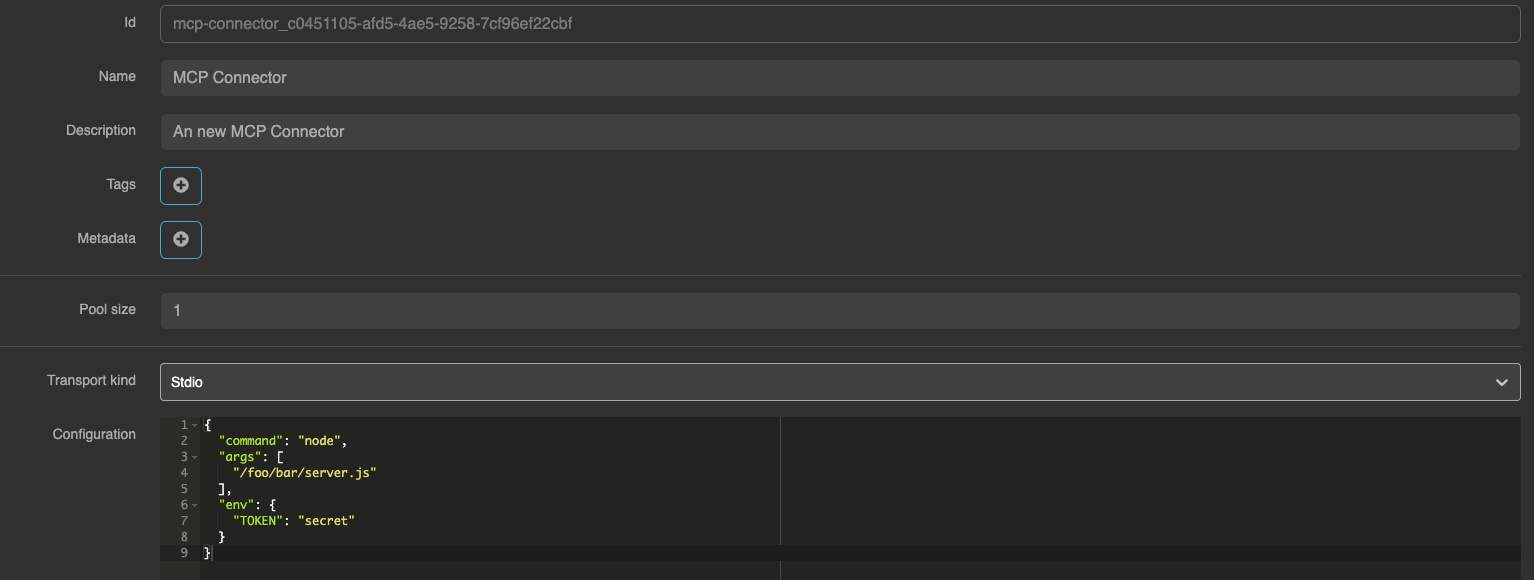
Default config
{
  "command": "node",
  "args": [
    "/foo/bar/server.js"
  ],
  "env": {
    "TOKEN": "secret"
  }
}
Example with Filesystem MCP Server
Filesystem MCP Connector configuration
{
  "command": "npx",
  "args": [
    "-y",
    "@modelcontextprotocol/server-filesystem",
    "/Users/your-user/Desktop"
  ]
}
Example with Github MCP Server
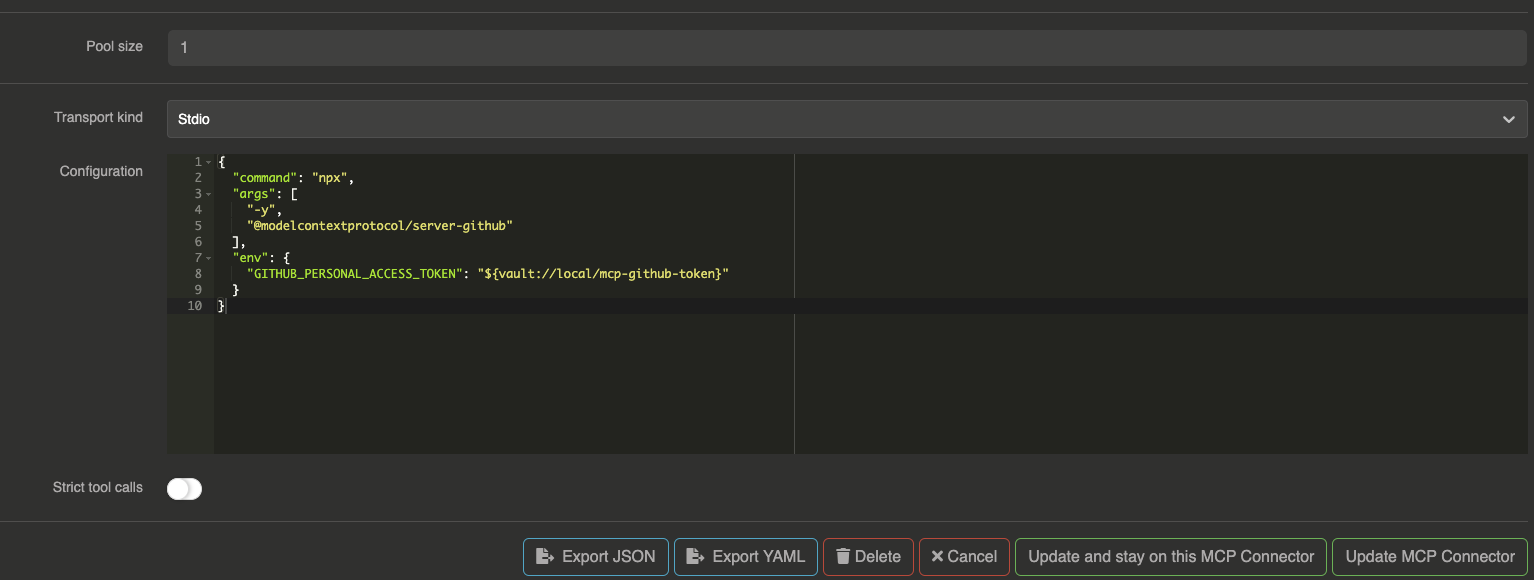
To use the Github MCP server you will need to generate a Github access token.
Then, we will put the token into our local vault.
Go to your Otoroshi danger zone and go to Global Metadata section.
Right after, you can create a new KEY, VALUE pair like this example (in the Otoroshi environment) :
{
  "mcp-github-token": "YOUR_GITHUB_TOKEN_HERE"
}
Github MCP Connector configuration
{
  "command": "npx",
  "args": [
    "-y",
    "@modelcontextprotocol/server-github"
  ],
  "env": {
    "GITHUB_PERSONAL_ACCESS_TOKEN": "${vault://local/mcp-github-token}"
  }
}
Now you can use Github MCP server's functions to Create issues, list all issues, list pull requests and much more with your favorite LLMs !
Filtering tools, resources and prompts
MCP connectors expose tools, resources, resource templates, and prompts from the MCP server. You can filter which ones are available using include/exclude patterns. All patterns support regex matching.
Filtering tools (functions)
Use include_functions and exclude_functions to control which tools are exposed:
{
  "id": "mcp-connector_xxxxx",
  "name": "filtered-mcp",
  "transport": { ... },
  "include_functions": ["get_.*", "list_.*"],
  "exclude_functions": ["delete_.*", "drop_.*"]
}
Filtering resources
Use include_resources and exclude_resources to control which resources are exposed:
{
  "include_resources": ["users", "projects"],
  "exclude_resources": ["admin_.*"]
}
Filtering resource templates
Use include_resource_templates and exclude_resource_templates to filter resource templates by name, and include_resource_template_uris / exclude_resource_template_uris to filter by URI template:
{
  "include_resource_templates": ["user_template"],
  "exclude_resource_templates": [],
  "include_resource_template_uris": ["file://.*"],
  "exclude_resource_template_uris": ["file:///etc/.*"]
}
Filtering prompts
Use include_prompts and exclude_prompts to control which prompts are exposed:
{
  "include_prompts": ["summarize", "translate"],
  "exclude_prompts": ["debug_.*"]
}
Complete filtering example
{
  "id": "mcp-connector_xxxxx",
  "name": "filtered-github-mcp",
  "transport": {
    "kind": "stdio",
    "options": {
      "command": "npx",
      "args": ["-y", "@modelcontextprotocol/server-github"],
      "env": {
        "GITHUB_PERSONAL_ACCESS_TOKEN": "${vault://local/mcp-github-token}"
      }
    }
  },
  "include_functions": ["list_.*", "get_.*", "search_.*"],
  "exclude_functions": ["delete_.*"],
  "include_resources": [],
  "exclude_resources": [],
  "include_prompts": [],
  "exclude_prompts": []
}
Advanced rules
Beyond simple include/exclude patterns, MCP connectors support advanced rules based on JsonPath validation. Rules allow you to control access to tools, resources, resource templates, and prompts based on the request context (consumer identity, apikey metadata, request details, etc.).
Rules are organized by category and can target specific items by name or all items using the * wildcard.
Rule structure
{
  "allow_rules": {
    "tool_rules": {
      "sensitive_tool": [
        { "path": "$.apikey.metadata.role", "value": "admin" }
      ],
      "*": [
        { "path": "$.apikey.enabled", "value": true }
      ]
    },
    "prompt_rules": { ... },
    "resource_rules": { ... },
    "resource_templates_rules": { ... }
  },
  "disallow_rules": {
    "tool_rules": {
      "dangerous_tool": [
        { "path": "$.apikey.metadata.env", "value": "production" }
      ]
    },
    "prompt_rules": { ... },
    "resource_rules": { ... },
    "resource_templates_rules": { ... }
  }
}
How rules work
- Disallow rules are evaluated first: if a disallow rule matches, the item is blocked
- Allow rules are evaluated next: if an allow rule is defined for the item, it must match for the item to be accessible
- If no rule is defined for an item, it is accessible by default
Rules use Otoroshi's JsonPathValidator format to validate against the request context, which includes consumer identity, apikey metadata, request headers, and more.
Example: restrict tools by consumer role
{
  "allow_rules": {
    "tool_rules": {
      "create_repository": [
        { "path": "$.apikey.metadata.github_role", "value": "maintainer" }
      ],
      "delete_repository": [
        { "path": "$.apikey.metadata.github_role", "value": "admin" }
      ]
    }
  },
  "disallow_rules": {
    "tool_rules": {
      "delete_repository": [
        { "path": "$.apikey.metadata.env", "value": "production" }
      ]
    }
  }
}
In this example:
create_repositoryis only available to consumers withgithub_role: maintainerin their apikey metadatadelete_repositoryis only available to consumers withgithub_role: admin, and is always blocked in production environments
Authentication passthrough
MCP connectors can forward the consumer's authentication token to the MCP server. This is useful when the MCP server needs to authenticate the consumer or apply its own authorization logic.
In the transport headers configuration, use the {input_token} placeholder to inject the consumer's Bearer token:
{
  "transport": {
    "kind": "sse",
    "options": {
      "url": "https://my-mcp-server.example.com/sse",
      "headers": {
        "Authorization": "Bearer {input_token}"
      }
    }
  }
}
The {input_token} placeholder is replaced at runtime with the Bearer token from the incoming request's Authorization header. This works with SSE, WebSocket, and Streamable HTTP transports.
Audit events
A connector can emit an audit event for every call Otoroshi makes to the upstream MCP server (tools, resources, resource templates, prompts). This is the client-side counterpart of the McpAudit events emitted by the MCP server exposition plugins.
Independently of these (opt-in) audit events, every upstream MCP call also feeds Otoroshi's real-time metrics: mcp.client.calls, mcp.client.errors, and per-operation mcp.client.<op>.calls / .errors / .duration. These are emitted whenever Otoroshi metrics are enabled — no flag required. See Observability — Real-time MCP metrics.
Enabling audit events
Set audit_events to true on the connector (default: false):
{
  "id": "mcp-connector_xxxxx",
  "name": "github-mcp",
  "transport": { ... },
  "audit_events": true
}
Audit event payload
Each upstream operation produces an AuditEvent with the audit type McpClientAudit:
| Field | Type | Description |
|---|---|---|
request_id | string | null | The Otoroshi request id (snowflake) of the triggering request, for correlation with LLMUsageAudit and McpAudit events. null when the call happens outside a request context. |
mcp_connector_id | string | The connector entity id |
mcp_connector_name | string | The connector name |
mcp_connector_kind | string | The transport kind (stdio, sse, ws, http, http_2026_07_28, http_langchain, meta, openapi) |
mcp_operation | string | The operation performed: tools/list, tools/call, resources/list, resources/read, resources/templates/list, prompts/list, prompts/get |
mcp_request | object | The request (e.g. tool name and arguments for tools/call, uri for resources/read) |
mcp_response | object | The full upstream response payload (e.g. the list of tools/resources/prompts, the tools/call result with its content) |
duration | number | The upstream call duration in milliseconds |
status | string | success or error |
error | string | Error message if the upstream call failed, null otherwise |
user | object | The authenticated user information (if available) |
apikey | object | The API key used for the request (if available) |
route | object | The Otoroshi route that triggered the call (if available) |
Example audit event
{
  "@type": "AuditEvent",
  "audit": "McpClientAudit",
  "request_id": "1905616593920983819",
  "mcp_connector_id": "mcp-connector_xxxxx",
  "mcp_connector_name": "github-mcp",
  "mcp_connector_kind": "http",
  "mcp_operation": "tools/call",
  "mcp_request": { "name": "create_issue", "arguments": { "repo": "demo", "title": "bug" } },
  "mcp_response": {
    "content": [
      { "type": "text", "text": "issue #42 created" }
    ]
  },
  "duration": 318,
  "status": "success",
  "error": null,
  "user": null,
  "apikey": { "clientId": "xxx", "clientName": "my-api-key" },
  "route": { "id": "route_xxx", "name": "mcp-openai" }
}
Filtering audit events in data exporters
{
  "include": [
    { "@type": "AuditEvent", "audit": "McpClientAudit" }
  ]
}
Expose an OpenAPI spec as MCP tools
The openapi transport kind turns any OpenAPI / Swagger specification into a set of MCP tools — without any MCP server. You point the connector at a spec (by URL or inline), and every operation becomes a tool an LLM can call; Otoroshi then performs the corresponding HTTP request against the target REST API and returns the response. This is the fastest way to give a model a REST API as tools when no MCP server exists for it.
The spec is fetched once and cached (parsed into operations), so listing tools is cheap. This connector exposes tools only — no resources, resource templates, or prompts.
How operations become tools
In the default mode, each OpenAPI operation becomes one MCP tool:
- The tool name is the operation's
operationId, slugified to a valid tool name ([a-zA-Z0-9_-]); duplicates are de-duplicated with a numeric suffix. - The tool description is the operation
summary(ordescription), followed byHTTP <METHOD> <path>. - The tool parameters are built from the operation's
path,queryandheaderparameters, plus abodyproperty for the request body.$ref,enum,anyOf/oneOf,allOfand arrays in the spec schemas are resolved into the tool's JSON Schema. Path parameters (and any parameter markedrequired) are required.
When the model calls a tool, Otoroshi resolves the path template, builds the query string, sends configured + per-call headers, attaches the JSON body for non-GET/HEAD methods, and returns the result as a JSON string of shape { "status": <http status>, "body": <json or text> }. A non-2xx status is reported back to the model as an error.
Configuration
{
  "id": "mcp-connector_xxxxx",
  "name": "petstore-openapi",
  "transport": {
    "kind": "openapi",
    "options": {
      "spec_url": "https://petstore3.swagger.io/api/v3/openapi.json",
      "base_url": "https://petstore3.swagger.io/api/v3",
      "headers": {
        "Authorization": "Bearer ${vault://local/petstore-token}"
      },
      "include_tags": ["pet"],
      "exclude_operation_ids": ["deletePet"]
    }
  },
  "kind": "ai-gateway.extensions.cloud-apim.com/McpConnector"
}
| Option | Type | Default | Description |
|---|---|---|---|
transport.options.spec_url | string | — | URL of the OpenAPI spec (JSON or YAML). Fetched and cached. Ignored when spec is provided. |
transport.options.spec | object | string | — | Inline OpenAPI spec — a JSON object, or a JSON/YAML string. Takes precedence over spec_url. |
transport.options.base_url | string | spec's first servers[].url | Base URL of the target API the tools call. |
transport.options.headers | object | {} | Static headers sent on every call to the target API (downstream auth). Supports vault references and the {input_token} passthrough placeholder. |
transport.options.timeout | number (ms) | 180000 | Per-call request timeout. |
transport.options.include_operation_ids | string[] | [] | Allow-list of operationIds to expose (glob/regex). Empty = all. |
transport.options.exclude_operation_ids | string[] | [] | Block-list of operationIds to hide (glob/regex). |
transport.options.include_tags | string[] | [] | Only expose operations carrying at least one of these OpenAPI tags. Empty = all. |
transport.options.exclude_tags | string[] | [] | Hide operations carrying any of these OpenAPI tags. |
transport.options.expose_as_meta | bool | false | Expose 3 meta tools instead of one tool per operation (see below). |
transport.options.cache_ttl | number (ms) | 600000 | How long a spec fetched from a URL is cached (10 minutes by default). An inline spec is re-parsed only when it changes. |
transport.options.allowed_hosts | string[] | [] | Optional allow-list of target hosts. Empty = no restriction. A host matches exactly or as a subdomain (api.example.com also allows eu.api.example.com). |
transport.options.log | bool | false | Log the underlying HTTP calls. |
include_operation_ids / exclude_operation_ids / include_tags / exclude_tags select which operations are exposed at the OpenAPI level. The generic include_functions / exclude_functions connector filters (matching on the resulting tool name) and the advanced rules still apply on top, so you can combine spec-level filtering with per-consumer access control.
Meta mode for large APIs
A spec with dozens or hundreds of endpoints would flood the model's tool list. Set expose_as_meta: true to expose just three tools instead, letting the model discover and call operations on demand:
| Tool | Purpose |
|---|---|
search_operations | Keyword search over operationId, path, tags and summary. Returns { operationId, method, path, summary, tags } ranked by relevance. |
get_operation_schema | Return one operation's JSON schema: { operationId, method, path, description, parameters }. |
execute | Call one operation. Takes operationId and arguments (a JSON-encoded string of the args object; the request body goes under a body key). Returns { status, body }. |
{
  "id": "mcp-connector_xxxxx",
  "name": "big-api-openapi",
  "transport": {
    "kind": "openapi",
    "options": {
      "spec_url": "https://api.example.com/openapi.json",
      "base_url": "https://api.example.com",
      "expose_as_meta": true,
      "allowed_hosts": ["api.example.com"]
    }
  },
  "kind": "ai-gateway.extensions.cloud-apim.com/McpConnector"
}
Inline spec
For small or private APIs you can paste the spec directly with spec (no fetch). It takes precedence over spec_url:
{
  "transport": {
    "kind": "openapi",
    "options": {
      "base_url": "https://api.example.com",
      "spec": {
        "openapi": "3.0.0",
        "info": { "title": "Pets", "version": "1.0.0" },
        "servers": [{ "url": "https://api.example.com" }],
        "paths": {
          "/pets/{petId}": {
            "get": {
              "operationId": "getPetById",
              "summary": "Get a pet by id",
              "parameters": [
                { "name": "petId", "in": "path", "required": true, "schema": { "type": "string" } }
              ]
            }
          }
        }
      }
    }
  }
}
Once created, reference the connector on a provider or agent exactly like any other MCP connector (options.mcp_connectors), and the model gets the operations as callable tools.
Meta connector
The Meta connector (transport.kind: "meta") aggregates several other MCP connectors behind a single connector and exposes a small, fixed set of 5 virtualization tools instead of the union of every child server's tools. This keeps the model's context small when you wire up many servers — the model discovers and calls tools dynamically through these meta tools.
Options
| Option | Type | Description |
|---|---|---|
connectors | array of strings | The child MCP connector ids to aggregate. |
semantic_search_enabled | boolean | When true, search_tools fuses BM25 with embedding-based similarity (MiniLM-L6-v2) via Reciprocal Rank Fusion. Default false (lexical BM25 only). |
{
  "name": "meta-connector",
  "transport": {
    "kind": "meta",
    "options": {
      "connectors": ["mcp-connector_a", "mcp-connector_b"],
      "semantic_search_enabled": true
    }
  }
}
The 5 meta tools
| Tool | Description |
|---|---|
list_servers | List the aggregated servers as { slug, name, description }. The slug is used by the other tools. |
list_tools | List a server's tools as { name, description }. Takes server (a slug). |
get_tool_schema | Return { server, tool, description, parameters } (the full JSON schema). Takes server, tool. |
search_tools | Search tools across all (or a subset of) servers by relevance. Takes query, optional servers. |
execute | Run an ordered list of tool calls in one shot (see below). |
execute and the inter-call expression language
execute takes an ordered list of calls, each { server, tool, arguments, name? }. Calls run in order, and a call can reference an earlier call's result with the placeholder ${<name>.<path>} inside its (JSON-encoded) arguments:
<name>is thenameof an earlier call (orcall_<index>by default);<path>is a dotted path with array indices, e.g.result.items[0].id;- each call result is exposed as
{ ok, result }(or{ error }), so reference….result.…for the payload; - when a field's value is exactly one placeholder, the original type is preserved (numbers/objects/arrays stay native instead of being stringified).
{
  "calls": [
    { "name": "find", "server": "github", "tool": "search_repos", "arguments": "{\"q\": \"otoroshi\"}" },
    { "server": "github", "tool": "get_repo", "arguments": "{\"id\": \"${find.result.items[0].id}\"}" }
  ]
}
The same meta surface can be exposed server-side on a virtual server via expose_as_meta, without creating a meta connector at all.
Postgres MCP Server
User prompt to the LLM
{
  "messages": [
    {
       "role": "user",
       "content": "Could you list me all the users from the 'users' table please ?"
    }
  ]
}
Curl request
curl --request POST \
  --url http://mcp-pg-openai.oto.tools:8080/ \
  --header 'content-type: application/json' \
  --data '{
  "messages": [
    {
       "role": "user",
       "content": "Could you list me all the users from the '\''users'\'' table please ?"
    }
  ]
}'
LLM response :
{
  "id": "chatcmpl-3WFxjlu6MWpvw4ZaOGtyc4OqvFycGDP4",
  "object": "chat.completion",
  "created": 1743155603,
  "model": "gpt-4o-mini",
  "system_fingerprint": "fp-RvGvrs3QlRhPqmXM7NqGd61qeOPudtEZ",
  "choices": [
    {
      "index": 0,
      "message": {
        "role": "assistant",
        "content": "Here are all the users from the 'users' table:\n\n1. **Alice Johnson**\n   - Email: alice@example.com\n   - Age: 30\n   - Address: 123 Main St, Springfield\n   - Phone: 123-456-7890\n   - Created At: 2025-03-28T09:47:34.121Z\n\n2. **Bob Smith**\n   - Email: bob@example.com\n   - Age: 25\n   - Address: 456 Elm St, Shelbyville\n   - Phone: 987-654-3210\n   - Created At: 2025-03-28T09:47:34.121Z\n\n3. **Charlie Brown**\n   - Email: charlie@example.com\n   - Age: 35\n   - Address: 789 Oak St, Capital City\n   - Phone: 555-123-4567\n   - Created At: 2025-03-28T09:47:34.121Z"
      },
      "logprobs": null,
      "finish_reason": "stop"
    }
  ],
  "usage": {
    "prompt_tokens": 342,
    "completion_tokens": 214,
    "total_tokens": 556,
    "completion_tokens_details": {
      "reasoning_tokens": 0
    }
  }
}
Enabling no personal information guardrail
Using the No personal information guardrail will block all the requests mentioning personal information from the prompt to the LLM or from the response.
Warning : To enable the guardrail, you will need to create another provider that will be used to apply the guardrail rule :
Response from the LLM :
{
  "id": "chatcmpl-5iTwZroMP6B3qKEWqfHLbvcVsQhucOHE",
  "object": "chat.completion",
  "created": 1743177176,
  "model": "gpt-4o-mini",
  "system_fingerprint": "fp-1HS2LIBA0cK0N8rBVi30YVUbayejNDAo",
  "choices": [
    {
      "index": 0,
      "message": {
        "role": "assistant",
        "content": "This message has been blocked by the 'personal-information' guardrail !"
      },
      "logprobs": null,
      "finish_reason": "stop"
    }
  ],
  "usage": {
    "prompt_tokens": 0,
    "completion_tokens": 0,
    "total_tokens": 0,
    "completion_tokens_details": {
      "reasoning_tokens": 0
    }
  }
}
Full route configuration with guardrail :
{
  "_loc": {
    "tenant": "default",
    "teams": [
      "default"
    ]
  },
  "id": "provider_6bfe8012-1ccb-4884-bef2-00e307862e7e",
  "name": "OpenAI provider + Postgres MCP",
  "description": "OpenAI provider + Postgres MCP",
  "metadata": {},
  "tags": [],
  "provider": "openai",
  "connection": {
    "base_url": "https://api.openai.com/v1",
    "token": "${vault://local/openai-token}",
    "timeout": 30000
  },
  "options": {
    "model": "gpt-4o-mini",
    "frequency_penalty": null,
    "logit_bias": null,
    "logprobs": null,
    "top_logprobs": null,
    "max_tokens": null,
    "n": 1,
    "presence_penalty": null,
    "response_format": null,
    "seed": null,
    "stop": null,
    "stream": false,
    "temperature": 1,
    "top_p": 1,
    "tools": null,
    "tool_choice": null,
    "user": null,
    "wasm_tools": [],
    "mcp_connectors": [
      "mcp-connector_c0451105-afd5-4ae5-9258-7cf96ef22cbf"
    ],
    "allow_config_override": true
  },
  "provider_fallback": null,
  "context": {
    "default": null,
    "contexts": []
  },
  "models": {
    "include": [],
    "exclude": []
  },
  "guardrails": [
    {
      "enabled": true,
      "before": true,
      "after": true,
      "id": "pif",
      "config": {
        "provider": "provider_fc0b30ef-35e2-4a5d-8286-8b0e24f0b028",
        "pif_items": [
          "EMAIL_ADDRESS",
          "PHONE_NUMBER",
          "LOCATION_ADDRESS",
          "NAME",
          "IP_ADDRESS",
          "CREDIT_CARD",
          "SSN"
        ]
      }
    }
  ],
  "guardrails_fail_on_deny": false,
  "cache": {
    "strategy": "none",
    "ttl": 300000,
    "score": 0.8
  },
  "kind": "ai-gateway.extensions.cloud-apim.com/Provider"
}