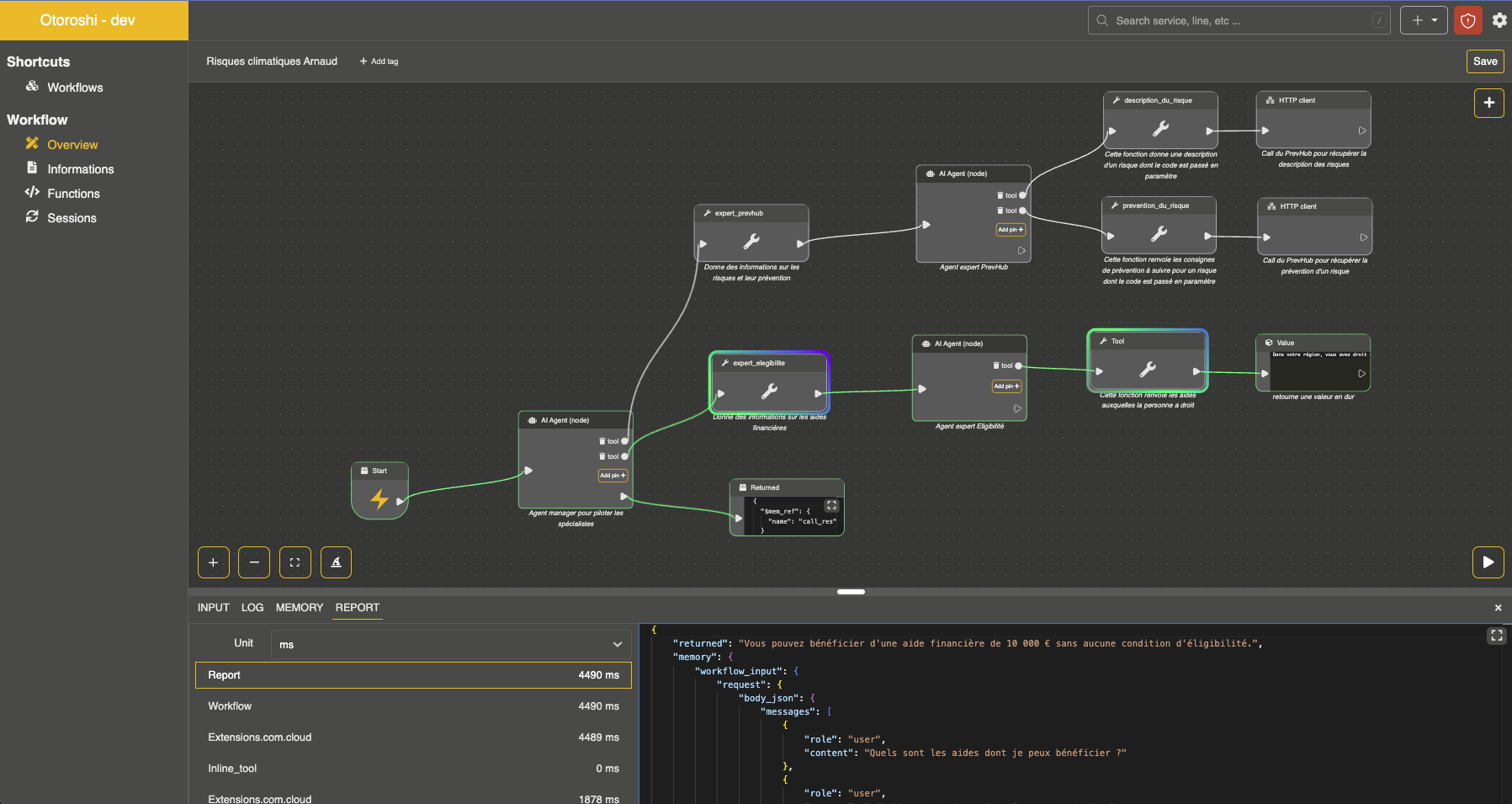
AI Agent Node
The AI Agent node is the primary way to run an AI agent within an Otoroshi workflow. It acts as an autonomous agent that uses an LLM provider to reason and take actions.
- Node kind:
extensions.com.cloud-apim.llm-extension.ai_agent
Configuration
| Parameter | Type | Required | Description |
|---|---|---|---|
name | string | yes | Name of the agent |
provider | string | yes | Id of the LLM provider to use |
description | string | yes | Description of the agent (used for handoff descriptions) |
instructions | array/string | yes | System instructions that define agent behavior |
input | string/array/object | yes | The agent input - can be a text string, a messages array, or an expression language reference |
model | string | no | Override the model used by the provider |
model_options | object | no | Override model options (temperature, etc.) |
tools | array | no | List of tool function ids the agent can use |
mcp_connectors | array | no | List of MCP connector ids the agent can use |
search_engines | array | no | List of Search Engine ids the agent can use as a web search tool |
inline_tools | array | no | List of inline tool definitions (see below) |
memory | string | no | Persistent memory provider id for conversation history |
guardrails | array | no | List of guardrail configurations |
handoffs | array | no | List of handoff configurations to other agents |
run_config | object | no | Runtime configuration |
run_config.max_turns | integer | no | Maximum number of agent turns (default: 10) |
Basic example
{
  "kind": "extensions.com.cloud-apim.llm-extension.ai_agent",
  "name": "assistant",
  "provider": "provider_xxxxx",
  "description": "A helpful general-purpose assistant",
  "instructions": [
    "You are a helpful assistant that answers questions clearly and concisely."
  ],
  "input": "${input.question}",
  "result": "agent_response"
}
Using tools
Agents can use three types of tools:
Tool functions
Reference existing tool functions registered in the LLM extension by their id:
{
  "kind": "extensions.com.cloud-apim.llm-extension.ai_agent",
  "name": "assistant",
  "provider": "provider_xxxxx",
  "description": "An assistant with tool access",
  "instructions": ["You help users by calling appropriate tools."],
  "input": "${input.question}",
  "tools": ["tool-function_xxxxx", "tool-function_yyyyy"],
  "result": "agent_response"
}
MCP connectors
Reference MCP connectors to give the agent access to MCP server tools:
{
  "kind": "extensions.com.cloud-apim.llm-extension.ai_agent",
  "name": "assistant",
  "provider": "provider_xxxxx",
  "description": "An assistant with MCP access",
  "instructions": ["You help users by using available MCP tools."],
  "input": "${input.question}",
  "mcp_connectors": ["mcp-connector_xxxxx"],
  "result": "agent_response"
}
Search engines
Reference Search Engines to give the agent a web search tool:
{
  "kind": "extensions.com.cloud-apim.llm-extension.ai_agent",
  "name": "research-assistant",
  "provider": "provider_xxxxx",
  "description": "An assistant with web search access",
  "instructions": ["Answer using up-to-date web information and cite your sources."],
  "input": "${input.question}",
  "search_engines": ["search-engine_xxxxx"],
  "result": "agent_response"
}
Inline tools
Define tools directly within the agent configuration. Each inline tool runs a workflow node when called:
{
  "kind": "extensions.com.cloud-apim.llm-extension.ai_agent",
  "name": "assistant",
  "provider": "provider_xxxxx",
  "description": "An assistant with inline tools",
  "instructions": ["You help users by calling tools when needed."],
  "input": "${input.question}",
  "inline_tools": [
    {
      "name": "get_current_time",
      "description": "Returns the current date and time",
      "parameters": {
        "type": "object",
        "properties": {
          "timezone": {
            "type": "string",
            "description": "The timezone (e.g. Europe/Paris)"
          }
        }
      },
      "required": ["timezone"],
      "node": {
        "kind": "call",
        "function": "core.system_call",
        "args": {
          "command": ["date"]
        }
      }
    }
  ],
  "result": "agent_response"
}
When the LLM decides to call an inline tool, the arguments are stored in the workflow memory as tool_input, and the associated workflow node is executed. The node result is returned to the LLM as the tool result.
You can set response_json_parse: true (or input_json_parse: true) on an inline tool to parse the tool arguments as JSON before storing them in tool_input.
Built-in tools
Agents can be equipped with a library of built-in tools that require no external configuration. These tools are enabled per-agent via the built_in_tools configuration and cover the core capabilities an autonomous agent typically needs: filesystem access, shell commands, HTTP calls, task tracking, planning, working memory, and agent delegation.
Configuration
| Parameter | Type | Description |
|---|---|---|
all | boolean | Enable all tool categories at once (default: false) |
workspace | boolean | Enable file tools: list_files, read_file, write_file, append_file, search_in_files |
shell | boolean | Enable run_command tool |
http | boolean | Enable http_call tool |
content_to_markdown | boolean | Enable content_to_markdown tool (document conversion via Kreuzberg) |
tasks | boolean | Enable task_create, task_update, task_get, task_list |
plan | boolean | Enable plan_set, plan_get |
memory | boolean | Enable memory_set, memory_get, memory_list |
persistent_kv | boolean | Enable persistent KV tools: persistent_kv_set, persistent_kv_get, persistent_kv_delete, persistent_kv_list |
persistent_kv_uri | string | Connection URI for the persistent KV backend (redis://... or postgresql://...) |
persistent_kv_namespace | string | Namespace for key isolation (supports Otoroshi EL expressions, default: agent-kv:{agent_name}:default) |
agent | boolean | Enable delegate tool (delegates to handoff agents) |
control | boolean | Enable final_answer tool |
include | array | Enable specific tools by name (overrides category flags) |
exclude | array | Disable specific tools by name (overrides everything) |
allowed_paths | array | Whitelist of filesystem paths the agent can access (required for workspace/shell tools) |
command_timeout | integer | Shell command timeout in milliseconds (default: 30000) |
sub_agents | array | Sub-agent profiles for the spawn_agent tool (see below) |
Example: autonomous coding agent
{
  "kind": "extensions.com.cloud-apim.llm-extension.ai_agent",
  "name": "coder",
  "provider": "provider_xxxxx",
  "description": "An autonomous coding agent",
  "instructions": [
    "You are an autonomous coding agent.",
    "Use the available tools to explore the codebase, understand it, and make changes.",
    "Always read files before modifying them."
  ],
  "input": "${input.question}",
  "built_in_tools": {
    "workspace": true,
    "shell": true,
    "tasks": true,
    "plan": true,
    "memory": true,
    "allowed_paths": ["/workspace/my-project"],
    "command_timeout": 30000
  },
  "run_config": {
    "max_turns": 20
  },
  "result": "agent_response"
}
Example: read-only analyzer with HTTP access
{
  "built_in_tools": {
    "workspace": true,
    "http": true,
    "tasks": true,
    "memory": true,
    "allowed_paths": ["/workspace/my-project"],
    "exclude": ["write_file", "append_file"]
  }
}
Example: fine-grained tool selection
{
  "built_in_tools": {
    "include": ["read_file", "search_in_files", "http_call", "final_answer"],
    "allowed_paths": ["/workspace/my-project"]
  }
}
Built-in tool reference
| Category | Tool | Description |
|---|---|---|
| Workspace | list_files | List files and directories at a given path |
| Workspace | read_file | Read a text file content |
| Workspace | write_file | Write content to a file (creates parent dirs) |
| Workspace | append_file | Append content to a file |
| Workspace | search_in_files | Search for a text pattern across files |
| Shell | run_command | Run a shell command in the workspace |
| HTTP | http_call | Make an HTTP request (GET, POST, PUT, DELETE, etc.) |
| Content | content_to_markdown | Convert a document (PDF, DOCX, HTML, etc.) to markdown via Kreuzberg |
| Persistent KV | persistent_kv_set | Store a key-value pair in persistent memory (survives across sessions) |
| Persistent KV | persistent_kv_get | Read a value from persistent memory |
| Persistent KV | persistent_kv_delete | Delete a key from persistent memory |
| Persistent KV | persistent_kv_list | List all entries in persistent memory |
| Tasks | task_create | Create a task to track work |
| Tasks | task_update | Update a task's status or fields |
| Tasks | task_get | Get a task by id |
| Tasks | task_list | List all tasks |
| Plan | plan_set | Set or replace the current working plan |
| Plan | plan_get | Get the current plan |
| Memory | memory_set | Store a key-value pair in working memory |
| Memory | memory_get | Read a value from working memory |
| Memory | memory_list | List all working memory entries |
| Agent | delegate | Delegate a subtask to a handoff agent |
| Agent | spawn_agent | Spawn a sub-agent from a pre-configured profile |
| Control | final_answer | Signal that the objective is complete |
Workspace sandboxing
All file and shell operations are sandboxed to the paths listed in allowed_paths. Any attempt to access a path outside these directories is denied. Paths can be absolute or relative to the first allowed path.
Working memory (scratchpad)
When task, plan, or memory tools are enabled, the agent gets a scratchpad — a structured working memory injected into its system prompt. The scratchpad tracks:
- Tasks: a list of sub-tasks with status (
todo,in_progress,done,blocked) - Plan: a goal with ordered steps
- Notes: key-value store for observations and intermediate results
The LLM uses these tools to organize multi-step work and track its own progress.
Content to markdown (Kreuzberg)
The content_to_markdown tool uses Kreuzberg to convert documents (PDF, DOCX, HTML, images, etc.) into markdown text. The agent can provide either a URL or base64-encoded content.
{
  "built_in_tools": {
    "content_to_markdown": true
  }
}
The tool accepts url (fetches and converts the document) or content + content_type (base64-encoded bytes with MIME type).
Persistent KV memory
The persistent KV tools give agents a key-value store that survives across sessions. Unlike the working memory (scratchpad), which is ephemeral to the current agent run, persistent KV data is stored externally in Redis or PostgreSQL.
The backend is auto-detected from the URI scheme:
redis://orrediss://— uses a Redis HASH per namespace (HSET/HGET/HDEL/HGETALL)postgresql://— uses a PostgreSQL tableotoroshi_agent_kv(created automatically)
{
  "built_in_tools": {
    "persistent_kv": true,
    "persistent_kv_uri": "redis://localhost:6379",
    "persistent_kv_namespace": "agent-kv:${consumer.id}:my-agent"
  }
}
The persistent_kv_namespace isolates data between agents and sessions. It supports Otoroshi expression language variables:
| Expression | Description |
|---|---|
${consumer.id} | The consumer id |
${apikey.id} | The API key id |
${user.email} | The authenticated user email |
${token.sub} | The JWT subject |
${req.ip} | The client IP address |
Example with PostgreSQL and per-apikey isolation:
{
  "built_in_tools": {
    "persistent_kv": true,
    "persistent_kv_uri": "postgresql://user:pass@localhost:5432/mydb",
    "persistent_kv_namespace": "agent-kv:${apikey.id}:assistant"
  }
}
Sub-agent spawning
The spawn_agent tool lets the LLM create sub-agents on the fly. Unlike delegate (which routes to a pre-configured handoff agent), spawn_agent lets the LLM write the instructions at call time. Sub-agent profiles define the capabilities (tools, provider, model), and the LLM provides the instructions and objective.
{
  "built_in_tools": {
    "all": true,
    "allowed_paths": ["/workspace"],
    "sub_agents": [
      {
        "name": "researcher",
        "description": "Agent for code analysis and research",
        "built_in_tools": {
          "workspace": true,
          "memory": true,
          "allowed_paths": ["/workspace"]
        }
      },
      {
        "name": "implementer",
        "description": "Agent for writing and modifying code",
        "built_in_tools": {
          "workspace": true,
          "shell": true,
          "allowed_paths": ["/workspace"]
        }
      }
    ]
  }
}
The LLM calls the tool with objective, instructions (the system prompt it writes), and optionally agent_profile (which profile to use). Sub-agents inherit the parent's provider/model if the profile doesn't specify one. Sub-agents cannot spawn further sub-agents (no recursive spawning).
Agent handoffs
Handoffs allow an agent to transfer the conversation to another specialized agent. The triage agent sees each possible handoff as a tool it can call.
{
  "kind": "extensions.com.cloud-apim.llm-extension.ai_agent",
  "name": "triage_agent",
  "provider": "provider_xxxxx",
  "description": "A triage agent that routes questions",
  "instructions": [
    "You determine which agent to use based on the user's question"
  ],
  "input": "${input.question}",
  "handoffs": [
    {
      "enabled": true,
      "agent": {
        "name": "math_tutor",
        "provider": "provider_xxxxx",
        "description": "Specialist agent for math questions",
        "instructions": [
          "You provide help with math problems. Explain your reasoning at each step."
        ],
        "mcp_connectors": []
      }
    },
    {
      "enabled": true,
      "agent": {
        "name": "history_tutor",
        "provider": "provider_xxxxx",
        "description": "Specialist agent for historical questions",
        "instructions": [
          "You provide assistance with historical queries. Explain events and context clearly."
        ],
        "mcp_connectors": []
      }
    }
  ],
  "result": "agent_response"
}
Handoff configuration
| Parameter | Type | Required | Description |
|---|---|---|---|
enabled | boolean | no | Whether this handoff is active (default: true) |
agent | object | yes | The target agent configuration (same structure as the AI Agent node) |
tool_name_override | string | no | Override the tool name (default: transfer_to_<agent_name>) |
tool_description_override | string | no | Override the tool description |
When a handoff occurs, the LLM calls a function named transfer_to_<agent_name> (or the overridden name). The agent runner then executes the target agent with the same input, inheriting the provider and model configuration if not overridden.
Persistent memory
Connect an agent to a persistent memory provider to maintain conversation history across workflow executions:
{
  "kind": "extensions.com.cloud-apim.llm-extension.ai_agent",
  "name": "assistant",
  "provider": "provider_xxxxx",
  "description": "An assistant with memory",
  "instructions": ["You are a helpful assistant."],
  "input": "${input.question}",
  "memory": "memory_xxxxx",
  "result": "agent_response"
}
Guardrails
Apply guardrails to validate agent inputs and outputs:
{
  "kind": "extensions.com.cloud-apim.llm-extension.ai_agent",
  "name": "assistant",
  "provider": "provider_xxxxx",
  "description": "A safe assistant",
  "instructions": ["You are a helpful assistant."],
  "input": "${input.question}",
  "guardrails": [
    {
      "id": "regex",
      "before": true,
      "after": false,
      "config": {
        "deny": [".*password.*", ".*credit card.*"]
      }
    },
    {
      "id": "prompt_injection",
      "before": true,
      "after": false,
      "config": {
        "provider": "provider_xxxxx"
      }
    }
  ],
  "result": "agent_response"
}
Available guardrail kinds
regex, webhook, llm, secrets_leakage, auto_secrets_leakage, gibberish, pif, moderation, moderation_model, toxic_language, racial_bias, gender_bias, personal_health_information, prompt_injection, faithfulness, sentences, words, characters, contains, semantic_contains, quickjs, wasm
Complete example: multi-agent system with tools
{
  "kind": "workflow",
  "steps": [
    {
      "kind": "extensions.com.cloud-apim.llm-extension.ai_agent",
      "name": "triage",
      "provider": "provider_xxxxx",
      "description": "A triage agent",
      "instructions": [
        "Route the user question to the appropriate specialist agent."
      ],
      "input": "${input.question}",
      "handoffs": [
        {
          "enabled": true,
          "agent": {
            "name": "researcher",
            "provider": "provider_xxxxx",
            "description": "Research agent with web search capabilities",
            "instructions": [
              "You help users find information using web search tools."
            ],
            "mcp_connectors": ["mcp-connector_brave-search"]
          }
        },
        {
          "enabled": true,
          "agent": {
            "name": "coder",
            "provider": "provider_xxxxx",
            "description": "Coding assistant",
            "instructions": [
              "You help users with coding problems. Write clean, documented code."
            ],
            "tools": ["tool-function_code-executor"],
            "mcp_connectors": []
          }
        }
      ],
      "guardrails": [
        {
          "id": "prompt_injection",
          "before": true,
          "after": false,
          "config": { "provider": "provider_xxxxx" }
        }
      ],
      "result": "agent_response"
    }
  ],
  "returned": "${agent_response}"
}
Workflow editor with an autonomous agent and its sub-agents